
Got a tip for us?
Let us know
Become a MacRumors Supporter for $50/year with no ads, ability to filter front page stories, and private forums.
Rip Those Macs Open
- Thread starter Kirkle
- Start date
- Sort by reaction score
You are using an out of date browser. It may not display this or other websites correctly.
You should upgrade or use an alternative browser.
You should upgrade or use an alternative browser.
From where did u get the ssd?
I got it from ebay
http://www.ebay.com/sch/Drives-Storage-Blank-Media-/165/i.html?_from=R40&_nkw=a1398+ssd
----------
Thanks.

Luap
macrumors 65816
There are still no teardowns of the 27" model....
Read thread. Yes, all of it 😉 Then post..
Read thread. Yes, all of it 😉 Then post..
Some (new) pictures of my machine, nothing special to see...

Large picture

Large picture
Some (new) pictures of my machine, nothing special to see...
Any issues with the Samsung 840 Pro so far?
I got it from ebay
http://www.ebay.com/sch/Drives-Storage-Blank-Media-/165/i.html?_from=R40&_nkw=a1398+ssd
----------
Thanks.
Hey R.OG. Thanks, amazing work! i just want to clarify, is this the 21.5 imac of 27 imac?, of which you have replaced hdd to samsung 840 pro, the one in which you have supplied pictures for..
Any issues with the Samsung 840 Pro so far?
Nothing to report besides the fact that it's blazingly fast in every, single situation - would love to see some benchmarks of the Blade SSD to compare them to the Samsung
#R.OG, can you help out with some tests of the Blade SSD or has anybody seen some tests out there?
kmad
where can I get the kit ?
Some Apple parts vendors should pop up with the kit in the next few days.
The cpu upgrade went well(see post above). The glass is very strong, it should not break or crack unless dropped.
Nice job R.OG, this is much appreciated. Thanks.
I'm about to order my iMac 27" 3.4Ghz- 680MX- 1TB, and putting in an OCZ Vertex 4 512GB and 32GB ram. I'd rather get a Samsung 840 but I read you can't update firmware in OSX. How do you update the firmware in your Samsung SSD?

jmcgeejr
macrumors 6502
Nice job R.OG, this is much appreciated. Thanks.
I'm about to order my iMac 27" 3.4Ghz- 680MX- 1TB, and putting in an OCZ Vertex 4 512GB and 32GB ram. I'd rather get a Samsung 840 but I read you can't update firmware in OSX. How do you update the firmware in your Samsung SSD?
You should be able to boot off a windows dvd and flash from command prompt.
Nothing to report besides the fact that it's blazingly fast in every, single situation - would love to see some benchmarks of the Blade SSD to compare them to the Samsung
#R.OG, can you help out with some tests of the Blade SSD or has anybody seen some tests out there?
Here are some benchmarks of the 256 & 128GB blade SSD.
256GB

128GB

----------
Part number on the iMac Kit (a bit of tape and tools) I believe the single tape kit has it's own part too, much much cheaper.
076-1416 KIT,LCD,SERVICE STARTER,IMAC
It runs 92 dollars.
Thanks
Nice job R.OG, this is much appreciated. Thanks.
I'm about to order my iMac 27" 3.4Ghz- 680MX- 1TB, and putting in an OCZ Vertex 4 512GB and 32GB ram. I'd rather get a Samsung 840 but I read you can't update firmware in OSX. How do you update the firmware in your Samsung SSD?
I usually upgrade my SSD firmware with a windows PC ever since my mac pro killed a crucial m4 ssd during an upgrade.
jmcgeejr
macrumors 6502
I usually upgrade my SSD firmware with a windows PC ever since my mac pro killed a crucial m4 ssd during an upgrade.
Rog, I am thinking about keeping my 1TB but adding in a blade to my 27", now is it worth it to get the owc 480GB or just get a 256 apple issued one?
Hey R.OG. Thanks, amazing work! i just want to clarify, is this the 21.5 imac of 27 imac?, of which you have replaced hdd to samsung 840 pro, the one in which you have supplied pictures for..
I've installed Samsung 830 SSD in both machines. The pics in this thread are for the 27" but you can find some for the 21.5" here
Rog, I am thinking about keeping my 1TB but adding in a blade to my 27", now is it worth it to get the owc 480GB or just get a 256 apple issued one?
if you need the space that OWC SSD is definitely a good choice.
I removed the motherboard last night and put in a 256GB ssd from a rMBP. I've got to say, internally, the imac is quite simple to take apart compared to previous models. There is a lot less blocking access to the logic board and it is far less fiddly to slot back together properly. There was only about a dozen screws to keep track of including the logic board, fan and both speakers. If it wasn't for the screen adhesive, it would have been the simplest imac to tinker with for years.
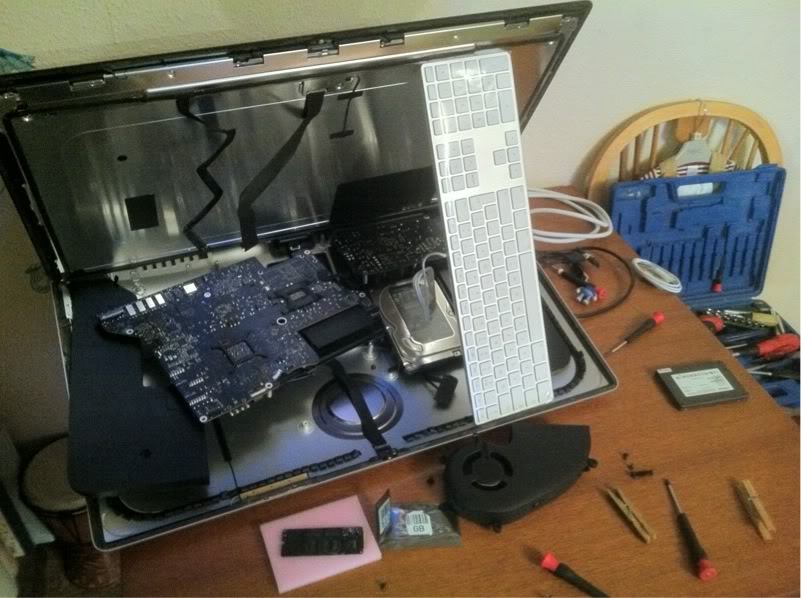
As you can see from the photo, I didn't fully remove the screen. I found that the bottom strip was held quite tightly on so I didn't want to break the join. The keyboard acted as a nice support. There is a ridge on the back of the screen which almost seemed designed to be jacked by the keyboard. By the way, I still have pegs holding together the top of the screen.
Here's where the SSD goes. It's the white slot below my thumb.
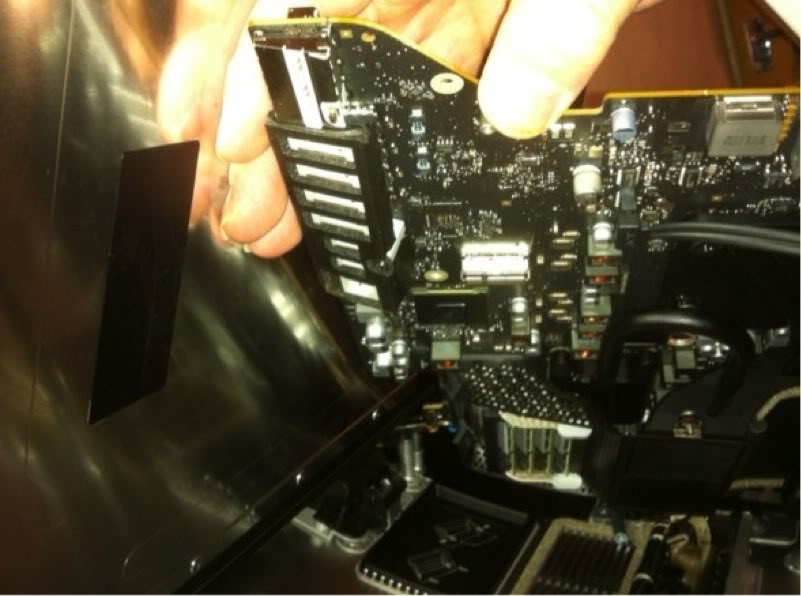
There were a couple of awkward screws that it's worth being aware of. There is a fiddly double decker screw that locks the power supply - to the logic board - to the rear casing, and there is one below the middle of the logic board accessible through a small hole.
You don't have to worry about removing ram or anything before you begin.
As you can see from the photo, I didn't fully remove the screen. I found that the bottom strip was held quite tightly on so I didn't want to break the join. The keyboard acted as a nice support. There is a ridge on the back of the screen which almost seemed designed to be jacked by the keyboard. By the way, I still have pegs holding together the top of the screen.
Here's where the SSD goes. It's the white slot below my thumb.
There were a couple of awkward screws that it's worth being aware of. There is a fiddly double decker screw that locks the power supply - to the logic board - to the rear casing, and there is one below the middle of the logic board accessible through a small hole.
You don't have to worry about removing ram or anything before you begin.
I removed the motherboard last night and put in a 256GB ssd from a rMBP. I've got to say, internally, the imac is quite simple to take apart compared to previous models. There is a lot less blocking access to the logic board and it is far less fiddly to slot back together properly. There was only about a dozen screws to keep track of including the logic board, fan and both speakers. If it wasn't for the screen adhesive, it would have been the simplest imac to tinker with for years.
Image
As you can see from the photo, I didn't fully remove the screen. I found that the bottom strip was held quite tightly on so I didn't want to break the join. The keyboard acted as a nice support. There is a ridge on the back of the screen which almost seemed designed to be jacked by the keyboard. By the way, I still have pegs holding together the top of the screen.
Here's where the SSD goes. It's the white slot below my thumb.
Image
There were a couple of awkward screws that it's worth being aware of. There is a fiddly double decker screw that locks the power supply - to the logic board - to the rear casing, and there is one below the middle of the logic board accessible through a small hole.
You don't have to worry about removing ram or anything before you begin.
Nice job pubjoe, like you said aside form the adhesive tape this imac is definitely the easier to upgrade than previous generations. How in the world did you remove the bottom screws with the screen at that angle? I like the idea for leaving the bottom strip intact.
Thanks R.OG.
In the picture the screen is resting at an angle but I lifted to to nearly 90 degrees to remove the furthest screws with my free hand. It was whilst I was about to remove the screen completely that I realised I would not actually gain much more access in doing so. With the bottom strip of adhesive still bonded, the screen is able to rest in place with pegs holding the top of the screen. In fact, after about a day or so of the pegs being in place, the adhesive re-bonded somewhat and I had to pull quite firmly to remove it again. I obviously wouldn't trust the old adhesive to hold the weight for too long but I'm toying with the idea that applying a small amount of the correct strength glue might be enough to secure it - and also minimise evidence that I've previously ripped it off.
By the way, I now have a total of 768GB ssd storage for a total of £400. I might not keep this configuration - haven't quite decided yet.
In the picture the screen is resting at an angle but I lifted to to nearly 90 degrees to remove the furthest screws with my free hand. It was whilst I was about to remove the screen completely that I realised I would not actually gain much more access in doing so. With the bottom strip of adhesive still bonded, the screen is able to rest in place with pegs holding the top of the screen. In fact, after about a day or so of the pegs being in place, the adhesive re-bonded somewhat and I had to pull quite firmly to remove it again. I obviously wouldn't trust the old adhesive to hold the weight for too long but I'm toying with the idea that applying a small amount of the correct strength glue might be enough to secure it - and also minimise evidence that I've previously ripped it off.
By the way, I now have a total of 768GB ssd storage for a total of £400. I might not keep this configuration - haven't quite decided yet.
I'd rather get a Samsung 840 but I read you can't update firmware in OSX. How do you update the firmware in your Samsung SSD?
Do they ever settle on SSD firmware, or is it usually something that needs updating?
Do they ever settle on SSD firmware, or is it usually something that needs updating?
I'm sure they do, as time goes on the firmware matures. But the Samsung 840 is fairly new so I'd definitely be wanting access to update this.
I usually upgrade my SSD firmware with a windows PC ever since my mac pro killed a crucial m4 ssd during an upgrade.
R.OG:
Samsung SSD firmware update: I've never done this. Do you always connect the drive to your win7 machine internally or can it be updated connected externally ex/ via USB? I ask this because I run win7 via vmWare Fusion 5 and can easily use an external enclosure to connect the SSD to my Win7 vm.
Otherwise I'd have to bring the SSD to work as my home is mac-only 🙂
Thanks,