Become a MacRumors Supporter for $50/year with no ads, ability to filter front page stories, and private forums.

CTYankee

macrumors 6502
Original poster
I noticed Handbrake was encoding at about 75% its usual rate. I checked Activity Monitor and saw that it is only using 60% CPU.

On 10.8 it would definitely run faster and hotter. The fan barely kicks on now. Rendering is at 60fps and not the 75+ for the AppleTV2 setting with 720P source material.

Anyone else seeing Handbrake run slower?
Any settings I'm missing that are make it run cooler/slower?
 
Last edited:
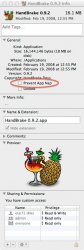
I don't know if handbrake supports app nap yet, but have you checked get into to see if it supports it, and if so, if it's enabled? Just a bunch because it sounds vaguely similar to problems people have been having with FCP X.
 
Try this:

1. Right-click Handbrake in your Applications folder.
2. Select Get Info.
3. Put a check next to Prevent App Nap.
 

Attachments

  • get info.jpg
    get info.jpg
    79.7 KB · Views: 340
I restarted and it worked fine. However good tip on the ability to turn off App Nap, thanks!
 
Strange…HB occassionly starts and runs around 40-60% of CPU. Other times t cranks right up to 98%. I can't see why or what is different, but it definitely does not go full speed all the time like it used to (even with App Nap turned off).
 
I noticed Handbrake was encoding at about 75% its usual rate.
The reason is probably the new timer coalescing. Threads sleep and wake up, as necessary. OS X uses high precision timers for the thread (pthreads, GCD and so on) management, AFAIK.
 
Register on MacRumors! This sidebar will go away, and you'll see fewer ads.