Become a MacRumors Supporter for $50/year with no ads, ability to filter front page stories, and private forums.
It almost makes me want to go back to recording music with a tape-machine, a drum-sampler, and an Atari ST for Midi.
You still can... if you can find a working Atari ST. ;)

There are always trade-offs when it comes to adopting new tech, aren't there.
 
I’m about 90% sure the little information ℹ️ takes you to the default screen of “Updates for your Mac” which is the same screen as if you click the icon in the Tahoe line.

It’s not a special screen for THAT update.

The new OS is always a default upgrade. You have already downloaded the update so clicking update tonight or restart now will install you Sequoia update you have downloaded.
 
  • Like
Reactions: RedWeasel
Actually I noticed similar last time around, when macOS Sequoia 15.7.2 and macOS Tahoe 26.1 were available. While this is not new new, I can see the reason to flat out upgrade to the latest version.
 
What I disliked about updating Sequoia from 15.6 to 15.7.3 today on my M4 Mini, is that the download jumped from 1.8GB to 4.8GB.
But during the download, which was running at a mind numbing 6MB/sec, Sequoia was uploading 15MB/sec constantly throughout. This means I uploaded over 14GB of data to Apple today!
My iCloud and AI are disabled, and I only ever used Safari for downloading music software - paying for it on my iPad, which is not linked to the M4 Mini.
Would someone like to tell me what is going on?
It feels like they just copied all my user folders?
Could it be that your existing data is getting automatically backed up to the cloud when you update? That would happen if you were on an iOS or iPadOS device, I believe.

You did say that you have iCloud disabled on that machine, though.
 
This didn't happen to me.

I just did a straightforward upgrade to 15.7.3 today. It never tried to make me select Tahoe. There was no oddness at all.
 
When I first heard the news about macOS Tahoe, I thought the planned UI was a return to what would make a Mac a Mac. I don't know why Apple are promoting it even thought it isn't as big a release as we were informed. It has most of the Sequoia animations and some native apps are just the same with rounded corners. It's just an inconsistent experience.
 
Could it be that your existing data is getting automatically backed up to the cloud when you update? That would happen if you were on an iOS or iPadOS device, I believe.

You did say that you have iCloud disabled on that machine, though.
I’d really like to know what happened to the poster that saw how 14GB of data were uploaded to Apple when doing the update.

If Apple is uploading your data without your permission, it would put them on pair with Microsoft…
 
Am not upgrading to Tahoe until next year at least, when most bugs will hopefully be remedied 🤞.
Waiting until next year is a wise decision
Very disappointed in Apple's behaviour - I switched from Windows last year, but have become rather disillusioned with Apple also since - especially in comparison to how they used to be.
As a decades long Apple customer it’s particularly disappointing to witness the decline. Once a trusted, innovative company with excellent hardware, I’ve bought and enjoyed many Apple laptops, iPads and iPhones with great success until the last year or two.

Most recently it’s the Liquid Glass debacle that’s consumed countless hours dealing with bugs, a plethora of settings changes and other annoyances that have been productivity killers.

Apples obsession with cutesy animations, Memoji, Image Playground, stickers, Contact Posters and such to attract children and the easily amused has detracted from the ability to get serious work done.
 
I’d really like to know what happened to the poster that saw how 14GB of data were uploaded to Apple when doing the update.

If Apple is uploading your data without your permission, it would put them on pair with Microsoft…
That was me. I haven’t looked into it further. I use iCloud on my iPad and iPhone, but my Mac Mini M4 isn’t linked to any other machine, nor is iCloud selected.
Probably best I don’t try and guess, but wait and see if any more light sheds itself on this later. The main thing is I have no sensitive data on my machine. But I will certainly be working in music offline from now on, and make sure my external storage is unmounted when updating or patching OS, from now on.
 
This is just so unacceptable that Apple does this.

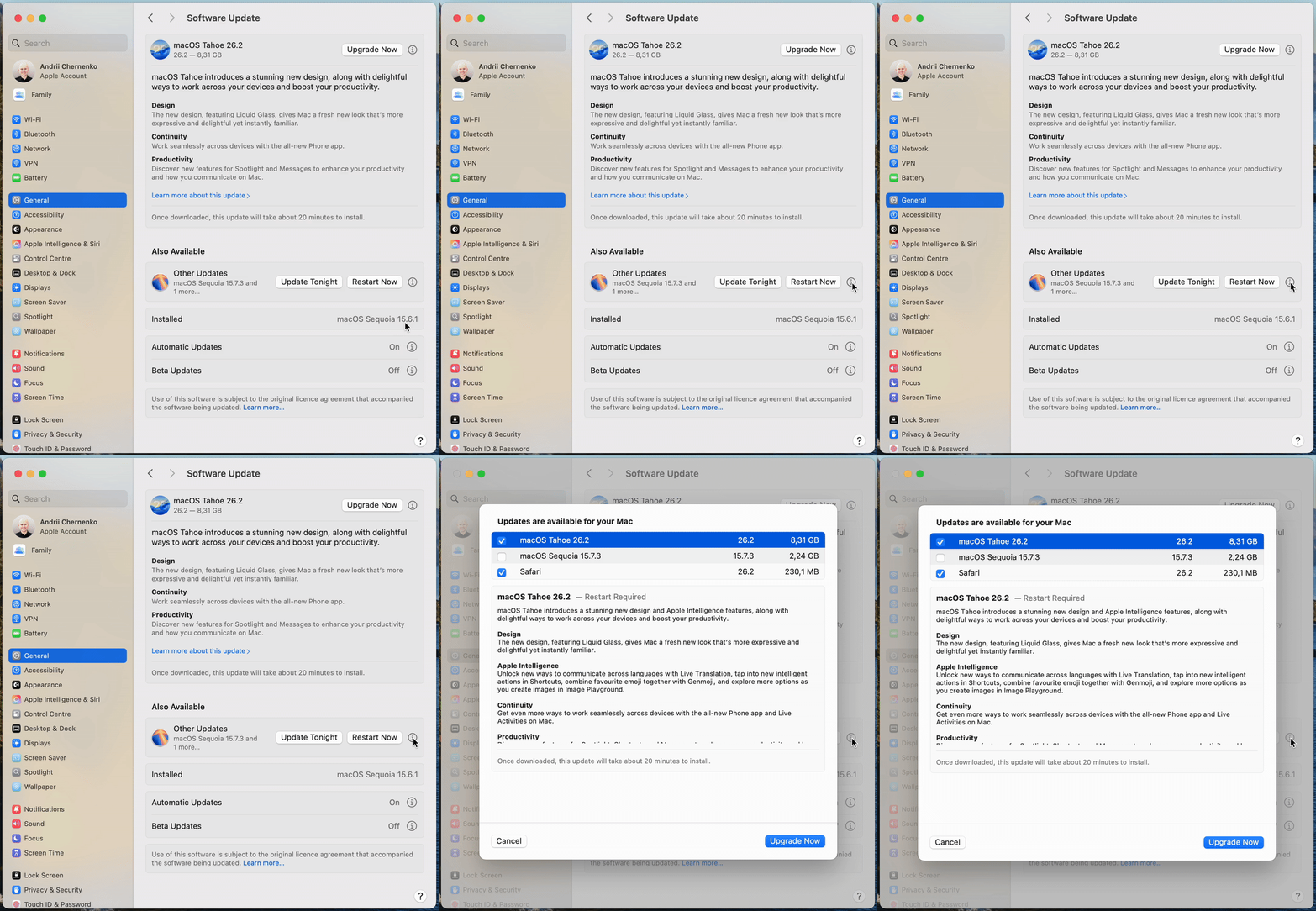
There is a VERY dark pattern on the Sequoia 15.7.3 update panel.

They make it look very clearly like you are updating (tonight or now) to 15.7.3, but when you click on the little "i" icon for more information about the update you are about to install (or agree to install tonight), they've actually selected the Tahoe upgrade.

I just find this to be abhorrent behavior on the part of Apple.

They are flat out lying to you on the main page and you only discover it if you dig in for more information.

This company has become rotten to the core.

ezgif-53993516d382406a.gif


Original source on Mastodon
they had did the same thing to iOS 18 and earlier users who have compatible iPhone and iPad, and they decide to hold off on updating for any reason(s)
 
That was me. I haven’t looked into it further. I use iCloud on my iPad and iPhone, but my Mac Mini M4 isn’t linked to any other machine, nor is iCloud selected.
Probably best I don’t try and guess, but wait and see if any more light sheds itself on this later. The main thing is I have no sensitive data on my machine. But I will certainly be working in music offline from now on, and make sure my external storage is unmounted when updating or patching OS, from now on.
Working on music offline might help you concentrate better 😉

It sounds like you are inferring from something (what?) that more data was transmitted to Apple than you thought was necessary during the update.

I'm not sure how the internal processes of the macOS updater works, but I assume that it compares the data on your hard drive with the update data on the server, to selectively determine what you need. The update also has to verify that your machine is compatible with the update. That might result in a fair amount of system files or a system report being transmitted to Apple. I would doubt that they would need your personal documents or any other non-OS-specific file for the update. If you are concerned, you might want to delve into the technical explanations.

Working offline means that you assume Apple is secretly downloading your files while you are online, even when not updating. That's a pretty scary assumption. I couldn't tell you whether Apple is actually doing something that nefarious, but I really don't think that is the case, based on their general stance towards privacy. Of course, it's totally up to you how you want to handle your machine and data. If you think you should stay offline when working, that is fine too. Music production is generally fine to do offline and usually doesn't require any online resources, unless you are running plugins that need to authenticate their licenses every so often.
 
  • Like
Reactions: Solarflares
Working on music offline might help you concentrate better 😉

It sounds like you are inferring from something (what?) that more data was transmitted to Apple than you thought was necessary during the update.

I'm not sure how the internal processes of the macOS updater works, but I assume that it compares the data on your hard drive with the update data on the server, to selectively determine what you need. The update also has to verify that your machine is compatible with the update. That might result in a fair amount of system files or a system report being transmitted to Apple. I would doubt that they would need your personal documents or any other non-OS-specific file for the update. If you are concerned, you might want to delve into the technical explanations.

Working offline means that you assume Apple is secretly downloading your files while you are online, even when not updating. That's a pretty scary assumption. I couldn't tell you whether Apple is actually doing something that nefarious, but I really don't think that is the case, based on their general stance towards privacy. Of course, it's totally up to you how you want to handle your machine and data. If you think you should stay offline when working, that is fine too. Music production is generally fine to do offline and usually doesn't require any online resources, unless you are running plugins that need to authenticate their licenses every so often.
Good post. Thanks.
I would assume that Apple would only need to see file headings to know which items to update - not the entire contents. But then, their update might have to accommodate any changes and modifications I have made, and restore them after the update. So I can now understand the huge upload, using this mindset, and applying some small sense of trust.

Yes, my drum-sampler VST validates online. If offline, they give me 90 days usage before validation is again required.
I generally begin every session online, validate, then often go offline for recording external sources, like guitars and vocals etc. This is a sensible approach I think.
I do have an SKI-remote App on my iPad and iPhone, for controlling Cubase. This uses wi-fi, so I’m no Luddite!

In the past, updating was a no-brainer. But these days, it’s something that requires real consideration, and I am very wary of both Apple’s and Microsoft’s ability to provide me a 100% stable, fully operational latest-update platform from which to work in Audio.

Back to Tahoe though - I wouldn’t touch it with a barge-pole right now. Or Cubase 15 either.
 
Last edited:
  • Like
Reactions: jchap
In the past, updating was a no-brainer. But these days, it’s something that requires real consideration, and I am very wary of both Apple’s and Microsoft’s ability to provide me a 100% stable, fully operational latest-update platform from which to work in Audio.

Back to Tahoe though - I wouldn’t touch it with a barge-pole right now. Or Cubase 15 either.
I hear you. If you've already got a working production environment going, there's typically no need to rush to update, especially if you don't spend much time online. Many audio product and software manufacturers are still testing their stuff on Tahoe anyway, and there might be some bugs.

I remember a major studio I was working at, which used macOS Catalina all the way up through last year on their main production machine! If it ain't broke, don't fix it...
 
I hear you. If you've already got a working production environment going, there's typically no need to rush to update, especially if you don't spend much time online. Many audio product and software manufacturers are still testing their stuff on Tahoe anyway, and there might be some bugs.

I remember a major studio I was working at, which used macOS Catalina all the way up through last year on their main production machine! If it ain't broke, don't fix it...
Monterey and Cubase 12 was the sweet spot for sure. Many are still there, and good for them - some on Intel i7 chips! An i9 chip would give you a great platform.
But I used Catalina and Cubase 11 for ages on an i7.. Never a problem, for what I do.
Missed Big Sur completely. I distinctly remember the early-adopter compatibility woes of Cubase and 3rd-party control-surface users, which actually went on for the whole year.
Once my 2015 i7 MacBook Pro hit Cubase 13 and the now required Monterey, things got very sluggish, with performance spikes under mild load. Very surprised that my 2015 top-spec machine was now so long in the tooth. I sincerely regretted upgrading my Cubase 12 and Catalina.
Moving finally to Cubase 14 in a pre-15 sale, I was forced to buy the M4 Mini this year. Happy I did, and Sequoia is fine here.
I am now over one year out of date on OS and Cubase, but couldn’t care less. It works.
Fool me once, more fool you. But fool me twice….
 
Last edited:
  • Like
Reactions: jchap
Good post. Thanks.
I would assume that Apple would only need to see file headings to know which items to update - not the entire contents. But then, their update might have to accommodate any changes and modifications I have made, and restore them after the update. So I can now understand the huge upload, using this mindset, and applying some small sense of trust.

Yes, my drum-sampler VST validates online. If offline, they give me 90 days usage before validation is again required.
I generally begin every session online, validate, then often go offline for recording external sources, like guitars and vocals etc. This is a sensible approach I think.
I do have an SKI-remote App on my iPad and iPhone, for controlling Cubase. This uses wi-fi, so I’m no Luddite!

In the past, updating was a no-brainer. But these days, it’s something that requires real consideration, and I am very wary of both Apple’s and Microsoft’s ability to provide me a 100% stable, fully operational latest-update platform from which to work in Audio.

Back to Tahoe though - I wouldn’t touch it with a barge-pole right now. Or Cubase 15 either.

I have to ask where do you see the amount supposedly uploaded? I only had the download speed/amount downloaded showing during the update process, so this sounds very odd.
 
I have to ask where do you see the amount supposedly uploaded? I only had the download speed/amount downloaded showing during the update process, so this sounds very odd.
I watched the upload speed in Activity Monitor. It was pretty constant at 15MB/sec upload throughout. So I just assumed the 14GB total - since the 4.8GB download ran at 5MB/sec.
 
  • Like
Reactions: jchap
I watched the upload speed in Activity Monitor. It was pretty constant at 15MB/sec upload throughout. So I just assumed the 14GB total - since the 4.8GB download ran at 5MB/sec.
At the very least, updating seems like a wasteful process in terms of bandwidth and data usage... nearly three times the amount used in "phoning home" to Apple than is actually downloaded.

Of course, when I checked the size of the System folder on my Mac, I got this:
macOS_System_folder_usage.png

So, if even just some of the contents of the system Library and Applications folders are uploaded to Apple for analysis and finding matching update files, that would still account for the data upload you mentioned. (I really don't know how much data the System Update utility uploads, but this isn't in the Users folder, if this is indeed the data that is being compared and uploaded.)
 
Last edited:
  • Like
Reactions: Solarflares
????????????????????
The download and update took less than 10 mins...
Absolutely straightforward.

Ma cOS-updateOK.jpg
 
I watched the upload speed in Activity Monitor. It was pretty constant at 15MB/sec upload throughout. So I just assumed the 14GB total - since the 4.8GB download ran at 5MB/sec.

oh ok, I had no idea anything gets uploaded, wherever to, when you're downloading an update.
 
  • Like
Reactions: jchap
Register on MacRumors! This sidebar will go away, and you'll see fewer ads.
