
Got a tip for us?
Let us know
Become a MacRumors Supporter for $50/year with no ads, ability to filter front page stories, and private forums.
Using DropBox image url-link?
- Thread starter m4v3r1ck
- Start date
- Sort by reaction score
You are using an out of date browser. It may not display this or other websites correctly.
You should upgrade or use an alternative browser.
You should upgrade or use an alternative browser.

GGJstudios
macrumors Westmere



flameproof
macrumors 6502a
What you did was attaching an image that was then uploaded to macrumors and is now stored on the macrumors server.
As far as I know Dropbox can not be used as an image store that lets you hotlink images to other sites.
PLEASE correct if I am wrong. (I think Photobucket can do that though)
As far as I know Dropbox can not be used as an image store that lets you hotlink images to other sites.
PLEASE correct if I am wrong. (I think Photobucket can do that though)

S.B.G
Moderator emeritus
What you did was attaching an image that was then uploaded to macrumors and is now stored on the macrumors server.
As far as I know Dropbox can not be used as an image store that lets you hotlink images to other sites.
PLEASE correct if I am wrong. (I think Photobucket can do that though)
Yes you can use Dropbox to store images and then share them on other sites. I do this all the time here on MacRumors.
Yes you can use Dropbox to store images and then share them on other sites. I do this all the time here on MacRumors.
Hi All,
When I use the link-share from dropbox no image will be shown! @Sandbox, could you please share your workflow using DropBox? Thnx!!!
Cheers
flameproof
macrumors 6502a

S.B.G
Moderator emeritus
Hi All,
When I use the link-share from dropbox no image will be shown! @Sandbox, could you please share your workflow using DropBox? Thnx!!!
Cheers
First you must use the Public folder in your Dropbox folder.
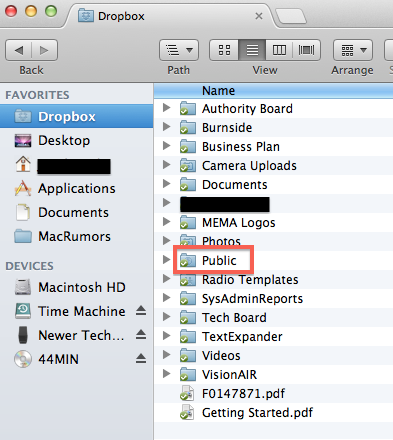
Then on an image you want to share you right-click (or command + click) on it and in the contextual menu you will get a Dropbox menu and you select Copy Public Link.

Then on the MacRumors forum, in the edit or create post tool bar you select the insert image button.
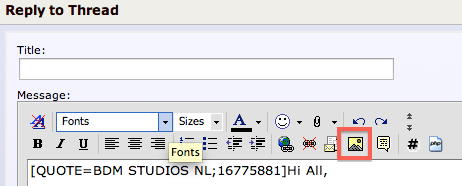
Paste the URL of the image file from the public folder of Dropbox into the dialog box.

Then the code appears in your post like this.
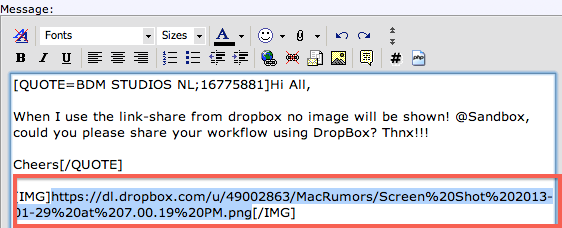
Every one of these images I just posted are coming from my Dropbox folder.

S.B.G
Moderator emeritus
It can be done from iPad as well, but its way more cumbersome that way. I don't even fool with it. I use my Mac when I need to link images from Dropbox.
flameproof
macrumors 6502a
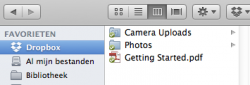
Hi, in my DropBox folder I only have:
Camera Uploads
Photos
No public folder!
----------

----------
Was my dropbox installed propperly?

Camera Uploads
Photos
No public folder!
----------
----------
Was my dropbox installed propperly?
Attachments
Last edited:
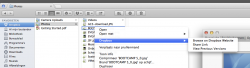

[resolved!!!] ;-)
Hi Sandbox,
Thanks for your support man! As usual this is a matter of RTFM! 😎 I had to get into my web-UCP and setup the public folder for using in DropBox!
All works fine now!
Have a nice Sunday!!!
Cheers
I'm no longer at home now, so I will have to look into how I got that later. It's been a while since I setup Dropbox and I wonder if I did some kind of custom setting or something.
Hi Sandbox,
Thanks for your support man! As usual this is a matter of RTFM! 😎 I had to get into my web-UCP and setup the public folder for using in DropBox!
All works fine now!
Have a nice Sunday!!!
Cheers
S.B.G
Moderator emeritus
No public sharing!
I'm reading through the Dropbox support forum and saw this thread. You might try updating your OS X Dropbox installation and/or uninstalling it and installing the latest version. You should get a Public folder in there. Also check out the thread I linked to.
----------
Hi Sandbox,
Thanks for your support man! As usual this is a matter of RTFM! 😎 I had to get into my web-UCP and setup the public folder for using in DropBox!
Image
All works fine now!
Have a nice Sunday!!!
Cheers
Okay good, glad you got it working!

simsaladimbamba
Guest
I thought I had read the manual now correctly, and have setup a public folder. But with all means, I cannot get to see the option of selecting the 'copy public link'. All I see instead is an option 'share link'. When I follow that one, I can get a link for a download or for sharing via Facebook or Twitter. But no hotlink for use on a forum.
Am I still missing then something, or is it simply not possible for me since I am not a rather new subscriber to Dropbox (account created early 2013).
Am I still missing then something, or is it simply not possible for me since I am not a rather new subscriber to Dropbox (account created early 2013).
simsaladimbamba
Guest
I thought I had read the manual now correctly, and have setup a public folder. But with all means, I cannot get to see the option of selecting the 'copy public link'. All I see instead is an option 'share link'. When I follow that one, I can get a link for a download or for sharing via Facebook or Twitter. But no hotlink for use on a forum.
Am I still missing then something, or is it simply not possible for me since I am not a rather new subscriber to Dropbox (account created early 2013).
Tried the download link yet? If it is an image, it should end on PNG or JPG or whatever format you chose.
You can use that address to embed an image via the

Very very confusing!
I only use Dropbox public linking from within Finder and/or Explorer as discribed in above posts, but I gave it another try just now 😉
I'm afraid DropBox killed the "use public link" option in the web version, so very confusing indeed! 😕
No luck using safari on iOS, no luck with the app for iOS.
This is for me the only way to copy a link with the DropBox app for iOS, using the "share link" within the editor! No images are shown when link is pasted into the "share image" option....
https://www.dropbox.com/s/davq0qu5pqxkd3q/2013-05-24%2018.01.21.jpg
And last but not least, not able to paste an image url link with the attachments within this editor.
Houston, we've got a problem!? 😕 and completly lost here 😉
I thought I had read the manual now correctly, and have setup a public folder. But with all means, I cannot get to see the option of selecting the 'copy public link'. All I see instead is an option 'share link'. When I follow that one, I can get a link for a download or for sharing via Facebook or Twitter. But no hotlink for use on a forum.
Am I still missing then something, or is it simply not possible for me since I am not a rather new subscriber to Dropbox (account created early 2013).
I only use Dropbox public linking from within Finder and/or Explorer as discribed in above posts, but I gave it another try just now 😉
I'm afraid DropBox killed the "use public link" option in the web version, so very confusing indeed! 😕
No luck using safari on iOS, no luck with the app for iOS.
This is for me the only way to copy a link with the DropBox app for iOS, using the "share link" within the editor! No images are shown when link is pasted into the "share image" option....
https://www.dropbox.com/s/davq0qu5pqxkd3q/2013-05-24%2018.01.21.jpg
And last but not least, not able to paste an image url link with the attachments within this editor.
Houston, we've got a problem!? 😕 and completly lost here 😉
Last edited:

Renzatic
Suspended
Another way to do this would be to remember the number assigned to your DB public folder account. As far as I know it never changes, so if you need to post a link from there, but can't get a public link for some reason, just remember it, and tag the name and extension of the file you want to share there.
For example, say I have a .jpg file called "cool_dog" in my public folder, but I'm on my iPad, and can't get a link from inside the app. All I need to know is that my dropbox public folder is located at...
"https://dl.dropboxusercontent.com/u/3018396"
...and all I have to do from there is tag the name of the file in at the end.
"https://dl.dropboxusercontent.com/u/3018396/cool_dog.jpg"
It's not the easiest thing in the world to do, but all I have to remember is the number at the end. 3018396 is my public folder squirreled away deep in some DB server somewhere. Everything before that is a generic Dropbox URL.
For example, say I have a .jpg file called "cool_dog" in my public folder, but I'm on my iPad, and can't get a link from inside the app. All I need to know is that my dropbox public folder is located at...
"https://dl.dropboxusercontent.com/u/3018396"
...and all I have to do from there is tag the name of the file in at the end.
"https://dl.dropboxusercontent.com/u/3018396/cool_dog.jpg"
It's not the easiest thing in the world to do, but all I have to remember is the number at the end. 3018396 is my public folder squirreled away deep in some DB server somewhere. Everything before that is a generic Dropbox URL.
Solution
Old thread but figured you might want a solution on this anyway since I just wrote a blog post on this very topic.
Solution: Add ?raw=1 to the end of your Dropbox Public Link URL

Image you see here is coming straight from Dropbox, I promise!
Full write-up, including tips on taking screenshots.
Old thread but figured you might want a solution on this anyway since I just wrote a blog post on this very topic.
Solution: Add ?raw=1 to the end of your Dropbox Public Link URL
Image you see here is coming straight from Dropbox, I promise!
Full write-up, including tips on taking screenshots.
Old thread but figured you might want a solution on this anyway since I just wrote a blog post on this very topic.
Solution: Add ?raw=1 to the end of your Dropbox Public Link URL
Image
Image you see here is coming straight from Dropbox, I promise!
Full write-up, including tips on taking screenshots.
So if I understand correctly this issue is still not resolved by DropBox?
So if I understand correctly this issue is still not resolved by DropBox?
I have a feeling that while direct image linking isn't prohibited, it's something Dropbox wants to discourage -- so they make it a sort of secret/hidden feature.
I actually found the tip about adding ?raw=1 to the URL on Dropbox's own support documentation, so there's nothing sneaky about it. Works great. But doesn't give them any route for revenue 🙂