
Got a tip for us?
Let us know
Become a MacRumors Supporter for $50/year with no ads, ability to filter front page stories, and private forums.
iM 4,1-14,4 2011 iMac Graphics Card Upgrade
- Thread starter MichaelDT
- WikiPost WikiPost
- Start date
- Sort by reaction score
You are using an out of date browser. It may not display this or other websites correctly.
You should upgrade or use an alternative browser.
You should upgrade or use an alternative browser.
- Status
- The first post of this thread is a WikiPost and can be edited by anyone with the appropiate permissions. Your edits will be public.


SKYNET-1
macrumors member
If you're going to put forth all the effort, I would suggest using the RX 560 (WX4170) that Nick posted a while back. It has significantly less power draw than the 780M with comparable performance. You may still need to tweak the power settings to prevent overdrawing the PSU, but it will certainly be easier to cool as it has a 50W TDP vs a 122W TDP. Benchmarks show it only just barely underperforming the 780M, from what I can see.
Of course, this card might be a bit more work - backlight wire mod is required, and you'll likely need to solder on an EEPROM, but that seems like much LESS of a headache than worrying about picoPSUs, etc.
yeah, i know, but newer AMD GPUs has many problems n nick said he not would prefer because of many issues...
so i will use a underclocked 780 or i seen few hours ago, he has a bios for a 880 too(its a 780 with 8GB), n think i will take it, because i like to turn the textures to maximum, n 4GB is not enough in many many games where use high-res textures.
n with a lower TDP limit n clocks i will lose only 20-25% but keep 40% of power(122W -> 75W), so still 30% faster then a 770 or 5 times faster then the original 6750( = same speed like a desktop RX560)... n when im a lucky boy with the silicon lottery(like all my GPUs in the past), i can turn the GPU up n undervolt too, so maybe only 10% lose with 75W TDP(because most of the 880M r possible to 20% overclock without turn up the voltages).
n the pico PSU is nothing bad, because when u only need a pico PSU n the 24 to 14 pin cable n then works... then u can use 2600K n full powered 880M + overclock the GPU...
btw. just found a 27" 12.1 für 250 francs(1 swiss franc = around $1), looks on the pics like new... may i will give them a try, but im sure when i have them here, will too big(n no, i dont have a small APT)... n the other thing is, because of the higher resolution of the 27" i need to overclock the card for sure to get the same performance like in the 21.5"... but when i have them here, i will see what happen... n i can sell for the same price for sure or maybe more... or my 21.5" for a bit less... 🙂

highvoltage12v
macrumors 6502a
You probably didn't unlock the system partition using Hackintool.So, after trying to install again Lili.kext and WhateverGreen.kext with the Kext Utility, the log is the following:
Detected  ...  Darwin Kernel Version 19.3.0.

Start working: 2020-02-08 18:38:55 +0100

Task: Install "Lilu.kext (arches) x86_64"
           to "/System/Library/Extensions"

Found existing "/System/Library/Extensions/Lilu.kext"

BackUp : "Lilu.kext" to "Lilu.kext.bak" ... Error.

Install: "Lilu.kext" ... Can't copy source file.
Task: Install "WhateverGreen.kext (arches) x86_64"
           to "/System/Library/Extensions"

Found existing "/System/Library/Extensions/WhateverGreen.kext"

BackUp : "WhateverGreen.kext" to "WhateverGreen.kext.bak" ... Error.

Install: "WhateverGreen.kext" ... Can't copy source file.
Updating the system cache files . Done
-- Build time = 0 sec.


Syncing disk cache ... Done.

All done.
Have a nice ... day(night)
Enjoy ...
It looks that the kexts are already installed. But in Screen Preferences, I can't select the AirPlay Screen (Disabled).
Any clue?
Thank you! 🙂

Terrapater
macrumors newbie
I can send you a Quadro K2000M already flashed with Nick's rom I have a spare one. I bought it from a German ebayer for 100 $ and tested it, the card was intended for a 2009 iMac 21.5" until I find out that a Core2Duo machine is not upgradable.Thanks al for the help - I've concluded that somewhere down the road, I've totally killed this board (or it was DOA).
Anyway if anybody wants to sell me a pre-flashed board, please let me know !!!!
Thanks in advance!
I have previously successfully upgraded a 2011 iMac 21,5" and a 2010 iMac 27". I flashed all cards via a ch431a programmer and Terminal with Flashrom installed via Homebrew on my MacBook pro. Works like a charm and you do not need Windows or Linux.
I would send the card from Austria.

Jake F.
macrumors newbie
You probably didn't unlock the system partition using Hackintool.
Yes, I did it the first time, but not the second one. So I tried it again with the Hackintool and the log is:
Detected  ...  Darwin Kernel Version 19.3.0.

Start working: 2020-02-09 16:27:41 +0100

Task: Install "Lilu.kext (arches) x86_64"
           to "/System/Library/Extensions"

Found existing "/System/Library/Extensions/Lilu.kext"

BackUp : "Lilu.kext" to "Lilu.kext.bak" ... Done.

Install: "Lilu.kext" ... OK.

Repairing Permissions for "/System/Library/Extensions/Lilu.kext" ... Done.
-- Total processed: 5 files for 0 sec.

Task: Install "WhateverGreen.kext (arches) x86_64"
           to "/System/Library/Extensions"

Found existing "/System/Library/Extensions/WhateverGreen.kext"

BackUp : "WhateverGreen.kext" to "WhateverGreen.kext.bak" ... Done.

Install: "WhateverGreen.kext" ... OK.

Repairing Permissions for "/System/Library/Extensions/WhateverGreen.kext" ... Done.
-- Total processed: 5 files for 0 sec.

Updating the system cache files .................KernelCache ID: 95465DD90BC5E68288049B8C5187F6CB
............................................ False
-- Timeout 120 sec.

-- Unknown error --

Syncing disk cache ... Done.

All done.
Have a nice ... day(night)
Enjoy ...
So there's an error there, I don't know why that's happening!
Any clue?
Thank you! 🙂
Terrapater
macrumors newbie
Don't worry about the error! Due to the instructions it always appears.Yes, I did it the first time, but not the second one. So I tried it again with the Hackintool and the log is:
Detected  ...  Darwin Kernel Version 19.3.0.

Start working: 2020-02-09 16:27:41 +0100

Task: Install "Lilu.kext (arches) x86_64"
           to "/System/Library/Extensions"

Found existing "/System/Library/Extensions/Lilu.kext"

BackUp : "Lilu.kext" to "Lilu.kext.bak" ... Done.

Install: "Lilu.kext" ... OK.

Repairing Permissions for "/System/Library/Extensions/Lilu.kext" ... Done.
-- Total processed: 5 files for 0 sec.

Task: Install "WhateverGreen.kext (arches) x86_64"
           to "/System/Library/Extensions"

Found existing "/System/Library/Extensions/WhateverGreen.kext"

BackUp : "WhateverGreen.kext" to "WhateverGreen.kext.bak" ... Done.

Install: "WhateverGreen.kext" ... OK.

Repairing Permissions for "/System/Library/Extensions/WhateverGreen.kext" ... Done.
-- Total processed: 5 files for 0 sec.

Updating the system cache files .................KernelCache ID: 95465DD90BC5E68288049B8C5187F6CB
............................................ False
-- Timeout 120 sec.

-- Unknown error --

Syncing disk cache ... Done.

All done.
Have a nice ... day(night)
Enjoy ...
So there's an error there, I don't know why that's happening!
Any clue?
Thank you! 🙂
highvoltage12v
macrumors 6502a
No, we never came across a 980m with working eDP/internal display. Besides with no Maxwell drivers for Mac OS 10.14+ it's pointless to consider looking into the VBIOS of one. The future is most likely the WX cards once Kepler support is dropped.btw. somebody tried a GTX 980M with bootcamp? works with win(and internal display)?
can you add some details about the flashrom usage on osx? I am trying to flash the same card!I can send you a Quadro K2000M already flashed with Nick's rom I have a spare one. I bought it from a German ebayer for 100 $ and tested it, the card was intended for a 2009 iMac 21.5" until I find out that a Core2Duo machine is not upgradable.
I have previously successfully upgraded a 2011 iMac 21,5" and a 2010 iMac 27". I flashed all cards via a ch431a programmer and Terminal with Flashrom installed via Homebrew on my MacBook pro. Works like a charm and you do not need Windows or Linux.
I would send the card from Austria.
Jake F.
macrumors newbie
Don't worry about the error! Due to the instructions it always appears.
Alright!
But the problem is that the AirPlay is not available yet! 🙁
VaMPiReSuCKeR
macrumors newbie
Hello, I have doubts about which graphics to mount on my Imac 2011 21.5 ''. I want to do a bit of upgrade and wanted to put a 2600s and some graphics as powerful as possible for this imac. I have seen that the power supply is 205W and I do not know what graphic to put that does not exceed and give problems. I want to use Catalina.
Thanks!
Thanks!

NOTNlCE
macrumors 65816
Alright!
But the problem is that the AirPlay is not available yet! 🙁
Have you tried in Mojave? It is very easy to add a new APFS volume and quickly install the system to test. I will be home later this afternoon and can send info and/or test Catalina on my machines to try and assist.
Dear Terrapater may I suggest something?! would you like to exchange your already flashed K2000m card with my unflashed card? (I am in Greece)I can send you a Quadro K2000M already flashed with Nick's rom I have a spare one. I bought it from a German ebayer for 100 $ and tested it, the card was intended for a 2009 iMac 21.5" until I find out that a Core2Duo machine is not upgradable.
I have previously successfully upgraded a 2011 iMac 21,5" and a 2010 iMac 27". I flashed all cards via a ch431a programmer and Terminal with Flashrom installed via Homebrew on my MacBook pro. Works like a charm and you do not need Windows or Linux.
I would send the card from Austria.

nikey22
macrumors regular
Hello, I have doubts about which graphics to mount on my Imac 2011 21.5 ''. I want to do a bit of upgrade and wanted to put a 2600s and some graphics as powerful as possible for this imac. I have seen that the power supply is 205W and I do not know what graphic to put that does not exceed and give problems. I want to use Catalina.
Thanks!
For this machine, stick to Dell Nvidia Quadro K1000M, K1100M, K2000M, and K2100M cards, as they have the appropriate power draw (55W) to work safely and reduced chances of kernel panics.
post #1, post #3474
Last edited:

HighSierraCosworth
macrumors member
Hey all, Just finished up (most) of a Quadro K1100M upgrade to a 21.5 inch. getting some Kernel Panics. I'm running Mojave via the DosDude patcher, I've deselected legacy Graphics patch. I have installed that 2020-001 security update. Attached are the last kernel panic report, and an EtreCheck report
Code:EtreCheck version: 6.1.9 (6B057) Report generated: 2020-02-08 13:24:48 Download EtreCheck from https://etrecheck.com Runtime: 3:10 Performance: Good Problem: Computer is restarting Description: 2011 iMac GPU upgrade, Quadro K1100M, Nick vBIOS, random restarts, Fau lt CR2: 0x00007fffa7492ae0, Error code: 0x0000000000000000, Fault CPU: 0x1, PL: 0, VF: 0 Major Issues: Anything that appears on this list needs immediate attention. No Time Machine backup - Time Machine backup not found. Gatekeeper disabled - Gatekeeper security protection is disabled. This computer is at risk of malware infection. System Integrity Protection disabled - System Integrity Protection is disabled. This computer is at risk of malware infection. Kernel panics - This system has experienced kernel panics that could be related to 3rd party software. Apple security disabled - Apple security software is disabled. This computer is at risk of malware infection. Minor Issues: These issues do not need immediate attention but they may indicate future problems or opportunities for improvement. Unsigned files - There are unsigned software files installed. They appear to be legitimate but should be reviewed. Hardware Information: iMac (21.5-inch, Mid 2011) iMac Model: iMac12,1 1 2.5 GHz Intel Core i5 (i5-2400S) CPU: 4-core 8 RAM - Upgradeable BANK 0/DIMM0 - 2 GB DDR3 1333 BANK 1/DIMM0 - 2 GB DDR3 1333 BANK 0/DIMM1 - 2 GB DDR3 1333 BANK 1/DIMM1 - 2 GB DDR3 1333 Video Information: Quadro K1100M by Nick[D]vB - VRAM: 2 GB iMac 1920 x 1080 Drives: disk0 - TOSHIBA THNSNK128GVN8 M.2 2280 128GB 128.04 GB (Solid State - TRIM: No) Internal SATA 6 Gigabit Serial ATA disk0s1 - EFI (MS-DOS FAT32) [EFI] 210 MB disk0s2 [APFS Container] 127.83 GB disk1 [APFS Virtual drive] 127.83 GB (Shared by 4 volumes) disk1s1 - S*************e (APFS) (Shared - 30.78 GB used) disk1s2 - Preboot (APFS) [APFS Preboot] (Shared - 26 MB used) disk1s3 - Recovery (APFS) [Recovery] (Shared - 507 MB used) disk1s4 - VM (APFS) [APFS VM] (Shared - 20 KB used) Mounted Volumes: disk1s1 - S*************e 127.83 GB (Shared - 30.78 GB used, 103.87 GB available, 96.46 GB free) APFS Mount point: / disk1s4 - VM [APFS VM] 127.83 GB (Shared - 20 KB used, 96.46 GB free) APFS Mount point: /private/var/vm disk2s2 - F****************************] 3.36 GB (2.81 GB used, 548 MB free) Mac OS Extended Disk Image Mount point: /Volumes/F****************************] Owners enabled: No Read-only: Yes Network: Interface en0: Ethernet Interface en4: iPhone Interface fw0: FireWire Interface en1: Wi-Fi 802.11 a/b/g/n Interface en3: Bluetooth PAN Interface bridge0: Thunderbolt Bridge iCloud Quota: 2.84 GB available System Software: macOS Mojave 10.14.6 (18G3020) Time since boot: Less than an hour Security: System Status Gatekeeper: Anywhere System Integrity Protection: Disabled Antivirus software: None! Unsigned Files: Launchd: /Library/LaunchAgents/com.dosdude1.PatchUpdater.plist Executable: /usr/local/sbin/patchupdaterd Details: Exact match found in the whitelist - probably OK Kernel Extensions: /Library/Extensions [Not Loaded] LegacyUSBInjector.kext (1.0) [Loaded] SIPManager.kext (1.0 - SDK 10.12) ~/Downloads/Hackintool.app [Not Loaded] AppleIntelInfo.kext (3.0 - SDK 10.14) System Launch Agents: [Not Loaded] 17 Apple tasks [Loaded] 169 Apple tasks [Running] 114 Apple tasks System Launch Daemons: [Not Loaded] 39 Apple tasks [Loaded] 182 Apple tasks [Running] 112 Apple tasks [Other] One Apple task Launch Agents: [Running] com.dosdude1.PatchUpdater.plist (? dc576c08 - installed 2020-02-07) Launch Daemons: [Running] com.crystalidea.macsfancontrol.smcwrite.plist (Ilya Parniuk - installed 2020-02-07) User Login Items: [Not Loaded] AdGuard Login Helper (App Store - installed 2020-02-07) Modern Login Item /Applications/AdGuard for Safari.app/Contents/Library/LoginItems/AdGuard Login Helper.app [Not Loaded] AdGuard for Safari Login Helper (App Store - installed 2020-02-07) Modern Login Item /Applications/AdGuard for Safari.app/Contents/Library/LoginItems/AdGuard for Safari Login Helper.app [Not Loaded] BSLoginLauncher (App Store - installed 2020-02-08) Modern Login Item /Applications/Brightness Slider.app/Contents/Library/LoginItems/BSLoginLauncher.app Audio Plug-ins: AppleTimeSyncAudioClock: 1.0 (Apple - installed 2019-09-20) BluetoothAudioPlugIn: 6.0.14 (Apple - installed 2020-02-07) AirPlay: 2.0 (Apple - installed 2020-02-07) AppleAVBAudio: 760.6 (Apple - installed 2019-09-20) BridgeAudioSP: 5.52 (Apple - installed 2020-02-07) iSightAudio: 7.7.3 (Apple - installed 2019-09-20) Safari Extensions: AdGuard - App Store (installed 2020-02-07) AdGuard Custom - App Store (installed 2020-02-07) AdGuard Other - App Store (installed 2020-02-07) AdGuard Privacy - App Store (installed 2020-02-07) AdGuard Safari Icon - App Store (installed 2020-02-07) AdGuard Security - App Store (installed 2020-02-07) AdGuard Social - App Store (installed 2020-02-07) AdvancedBlocking - App Store (installed 2020-02-07) LastPass - Marvasol, Inc DBA LastPass (installed 2020-01-09) Night Eye - App Store (installed 2020-02-07) 3rd Party Preference Panes: Patch Updater (installed 2020-02-07) Time Machine: Time Machine Not Configured! One local snapshot Oldest local snapshot: 2020-02-07 18:35:03 Last local snapshot: 2020-02-07 18:35:03 Performance: System Load: 2.94 (1 min ago) 3.65 (5 min ago) 2.44 (15 min ago) Nominal I/O speed: 16.16 MB/s File system: 28.08 seconds Write speed: 117 MB/s Read speed: 501 MB/s CPU Usage Snapshot: Type Overall System 19 % User 54 % Idle 27 % Top Processes Snapshot by CPU: Process (count) CPU (Source - Location) diskimages-helper 51.72 % (Apple) com.apple.WebKit.WebContent (9) 40.92 % (Apple) WindowServer 27.04 % (Apple) Safari 24.58 % (Apple) DesktopServicesHelper 24.22 % (Apple) Top Processes Snapshot by Memory: Process (count) RAM usage (Source - Location) com.apple.WebKit.WebContent (9) 1.41 GB (Apple) EtreCheckPro 459 MB (Etresoft, Inc.) com.apple.SafariServices.ExtensionHelper (2) 224 MB (Apple) Discord Helper (2) 216 MB (Hammer & Chisel Inc.) mdworker_shared (8) 144 MB (Apple) Top Processes Snapshot by Network Use: Process (count) Input / Output (Source - Location) com.apple.WebKit.Networking 10 MB / 233 KB (Apple) Discord 6 MB / 31 KB (Hammer & Chisel Inc.) cloudd 62 KB / 28 KB (Apple) mDNSResponder 60 KB / 22 KB (Apple) commerce 34 KB / 2 KB (Apple) Top Processes Snapshot by Energy Use: Process (count) Energy (0-100) (Source - Location) diskimages-helper 30 (Apple) VTDecoderXPCService (2) 4 (Apple) com.apple.WebKit.WebContent (9) 3 (Apple) Safari 2 (Apple) Finder 2 (Apple) Virtual Memory Information: Physical RAM: 8 GB Free RAM: 18 MB Used RAM: 5.02 GB Cached files: 2.96 GB Available RAM: 2.98 GB Swap Used: 0 B Software Installs (past 30 days): Install Date Name (Version) 2020-02-07 Night Eye (4.0.4) 2020-02-07 AdGuard for Safari (1.6.4) 2020-02-07 XProtectPlistConfigData (2113) 2020-02-07 MRTConfigData (1.54) 2020-02-07 Gatekeeper Configuration Data (181) 2020-02-07 Safari (13.0.5) 2020-02-07 Security Update (10.14.6) 2020-02-08 Brightness Slider (1.2.6) 2020-02-08 LastPass (4.4.0) Diagnostics Information (past 7-30 days): 2020-02-08 13:11:33 Kernel Panic Details: panic(cpu 1 caller 0xffffff8006cdda4d): Kernel trap at 0xffffff80071c9 180, type 13=general protection, registers: 3rd party kernel extensions: com.parrotgeek.SIPManager 2020-02-08 12:59:42 DiskImageMounter.app High CPU Use Executable: /System/Library/CoreServices/DiskImageMounter.app 2020-02-08 11:09:23 AdGuard for Safari.app Crash Executable: /Applications/AdGuard for Safari.app 2020-02-07 20:33:19 ReportCrash Crash Executable: /System/Library/CoreServices/ReportCrash Details: dyld3 mode Analyzing process: Kext Utility[418], path: ???; parent process: [1], path: /sbin/launchd End of report
Code:Anonymous UUID: 5B456913-64EF-3292-7E37-2EC6934BFE96 Sat Feb 8 13:11:33 2020 *** Panic Report *** panic(cpu 1 caller 0xffffff80090dda4d): Kernel trap at 0xffffff80095c9180, type 13=general protection, registers: CR0: 0x0000000080010033, CR2: 0x00007fffa7492ae0, CR3: 0x00000001bba810d6, CR4: 0x00000000000626e0 RAX: 0x0f0f0f0f0f0f0f0f, RBX: 0x0000000000000002, RCX: 0x0000000000000000, RDX: 0xffffff801ae7b6e0 RSP: 0xffffff913836b9a0, RBP: 0xffffff913836bb30, RSI: 0x0000000000000000, RDI: 0xffffff801da56a80 R8: 0x000000000000001e, R9: 0xffffff801d9faac8, R10: 0x0000000000000001, R11: 0xffffff801d673b40 R12: 0xffffff801da56a80, R13: 0xffffff8009a208c8, R14: 0xffffff801ae7b6e0, R15: 0x0000000000000001 RFL: 0x0000000000010202, RIP: 0xffffff80095c9180, CS: 0x0000000000000008, SS: 0x0000000000000010 Fault CR2: 0x00007fffa7492ae0, Error code: 0x0000000000000000, Fault CPU: 0x1, PL: 0, VF: 0 Backtrace (CPU 1), Frame : Return Address 0xffffff8008d51a90 : 0xffffff8008fb058d 0xffffff8008d51ae0 : 0xffffff80090ec0f5 0xffffff8008d51b20 : 0xffffff80090dd82a 0xffffff8008d51b90 : 0xffffff8008f5d9d0 0xffffff8008d51bb0 : 0xffffff8008faffa7 0xffffff8008d51cd0 : 0xffffff8008fafdf3 0xffffff8008d51d40 : 0xffffff80090dda4d 0xffffff8008d51eb0 : 0xffffff8008f5d9d0 0xffffff8008d51ed0 : 0xffffff80095c9180 0xffffff913836bb30 : 0xffffff80095c9346 0xffffff913836bb60 : 0xffffff800962d705 0xffffff913836bbc0 : 0xffffff8009637664 0xffffff913836bc10 : 0xffffff8009637720 0xffffff913836bc40 : 0xffffff800968bdfb 0xffffff913836bc90 : 0xffffff800968bf0d 0xffffff913836bd40 : 0xffffff800909a53b 0xffffff913836bd80 : 0xffffff8008fb5dcc 0xffffff913836bdd0 : 0xffffff8008f90b41 0xffffff913836be50 : 0xffffff8008fa525e 0xffffff913836bef0 : 0xffffff80090c3767 0xffffff913836bfa0 : 0xffffff8008f5e1b6 BSD process name corresponding to current thread: dpd Boot args: -no_compat_check Mac OS version: 18G3020 Kernel version: Darwin Kernel Version 18.7.0: Thu Jan 23 06:52:12 PST 2020; root:xnu-4903.278.25~1/RELEASE_X86_64 Kernel UUID: 71EBCAB7-7239-36ED-A2B8-3DCEB0D5EFD1 Kernel slide: 0x0000000008c00000 Kernel text base: 0xffffff8008e00000 __HIB text base: 0xffffff8008d00000 System model name: iMac12,1 (Mac-942B5BF58194151B) System uptime in nanoseconds: 1863996107964 last loaded kext at 1248139850366: com.apple.driver.AppleXsanScheme 3 (addr 0xffffff7f8c3f0000, size 32768) last unloaded kext at 506714055338: com.apple.driver.usb.AppleUSBUHCI 1.2 (addr 0xffffff7f8a956000, size 135168) loaded kexts: com.parrotgeek.SIPManager 1 com.apple.filesystems.smbfs 3.3.2 com.apple.driver.AppleHWSensor 1.9.5d0 com.apple.driver.AudioAUUC 1.70 com.apple.fileutil 20.036.15 com.apple.filesystems.autofs 3.0 com.apple.driver.AppleMikeyHIDDriver 131 com.apple.driver.AGPM 110.25.11 com.apple.driver.AppleMikeyDriver 281.52 com.apple.driver.AppleGraphicsDevicePolicy 3.50.14 com.apple.AGDCPluginDisplayMetrics 3.50.14 com.apple.driver.AppleUpstreamUserClient 3.6.5 com.apple.driver.AppleHV 1 com.apple.iokit.IOUserEthernet 1.0.1 com.apple.GeForce 12.0.0 com.apple.driver.AppleHDA 281.52 com.apple.driver.AppleIntelHD3000Graphics 10.0.4 com.apple.iokit.IOBluetoothSerialManager 6.0.14d4 com.apple.driver.pmtelemetry 1 com.apple.Dont_Steal_Mac_OS_X 7.0.0 com.apple.driver.AppleBacklight 170.12.12 com.apple.driver.AppleOSXWatchdog 1 com.apple.driver.AppleThunderboltIP 3.1.2 com.apple.driver.AppleMCCSControl 1.5.9 com.apple.driver.ACPI_SMC_PlatformPlugin 1.0.0 com.apple.driver.AppleSMCPDRC 1.0.0 com.apple.driver.AppleSMCLMU 212 com.apple.driver.AppleIntelSlowAdaptiveClocking 4.0.0 com.apple.driver.eficheck 1 com.apple.driver.AppleLPC 3.1 com.apple.driver.AppleIntelSNBGraphicsFB 10.0.4 com.apple.driver.AppleIRController 354 com.apple.driver.AppleUSBCardReader 456.260.3 com.apple.filesystems.apfs 945.275.8 com.apple.driver.AppleVirtIO 2.1.3 com.apple.filesystems.hfs.kext 407.200.4 com.apple.AppleFSCompression.AppleFSCompressionTypeDataless 1.0.0d1 com.apple.BootCache 40 com.apple.AppleFSCompression.AppleFSCompressionTypeZlib 1.0.0 com.apple.AppleSystemPolicy 1.0 com.apple.iokit.AppleBCM5701Ethernet 10.3.3 com.apple.driver.AppleFWOHCI 5.6.0 com.apple.private.KextAudit 1.0 com.apple.driver.AirPort.Atheros40 700.74.5 com.apple.driver.AppleAHCIPort 329.260.5 com.apple.driver.AppleRTC 2.0 com.apple.driver.AppleACPIButtons 6.1 com.apple.driver.AppleHPET 1.8 com.apple.driver.AppleSMBIOS 2.1 com.apple.driver.AppleACPIEC 6.1 com.apple.driver.AppleAPIC 1.7 com.apple.driver.AppleIntelCPUPowerManagementClient 220.0.0 com.apple.nke.applicationfirewall 202 com.apple.security.TMSafetyNet 8 com.apple.driver.AppleIntelCPUPowerManagement 220.0.0 com.apple.driver.AppleXsanScheme 3 com.apple.kext.triggers 1.0 com.apple.driver.AppleGraphicsControl 3.50.14 com.apple.iokit.IOAVBFamily 760.6 com.apple.plugin.IOgPTPPlugin 740.2 com.apple.iokit.IOSkywalkFamily 1 com.apple.nvidia.driver.NVDAGK100Hal 12.0.0 com.apple.iokit.IOAcceleratorFamily2 404.14 com.apple.driver.DspFuncLib 281.52 com.apple.kext.OSvKernDSPLib 528 com.apple.nvidia.driver.NVDAResman 12.0.0 com.apple.driver.AppleSSE 1.0 com.apple.iokit.IOSurface 255.6.1 com.apple.driver.AppleBacklightExpert 1.1.0 com.apple.iokit.IONDRVSupport 530.51 com.apple.AppleGPUWrangler 3.50.14 com.apple.AppleGraphicsDeviceControl 3.50.14 com.apple.driver.AppleThunderboltEDMSink 4.2.0 com.apple.driver.IOPlatformPluginLegacy 1.0.0 com.apple.driver.AppleSMBusController 1.0.18d1 com.apple.driver.AppleSMBusPCI 1.0.14d1 com.apple.iokit.IOFireWireIP 2.3.0 com.apple.iokit.IOSlowAdaptiveClockingFamily 1.0.0 com.apple.driver.AppleHDAController 281.52 com.apple.iokit.IOHDAFamily 281.52 com.apple.driver.IOPlatformPluginFamily 6.0.0d8 com.apple.iokit.IOGraphicsFamily 530.68 com.apple.iokit.BroadcomBluetoothHostControllerUSBTransport 6.0.14d4 com.apple.iokit.IOBluetoothHostControllerUSBTransport 6.0.14d4 com.apple.iokit.IOBluetoothHostControllerTransport 6.0.14d4 com.apple.iokit.IOBluetoothFamily 6.0.14d4 com.apple.driver.AppleUSBAudio 315.6 com.apple.driver.usb.IOUSBHostHIDDevice 1.2 com.apple.iokit.IOAudioFamily 206.5 com.apple.vecLib.kext 1.2.0 com.apple.driver.usb.networking 5.0.0 com.apple.driver.usb.AppleUSBHostCompositeDevice 1.2 com.apple.iokit.IOSerialFamily 11 com.apple.filesystems.hfs.encodings.kext 1 com.apple.driver.usb.AppleUSBHub 1.2 com.apple.driver.AppleThunderboltDPInAdapter 5.6.9 com.apple.driver.AppleThunderboltDPOutAdapter 5.6.9 com.apple.driver.AppleThunderboltDPAdapterFamily 5.6.9 com.apple.driver.AppleThunderboltPCIDownAdapter 2.1.5 com.apple.driver.AppleThunderboltNHI 4.7.9 com.apple.iokit.IOThunderboltFamily 6.8.6 com.apple.iokit.IOAHCIBlockStorage 301.270.1 com.apple.iokit.IOEthernetAVBController 1.1.0 com.apple.driver.mDNSOffloadUserClient 1.0.1b8 com.apple.iokit.IOFireWireFamily 4.7.3 com.apple.iokit.IO80211Family 1200.12.2 com.apple.driver.corecapture 1.0.4 com.apple.driver.usb.AppleUSBHostPacketFilter 1.0 com.apple.iokit.IOUSBFamily 900.4.2 com.apple.iokit.IOAHCIFamily 288 com.apple.driver.usb.AppleUSBEHCIPCI 1.2 com.apple.driver.usb.AppleUSBEHCI 1.2 com.apple.driver.AppleUSBHostMergeProperties 1.2 com.apple.driver.AppleEFINVRAM 2.1 com.apple.driver.AppleEFIRuntime 2.1 com.apple.iokit.IOSMBusFamily 1.1 com.apple.iokit.IOHIDFamily 2.0.0 com.apple.security.quarantine 3 com.apple.security.sandbox 300.0 com.apple.kext.AppleMatch 1.0.0d1 com.apple.driver.DiskImages 493.0.0 com.apple.driver.AppleFDEKeyStore 28.30 com.apple.driver.AppleEffaceableStorage 1.0 com.apple.driver.AppleKeyStore 2 com.apple.driver.AppleUSBTDM 456.260.3 com.apple.driver.AppleMobileFileIntegrity 1.0.5 com.apple.iokit.IOUSBMassStorageDriver 145.200.2 com.apple.iokit.IOSCSIBlockCommandsDevice 408.250.3 com.apple.iokit.IOSCSIArchitectureModelFamily 408.250.3 com.apple.iokit.IOStorageFamily 2.1 com.apple.kext.CoreTrust 1 com.apple.driver.AppleCredentialManager 1.0 com.apple.driver.KernelRelayHost 1 com.apple.iokit.IOUSBHostFamily 1.2 com.apple.driver.usb.AppleUSBCommon 1.0 com.apple.driver.AppleBusPowerController 1.0 com.apple.driver.AppleSEPManager 1.0.1 com.apple.driver.IOSlaveProcessor 1 com.apple.iokit.IOTimeSyncFamily 740.2 com.apple.iokit.IONetworkingFamily 3.4 com.apple.iokit.IOReportFamily 47 com.apple.driver.AppleACPIPlatform 6.1 com.apple.driver.AppleSMC 3.1.9 com.apple.iokit.IOPCIFamily 2.9 com.apple.iokit.IOACPIFamily 1.4 com.apple.kec.pthread 1 com.apple.kec.Libm 1 com.apple.kec.corecrypto 1.0 EOF Model: iMac12,1, BootROM 87.0.0.0.0, 4 processors, Intel Core i5, 2.5 GHz, 8 GB, SMC 1.71f22 Graphics: Quadro K1100M by Nick[D]vB, Quadro K1100M by Nick[D]vB, spdisplays_pcie_device, 2 GB Memory Module: BANK 0/DIMM0, 2 GB, DDR3, 1333 MHz, 0x02FE, 0x45424A3230554638424353302D444A2D4620 Memory Module: BANK 1/DIMM0, 2 GB, DDR3, 1333 MHz, 0x02FE, 0x45424A3230554638424353302D444A2D4620 Memory Module: BANK 0/DIMM1, 2 GB, DDR3, 1333 MHz, 0x80CE, 0x4D34373142353737334448302D4348392020 Memory Module: BANK 1/DIMM1, 2 GB, DDR3, 1333 MHz, 0x80CE, 0x4D34373142353737334448302D4348392020 AirPort: spairport_wireless_card_type_airport_extreme (0x168C, 0x9A), Atheros 9380: 4.0.74.0-P2P Bluetooth: Version 6.0.14d4, 3 services, 27 devices, 1 incoming serial ports Network Service: Wi-Fi, AirPort, en1 Serial ATA Device: TOSHIBA THNSNK128GVN8 M.2 2280 128GB, 128.04 GB USB Device: USB 2.0 Bus USB Device: FaceTime HD Camera (Built-in) USB Device: Hub USB Device: 4-Port USB 2.0 Hub USB Device: Nixeus REVEL USB Device: BCM20702A0 USB Device: USB keyboard USB Device: BRCM2046 Hub USB Device: Bluetooth USB Host Controller USB Device: USB 2.0 Bus USB Device: Hub USB Device: AudioBox USB USB Device: IR Receiver USB Device: Internal Memory Card Reader Thunderbolt Bus: iMac, Apple Inc., 25.1
So to follow up on this if anyone can give me assistance. As far as I can tell, the kernel panics only happens in Mojave and Catalina. I did a short stint on High Sierra again, and there was zero sign of instability. I did install the kexts for sleep and such from the first post of the thread, but it was still giving me panics. Is there anything obvious that I’m missing?
Terrapater
macrumors newbie
can you add some details about the flashrom usage on osx? I am trying to flash the same card!
can you add some details about the flashrom usage on osx? I am trying to flash the same card!
This tutorial works perfect:
Dear Terrapater may I suggest something?! would you like to exchange your already flashed K2000m card with my unflashed card? (I am in Greece)
Sorry, I don't need any other card. All my iMac's are upgraded!
The cheapest and most easy way to flash is this:
 forums.macrumors.com
2011 iMac Graphics Card Upgrade
so guys, I have a little gift for you to give back after such an incredible thread :D hope you like it, the headaches to get it running were immens for me as a newb. I couldn't stand it to use fckin windows to flash the cards and so I prepared this ~350mb drive I created a Linux Live USB...
forums.macrumors.com
Jake F.
macrumors newbie
Hey!Have you tried in Mojave? It is very easy to add a new APFS volume and quickly install the system to test. I will be home later this afternoon and can send info and/or test Catalina on my machines to try and assist.
I didn't try in Mojave. I upgraded de GPU and installed Catalina directly. I've been testing the new system for a week now and everything seems to work fine except for the AirPlay :/
nikey22
macrumors regular
@HighSierraCosworth
Your kernel panics are likely related to 3rd party software? Try to do a fresh install and see how it goes in Catalina. You have some launch agents and launch daemons that could cause this. Also you have 8Gb of ram, try 16 Gb. The major difference between HS and Mojave/Catalina is their file system of choice, APFS vs. MacOs Extended Journaled. So try a fresh install and see what happens after a week.
Your kernel panics are likely related to 3rd party software? Try to do a fresh install and see how it goes in Catalina. You have some launch agents and launch daemons that could cause this. Also you have 8Gb of ram, try 16 Gb. The major difference between HS and Mojave/Catalina is their file system of choice, APFS vs. MacOs Extended Journaled. So try a fresh install and see what happens after a week.
HighSierraCosworth
macrumors member
@HighSierraCosworth
Your kernel panics are likely related to 3rd party software? Try to do a fresh install and see how it goes in Catalina. You have some launch agents and launch daemons that could cause this. Also you have 8Gb of ram, try 16 Gb. The major difference between HS and Mojave/Catalina is their file system of choice, APFS vs. MacOs Extended Journaled. So try a fresh install and see what happens after a week.
Let’s see here
Catalina crashes in the installer.
16GB of RAM would require me to go out and get more, and I don’t see this being the problem, when my MacBook Pro was running a patched Mohave install with 6GB.
ive done 2 clean Mojave installs since then, and both have the same kernel panic issue. Back on High Sierra, and I’ve had none.
High Sierra’s preferred format is still APFS and not HFS+, and I’ve been using APFS on all of my MacOS installs. My only install on HFS+ is a 2007 white MacBook on snow leopard.
I would also like to point out that the install with the kernel panics was hours old, I didn’t exactly have the time to load it up with 3rd party crap to Bork it.

ich558
macrumors member
so guys, I have a little gift for you to give back after such an incredible thread 😀
hope you like it, the headaches to get it running were immens for me as a newb.
I couldn't stand it to use fckin windows to flash the cards and so I prepared this ~350mb drive
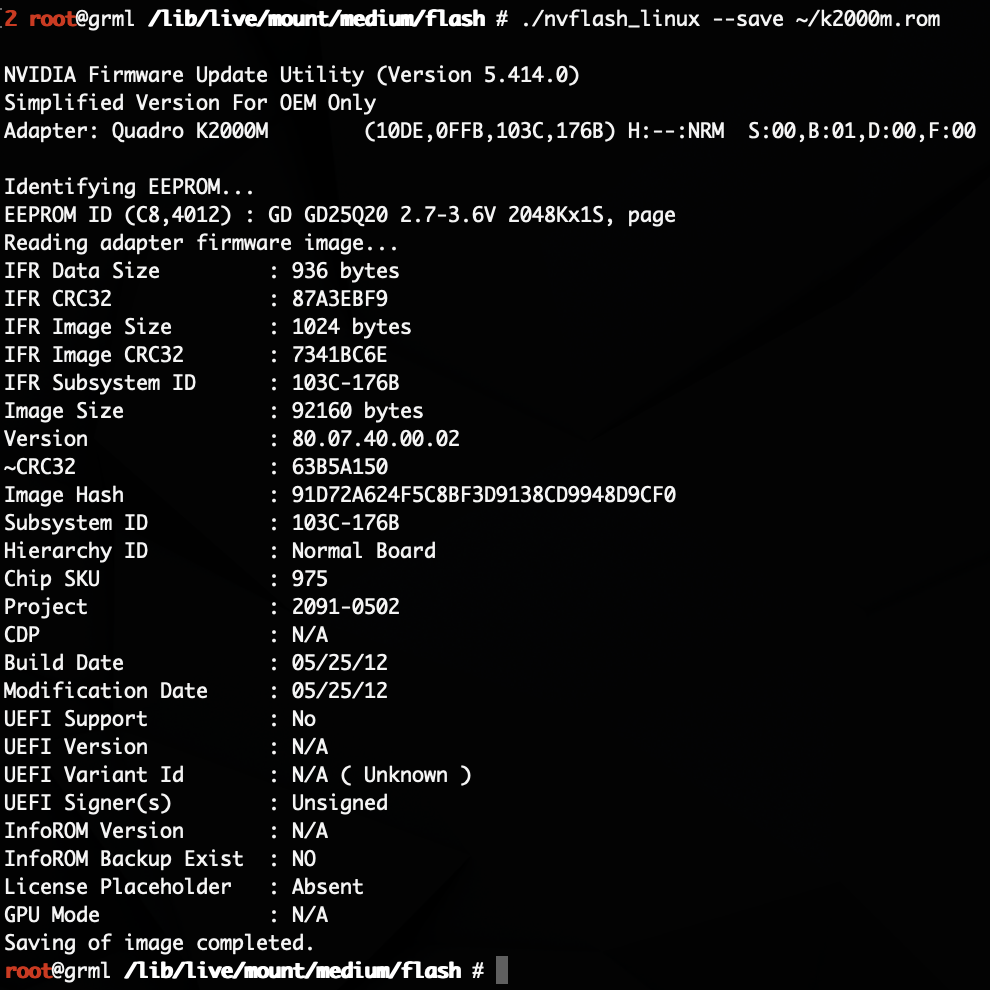
I created a Linux Live USB (based on grml.org) Thumb Drive with nvflash_linux and Nicks Bioses preloaded. and its booting by itself so you can work blind with a new unpatched nvidia card plugged in. Also, its starting a ssh daemon and using DHCP to get an IP so you can remote login 🙂
Steps
Download
14 days left to download, uploaded here: https://www.mediafire.com/file/cztz4xqj2sru9gj/2011_imac_usb.zip/file
mirror by NOTNICE, thnx: https://cloud.notnlce.com/index.php/s/xkJP34GD6a9WziE/download
Prepare USB Drive or SD Card
so, you take a small usb thumb drive, partition it with disk utility on a Mac: GPT + FAT32
and just unzip the files structure onto the drive, no dd or etcher or something. just copy paste it. folder structure see attached screenshot. (you can remove the .roms I downloaded and download itself if you want to be sure about the correct file size. I did not verify them at all. use/flash at your own risk please)
Test & Try
test your thumb drive with a more or less working GPU/ external Screen or just have faith in me
Swap Hardware
swap your GPU to NVIDIA and (!) disconnect every SSD/HDD, makes it easier to boot blindly from one USB or SD Card, connect the ETH Cable (!)
Find IP
let the iMac boot, everything is black, the boot loader is waiting 20s before booting, so give the whole process 1min time, then head over to your Router Page and find the right IP that the iMac got through DHCP
SSH to the iMac
now fire up your terminal on a Win/Mac/Linux Machine of your choice and ssh to your iMac with
ssh root@YOURIP
Password:flash
Confirm the ssh id with yes and you should be in your iMac
Working Directory
cd /lib/live/mount/medium/flash
read the RADME in there… I will enjoy my brand new k2000m in my 27" 2011 iMac with Catalina 10.15.3
… and because this is so easy, I rebuild it to a K1100M and flashed that also 😀 😀 🙂
(someone could write some fancy scripts but I thought its saver that everyone is doing it command by command and don't stop thinking and trusting some scripts)
Thanks. K2000m works fine! But i have 2 questions:
1. can i use also nun Dell;Alienware cards with this methode?
2. Can i use the K2000m bios also for a "non k" 2000m?
NOTNlCE
macrumors 65816
Thanks. K2000m works fine! But i have 2 questions:
1. can i use also nun Dell;Alienware cards with this methode?
2. Can i use the K2000m bios also for a "non k" 2000m?
Non-Dell cards should work fine once flashed with Nick's VBIOS.
You *might* be able to use the 2000M, but it is a completely different GPU core and is not tested here. I would stick with the listed cards.
Hi all! After reading all of the available info in this thread I am trying to fix my broken iMac 27'' from 2011. Mainboard shows 2 LED only with display connected, guessing it is the GPU.
Took the thing apart, put in a new Nvidia K2100m. I have reused the heatsink of bigger HD6970m original card. To prevent direct contact of the heatsink with the card I put some Arctic thermal pads to the ram. With some fresh thermal paste on the die, screwed everything back together. Checked one final time, no components touching the heat sink and almost perfect alignment due to the thermal pads being squeezed.
Now trying to boot the linux image provided, however the iMac is not playing along. I have 2 LED's on the mainboard. Only thing that does happen; after about 15 seconds all the fans start to blow 100%.
I have been checking the USB drive, works fine in an older iMac; boots right up.
I have put the USB in various ports, makes no difference.
Any suggestions where to look or what to check?
Is it normal the fans go to full speed when no display is connected?
Took the thing apart, put in a new Nvidia K2100m. I have reused the heatsink of bigger HD6970m original card. To prevent direct contact of the heatsink with the card I put some Arctic thermal pads to the ram. With some fresh thermal paste on the die, screwed everything back together. Checked one final time, no components touching the heat sink and almost perfect alignment due to the thermal pads being squeezed.
Now trying to boot the linux image provided, however the iMac is not playing along. I have 2 LED's on the mainboard. Only thing that does happen; after about 15 seconds all the fans start to blow 100%.
I have been checking the USB drive, works fine in an older iMac; boots right up.
I have put the USB in various ports, makes no difference.
Any suggestions where to look or what to check?
Is it normal the fans go to full speed when no display is connected?
NOTNlCE
macrumors 65816
Hi all! After reading all of the available info in this thread I am trying to fix my broken iMac 27'' from 2011. Mainboard shows 2 LED only with display connected, guessing it is the GPU.
Took the thing apart, put in a new Nvidia K2100m. I have reused the heatsink of bigger HD6970m original card. To prevent direct contact of the heatsink with the card I put some Arctic thermal pads to the ram. With some fresh thermal paste on the die, screwed everything back together. Checked one final time, no components touching the heat sink and almost perfect alignment due to the thermal pads being squeezed.
Now trying to boot the linux image provided, however the iMac is not playing along. I have 2 LED's on the mainboard. Only thing that does happen; after about 15 seconds all the fans start to blow 100%.
I have been checking the USB drive, works fine in an older iMac; boots right up.
I have put the USB in various ports, makes no difference.
Any suggestions where to look or what to check?
Is it normal the fans go to full speed when no display is connected?
Fans full with no display is expected behavior. Display has a temperature sensor when connected, which is why you get full speed.
Unsure on the Linux boot disk - do you have an internal drive connected? How do you know the iMac is not playing along? Depending on the GPU, you may not get a display, even externally. The boot disk is designed for you to be able to SSH in and run your flashes. Do you see the machine pull a DHCP lease in your router? Are you able to SSH?