
Got a tip for us?
Let us know
Become a MacRumors Supporter for $50/year with no ads, ability to filter front page stories, and private forums.
iM 4,1-14,4 2011 iMac Graphics Card Upgrade
- Thread starter MichaelDT
- WikiPost WikiPost
- Start date
- Sort by reaction score
You are using an out of date browser. It may not display this or other websites correctly.
You should upgrade or use an alternative browser.
You should upgrade or use an alternative browser.
- Status
- The first post of this thread is a WikiPost and can be edited by anyone with the appropiate permissions. Your edits will be public.

iMac2011_27
macrumors newbie
Good afternoon guys!
I ask for advice from those who bought video cards on eBay or Ali Express. Please advise what is better to buy
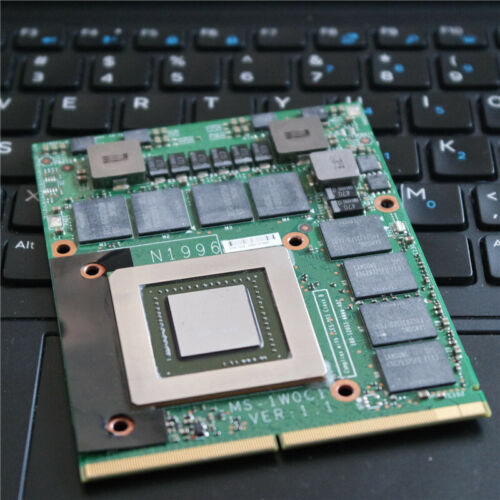
Or
https://aliexpress.ru/item/19939005...6056674573017609eaa72&ws_ab_test=searchweb0_0, searchweb201602_, searchweb201603_
The first option I see was in use. But there is factory glue around the video chip and you can see that the chip has not changed. On the second version, there is no glue around the video chip and there is a possibility that it was soldered.
The second card looks like a fake, I'm afraid that she would not have worked for a long time
Two questions.
Which option are you for?
Did you choose the right graphics card for your iMac 27 2011?
Please advise
I ask for advice from those who bought video cards on eBay or Ali Express. Please advise what is better to buy
DELL Nvidia GeForce GTX 780M 4GB DDR5 MXM 3.0 Type B for Alienware | eBay
Find many great new & used options and get the best deals for DELL Nvidia GeForce GTX 780M 4GB DDR5 MXM 3.0 Type B for Alienware at the best online prices at eBay! Free shipping for many products!
www.ebay.com
Or
https://aliexpress.ru/item/19939005...6056674573017609eaa72&ws_ab_test=searchweb0_0, searchweb201602_, searchweb201603_
The first option I see was in use. But there is factory glue around the video chip and you can see that the chip has not changed. On the second version, there is no glue around the video chip and there is a possibility that it was soldered.
The second card looks like a fake, I'm afraid that she would not have worked for a long time
Two questions.
Which option are you for?
Did you choose the right graphics card for your iMac 27 2011?
Please advise
Last edited:
That would be more an OSX issue than GPU issue.Is there a process for installing system updates after a successful GPU upgrade?
I'm on Mojave and noticed the 2020-006 security updates released last week. At a minimum I assume I may need to repatch the OS with dosdude's patcher. Anybody attempted this yet?
You may hop to the corresponding forum on OSX in Unsupported Macs.
I encounter the same situation with Catalina in my iMac 2010.
The OSX version stayed at H2 but the latest one should be more than that.
There is no software update displayed.
Not sure whether that could be related to Mac ID.
May re-install with DosDude's patcher with the latest Catalina download.
Thanks, I'll jump across and check it out. Was also wondering if it is likely to require reinstallation of the kext files, but that's fairly easy to rectify if required.That would be more an OSX issue than GPU issue.
You may hop to the corresponding forum on OSX in Unsupported Macs.
I encounter the same situation with Catalina in my iMac 2010.
The OSX version stayed at H2 but the latest one should be more than that.
There is no software update displayed.
Not sure whether that could be related to Mac ID.
May re-install with DosDude's patcher with the latest Catalina download.

herrdude
macrumors 6502
Yes.Thanks, I'll jump across and check it out. Was also wondering if it is likely to require reinstallation of the kext files, but that's fairly easy to rectify if required.
anthonyschr
macrumors newbie
I successfully upgraded my Mid 2011 27" iMac to a K3100M. I initially planned to replace the faulty HD 6970M, then went down this rabbit hole and never came back.
The card was $120 used on eBay and worked right out of the box, albeit with no boot screen or brightness control. That gave me confidence!
I don't have a PC at home and have next to no experience with shell, but the reflash was pretty easy using the Linux USB stick method by @xanderon and videos by @Curtis Gross. Had to add K3100M BIOS by @nikey22 to the package first (not included yet?).
Actually, before installing the card I did have to mod the heat sink with a rotary tool as some have indicated. No big deal. The X bracket was a bit more involved—I scrapped the K3100M's bracket after mangling it trying to pound out the threaded inserts. I found it much easier to use the 6970M's countersunk X bracket and grind away bits of it to fit around components on the board. This bracket has a larger square center section but should still do the trick of pressing the die to the sink. I used some electrical tape to insulate areas that might make contact with the bracket.
The card was $120 used on eBay and worked right out of the box, albeit with no boot screen or brightness control. That gave me confidence!
I don't have a PC at home and have next to no experience with shell, but the reflash was pretty easy using the Linux USB stick method by @xanderon and videos by @Curtis Gross. Had to add K3100M BIOS by @nikey22 to the package first (not included yet?).
Actually, before installing the card I did have to mod the heat sink with a rotary tool as some have indicated. No big deal. The X bracket was a bit more involved—I scrapped the K3100M's bracket after mangling it trying to pound out the threaded inserts. I found it much easier to use the 6970M's countersunk X bracket and grind away bits of it to fit around components on the board. This bracket has a larger square center section but should still do the trick of pressing the die to the sink. I used some electrical tape to insulate areas that might make contact with the bracket.

That is a good advice. I also placed electrical insulating tape at the back of the card before applying the X-bracelet.I successfully upgraded my Mid 2011 27" iMac to a K3100M. I initially planned to replace the faulty HD 6970M, then went down this rabbit hole and never came back.
The card was $120 used on eBay and worked right out of the box, albeit with no boot screen or brightness control. That gave me confidence!
I don't have a PC at home and have next to no experience with shell, but the reflash was pretty easy using the Linux USB stick method by @xanderon and videos by @Curtis Gross. Had to add K3100M BIOS by @nikey22 to the package first (not included yet?).
Actually, before installing the card I did have to mod the heat sink with a rotary tool as some have indicated. No big deal. The X bracket was a bit more involved—I scrapped the K3100M's bracket after mangling it trying to pound out the threaded inserts. I found it much easier to use the 6970M's countersunk X bracket and grind away bits of it to fit around components on the board. This bracket has a larger square center section but should still do the trick of pressing the die to the sink. I used some electrical tape to insulate areas that might make contact with the bracket.
Modding the heatsink isn't an easy task for most people. You need the tools and skill.
But I learn many things since I get into this rabbit hole as you do 😉
I had bought different tools like the dremel, ch341a programmer, G-clamps, hot air gun for desoldering etc. and read a lot of different things on eeproms, GPUs, vBIOS modding, thermal paste, the Terminal commands etc.
It is an enjoyable journey so far, not solely on the final working graphic card.
Hi everyone, looking for a bit of guidance please.
I have a 2009 iMac which had an ATI 4850 card, it was running Catalina using Dosdude' patcher etc. fine until the card failed...
So I've purchased a K3100 and followed the guides in this thread to reinstall the system on a new SSD. So far I'm at:
1) Modified the heatsink, installed the card with K5 etc.
2) Installed in the iMac and then flashed with the BIOS from Here in this thread
3) My internal display doesn't work as expected so I'm using an external monitor
4) I'm trying to install High Sierra again so I can update the iMac firmware, I can get the boot screen/HDD selector etc. fine on the external screen
5) When booting to the HS installer I get approx 60% through the first boot and it gets stuck. Doing a verbose boot gives this as the last entry:
Anyone have any idea where to go next?
Cheers
I have a 2009 iMac which had an ATI 4850 card, it was running Catalina using Dosdude' patcher etc. fine until the card failed...
So I've purchased a K3100 and followed the guides in this thread to reinstall the system on a new SSD. So far I'm at:
1) Modified the heatsink, installed the card with K5 etc.
2) Installed in the iMac and then flashed with the BIOS from Here in this thread
3) My internal display doesn't work as expected so I'm using an external monitor
4) I'm trying to install High Sierra again so I can update the iMac firmware, I can get the boot screen/HDD selector etc. fine on the external screen
5) When booting to the HS installer I get approx 60% through the first boot and it gets stuck. Doing a verbose boot gives this as the last entry:
IOConsoleUsers: gIOScreenLockState 3, hs 0, bs 0, now 0, sm 0x0
Googling that gives a few issues similar but mainly around Hackintoshes and badly configured BIOS/Efi when they have both an iGPU and an external card.Anyone have any idea where to go next?
Cheers
Ok, I've tried two versions so far, one from the App Store, one using Dosdude's HS patcher. Where do you suggest I get it from?Hi, there was the same situation on imac 2009, you need to download the latest version of High Sierra 13.6
herrdude
macrumors 6502
It seems to me that further back in this thread, someone had the same problem as you. They reinstalled the original card to get the latest firmware installed. Not sure if that is possible for you if the card is not working...Hi everyone, looking for a bit of guidance please.
I have a 2009 iMac which had an ATI 4850 card, it was running Catalina using Dosdude' patcher etc. fine until the card failed...
So I've purchased a K3100 and followed the guides in this thread to reinstall the system on a new SSD. So far I'm at:
1) Modified the heatsink, installed the card with K5 etc.
2) Installed in the iMac and then flashed with the BIOS from Here in this thread
3) My internal display doesn't work as expected so I'm using an external monitor
4) I'm trying to install High Sierra again so I can update the iMac firmware, I can get the boot screen/HDD selector etc. fine on the external screen
5) When booting to the HS installer I get approx 60% through the first boot and it gets stuck. Doing a verbose boot gives this as the last entry:
IOConsoleUsers: gIOScreenLockState 3, hs 0, bs 0, now 0, sm 0x0
Googling that gives a few issues similar but mainly around Hackintoshes and badly configured BIOS/Efi when they have both an iGPU and an external card.
Anyone have any idea where to go next?
Cheers
Worth a shot but painful to redo all the heatsink! I'll try it and see if its stable long enough to get the update done.It seems to me that further back in this thread, someone had the same problem as you. They reinstalled the original card to get the latest firmware installed. Not sure if that is possible for you if the card is not working...
Thanks
I put this in the kexts folder of the OpenCore 0.6.3 Catalina Loader and booted from it.Your card device ID change as you change card VBIOS. 0x67E8 ID is for WX4130. 0x67C0 is WX7100 ID. As you use PolarisBoost, it reports then WX7100 or WX41XX. I made a PolarisBoost version for you, it should report RX_480_4GB for 0x67E81002 or 0x67C01002 IDs.
However, the GPU identity remained the same.
Not sure whether any more steps are required but thanks for your effort anyway 🙂
postmortempries
macrumors newbie
After I couldnt download High Sierra 13.6 anywhere, I gave this download-script a try - worked perfect for me ... https://github.com/munki/macadmin-scriptsOk, I've tried two versions so far, one from the App Store, one using Dosdude's HS patcher. Where do you suggest I get it from?

Someone has tried a CPU benchmark with Mojave, Catalina, Big Sur OS?
I've this result on my iMac 27" 2011 i7-2600 3.4Ghz on Catalina (and also Big Sur).
View attachment 1669289
From Geekbench results seems very poor compared to original iMac 2011 i7 benchmark.
So I'm try to understand if my CPU is a bit tired 😄 or can be a normal result on non "typical" OS.
Thanks for report 🙂
Somethings definitely wrong in your case, i got 686/2561 on the same machine with Catalina and i also had a bunch of apps running at the time of the benchmark, even watching a live stream
Does anybody know why on big sur on my iMac mid 2011 with k1100m I only have 75% of my brightness and how to fix it?
possible small patcher bug, fix see below
#10,914
And call the patcher with --useOC with the patcher and use the latest OC 0.6.3 and the backlight fixup will be injected through opencore. possibly you have installed there the wrong version, or and old OC version, you may have ignored all my postings about this and installed the fixup for the ++ Nvidia cards like the K3100M etc...
Please, please follow and read the posts I made. I cannot really spoon feed every of your into this update...
Last edited:
Hi, is there any solution to do this in Big Sur?Seeking Volunteers!Purpose: If this experiment is successful we may replace all extensions scattering around the thread needed to be installed in such installer packages - which may be more easy for most users here.
This little package I attached will install hopefully without any problems the three kernel extensions needed to use the HW Monitor to show the GPU data in the /System/Library/Extensions folder.
You need SIP disabled (which is after @dosdude patcher installation of Catalina and Mojave the default) and your password. After installation the system will need to reboot.
You can check the success by simply open the /System/Library/Extensions folder and search for extensions names starting with FakeSMC and more importantly by running HW Monitor app. After installation you will see the CPU core frequency and some other additional data, the list of sensors becomes much longer. So use the app before and after installation.
To get rid of this files later you may use the uninstall script. Open the terminal app, entersudo(the trailing space is important) and drop the script onto the terminal window. It will ask for the password and remove all files and rebuild the kernel. I tested this on two 2011 systems (Catalina and Mojave).
So please help and post back any problems you experience, possibly attach a screen shot of error messages!
Notes:
EDIT:
It seems that the successful installation needs to make the root file system writable in advance. Open the Terminal app and entersudo mount -uw /will do this trick. The reason are more sophisticated security measures introduced with macOS 10.8.3.
The uninstall.sh works fine.
There are two ways to get an answer for this: Check out my posts on this thread or do the same on the Big Sur thread.Hi, is there any solution to do this in Big Sur?
Everything has been included to the micro patcher - there will be NO MORE additional installation of packages to Big Sur for iMacs with a new GPU.
Disclaimer: There is a small bug in version 0.5.1 cured be a patch I released here some pages ago or version 0.5.2 to be published later.
For Catalina, are these hardware monitoring kexts finalized yet ?There are two ways to get an answer for this: Check out my posts on this thread or do the same on the Big Sur thread.
Everything has been included to the micro patcher - there will be NO MORE additional installation of packages to Big Sur for iMacs with a new GPU.
Disclaimer: There is a small bug in version 0.5.1 cured be a patch I released here some pages ago or version 0.5.2 to be published later.
I suppose they may serve 2 important purposes.
One would be during the BIOS development to assess the power consumption and heat generation from the GPU and power supply module.
It also helps to monitor the iMac by optimising the fan speed during operation.
Unfortunately, my iMac 2010 is my principal working machine.
BTW, can the SIP be enabled again after installation?
These FakeSMC extensions have been modified to be Apple save long time ago.
I am not responsible for any potential damage, but right now these are working still with Big Sur injected by OC.
Since we cannot get the RX480 posting in an iMac 2011 you should be happy to own the 2010. I organized such a system for this reason.
I am not responsible for any potential damage, but right now these are working still with Big Sur injected by OC.
Since we cannot get the RX480 posting in an iMac 2011 you should be happy to own the 2010. I organized such a system for this reason.
Hi everyone, looking for a bit of guidance please.
I have a 2009 iMac which had an ATI 4850 card, it was running Catalina using Dosdude' patcher etc. fine until the card failed...
So I've purchased a K3100 and followed the guides in this thread to reinstall the system on a new SSD. So far I'm at:
1) Modified the heatsink, installed the card with K5 etc.
2) Installed in the iMac and then flashed with the BIOS from Here in this thread
3) My internal display doesn't work as expected so I'm using an external monitor
4) I'm trying to install High Sierra again so I can update the iMac firmware, I can get the boot screen/HDD selector etc. fine on the external screen
5) When booting to the HS installer I get approx 60% through the first boot and it gets stuck. Doing a verbose boot gives this as the last entry:
IOConsoleUsers: gIOScreenLockState 3, hs 0, bs 0, now 0, sm 0x0
Googling that gives a few issues similar but mainly around Hackintoshes and badly configured BIOS/Efi when they have both an iGPU and an external card.
Anyone have any idea where to go next?
Cheers
So I put the old ATI back in and eventually managed to boot the thing in safe mode to install HS via an external screen. It's since done all the updates successfully. In an overly excited manor I've put the K3100 back in but have forgot to disable SIP.
The issues remain basically but slightly different. I can boot in to HS with the K3100 but the external display is corrupted now, I did enable VNC with the ATI installed and that thankfully works fine. The card is correctly found and I can see the BIOS is by Nikey and everything appears to working well. Hard to say over VNC but seems HW acceleration is working.
I can't boot in to the recovery console to disable SIP as it appears to get to the same point as described in the boot process and lock up. I can't boot the Catalina Patcher either as it also gets to the same point in the boot process with the same IOConsoleUsers message as the last entry to the screen if I do a verbose boot.
Argh! looks like the ATI back in and SIP disabled and I'll try the AGC patch. Not convinced that is going to work. Suspect I might have hardware issues somewhere :-/
Last edited:

m0bil
macrumors 6502
Hello,Seeking for Beta Test Users (Package Installer)Attached you will find the a kernel extension package installer currently working on Catalina 10.15.4 and later. It will install all the packages listed in this post @highvoltage12v made years ago.
(Catalina iMac 2011 sleep/AGC/iGPU/backlightfixup installer)
It will patch the current installed AppleGraphicsControl (AGC) as described in this post addressing the black screen issue and the AppleBacklightFixup needed for ++ type Nvidia cards.
After starting the Apple package installer (double click) you can choose the destination and select the packages to be installed according to your system and card type. For this reason I separated the complete sets in several subsets. You can use the installer to install AGC, BacklightFixup, FakeSMC, and WhateverGreen/Lilu on 2009 and 2010 systems, too.
Attached you will find some selections screen shots. You can use the installer to select a single package only. You can use the installer with 2009 and 2010 iMacs, too. I marked all 2011 specific packages.
- 2011 HD3000 sleep extensions (Mojave & Catalina)
- 2011 sleep extensions (Catalina, only)
- Nvidia AppleGraphicsControl AGC (all iMacs, Nvidia card users, only)
- Nvidia BacklightFixup (all iMacs, Nvidia card users, only)
- AMD HD3000 sleep (AppleIntelSNBGraphicsFB.kext, 2011 iMac AMD Polaris card users only)
- Nvidia AppleGVA.framework (2011 only)
- FakeSMC Package (all iMacs, all graphics cards)
- vit9696 WhateverGreen and Lilu (all iMacs, all graphics cards)
Note: This installer currently will only install files on Catalina 10.15.4 and later!
Recipe:
If you are not willing to experiment on your current Catalina installation please create a new APFS Container, install Catalina 10.15.7 into it (it will use barely 15GB on your disk), boot into this newly created MacOS, and use the installer package to do the final adjustments. Check and report back! I will not link this to the first post if it causes trouble.
Have fun!
11/14/2020: upload a new version containing the plist patch working on all installed versions of the AppleGraphicsControl instead of replacing the file completely.
I've been helping a friend install Catalina on his 2011 imac 21.5, after upgrading broken card to K2100M. Fresh install from dosdude, then post-install patches and later this package installer. Booted from the new Catalina Loader 0.6.3 too
Everything is working fine, but no H264 acceleration (checked with VDADecoderChecker, VideoProc and GVADebugChecker). All the time it says no plugins available.
I've tried a couple of times reinstall the AppleGVA.framework from this package, but still no H264 acceleration available.
Later, I tried installing manually AppleGVA.framework from @highvoltage12v post and it worked on first try. So, maybe there is something not working right on the AppleGVA.framework install from your package installer.
Also, note that I never check Lilu/Whatevergreen/backlightfixup on the installer, as they are loaded from Catalina Loader.
Possibly the creation of the packages on Big Sur caused this. It is basically the very same file and installed in the same way. Will update posts and files next week...Hello,
I've been helping a friend install Catalina on his 2011 imac 21.5, after upgrading broken card to K2100M. Fresh install from dosdude, then post-install patches and later this package installer. Booted from the new Catalina Loader 0.6.3 too
Everything is working fine, but no H264 acceleration (checked with VDADecoderChecker, VideoProc and GVADebugChecker). All the time it says no plugins available.
I've tried a couple of times reinstall the AppleGVA.framework from this package, but still no H264 acceleration available.
Later, I tried installing manually AppleGVA.framework from @highvoltage12v post and it worked on first try. So, maybe there is something not working right on the AppleGVA.framework install from your package installer.
Also, note that I never check Lilu/Whatevergreen/backlightfixup on the installer, as they are loaded from Catalina Loader.

sergiodadi
macrumors member
More important the system should be able to sleep without panic and have AMD video acceleration enable, check with VideoProc.

You need OpenCore 🙂
I have a SD card with OC 0.6.3:

Should I install your patch with only select "AMD iMac 2001 Sleep patch" for my Imac 2011 with AMD WX4130 ? (201 should be 2011 in the description in your patch install ?)
