Become a MacRumors Supporter for $50/year with no ads, ability to filter front page stories, and private forums.
Status
The first post of this thread is a WikiPost and can be edited by anyone with the appropiate permissions. Your edits will be public.
Bought a few on ebay awhile back. Seems generally unavailable now. VBIOS (no EG2 versions) link in the guide ( link )
Thank you, it seems I may have to upgrade to sequoia as that is the version recommended here: “[WX4130] confirmed card works solidly on Sequoia using OCLP!
All other working AMD cards seems to require soldering mods etc depending on Card model / version and iMac model. wx4130 bypasses these more difficult combinations for now.
EG1.2 ( link ) version ( link ) is better than one directed by post #1 Non EG1.2 vBIOS had random hangs on Sonoma (tested with 2 cards on 2 12,2) Avoid EG2 version unless you plan to flash the logic board ROM.”

It says I may have to flash the logic board rom, how would I do this and is it necessary?

I also have the wx4150, not the wx4130. But it would still mean my card would work with sequoia if the wx4130 works because they are similar, no?
 
Thank you, it seems I may have to upgrade to sequoia as that is the version recommended here: “[WX4130] confirmed card works solidly on Sequoia using OCLP!
All other working AMD cards seems to require soldering mods etc depending on Card model / version and iMac model. wx4130 bypasses these more difficult combinations for now.
EG1.2 ( link ) version ( link ) is better than one directed by post #1 Non EG1.2 vBIOS had random hangs on Sonoma (tested with 2 cards on 2 12,2) Avoid EG2 version unless you plan to flash the logic board ROM.”

It says I may have to flash the logic board rom, how would I do this and is it necessary?

I also have the wx4150, not the wx4130. But it would still mean my card would work with sequoia if the wx4130 works because they are similar, no?

I've never tried wx4150. Maybe I'll try one eventually to write a guide.

I don't have the wx4130 anymore so don't know how the status on Sequoia but I'd expect it works well. Ran Sonoma on 2x 12,2+wx4130 as heavy daily user machines and both worked great for months. wx3200 (need small HW mod) also worked great on Sequoia (other than the intallation difficulty noted in my installation guide + no EG2 so if OC gets messed up on the internal drive, need OC boot disc)
 
Thank you, it seems I may have to upgrade to sequoia as that is the version recommended here: “[WX4130] confirmed card works solidly on Sequoia using OCLP!
All other working AMD cards seems to require soldering mods etc depending on Card model / version and iMac model. wx4130 bypasses these more difficult combinations for now.
EG1.2 ( link ) version ( link ) is better than one directed by post #1 Non EG1.2 vBIOS had random hangs on Sonoma (tested with 2 cards on 2 12,2) Avoid EG2 version unless you plan to flash the logic board ROM.”

It says I may have to flash the logic board rom, how would I do this and is it necessary?

I also have the wx4150, not the wx4130. But it would still mean my card would work with sequoia if the wx4130 works because they are similar, no?
I can confirm that WX4150 works on Sequoia.
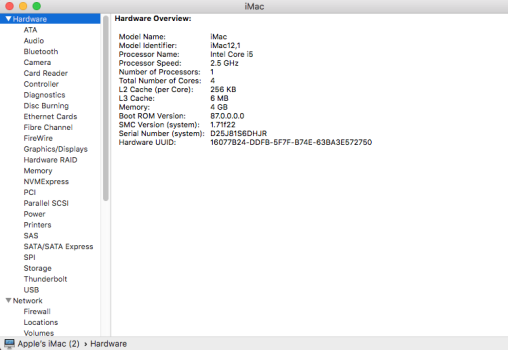
Upgarding the logic board rom is described in this forum: you have to install High Sierra on the original HDD! This OS installation process will update the Boot ROM if it is not already at the highest version (iMac12,1 and iMac12,2 87.0.0.0.0). Attention: with WX4130 and WX4150 you have to connect an external display (or a dummy stick) otherwise you will have a black screen when installing High Sierra!

Hope this helps.
 
iMac 12,2 + nVidia Kepler K2000M + OCLP 2.4.1 + macOS Sequoia Install Info

Basically Installation Sequence

Same as most other cards ( in signature link) except for OCLP installation notes below

VBIOS

Used Post #1 K2000M table ROM link from 5/2021 (instead of older noBC link which is a 12/2019 post)

K2000M HW

No mods necessary. Remove the old X bracket (but left the double sided sticky tape underneath as there are small components along its edges) and used the OEM X bracket (have beveled through hole for the OEM beveled head mounting bolt)

2x 12,2 install. No shim required for 12,2 2 pipe heatsink although gaps are fairly tight. I also used K5 pro non conductive thermal paste on 4x hynix DDR3 RAMs (probably unnecessary) and 3 large/taller inductors.

OCLP Sequioa Installation

Had OCLP Sequoia installed on K610M before replacing with K2000M. Tried 2 common faster methods but neither worked

Exchanged K610M with K2000M assuming OC and OCLP Sequoia root patch is identical. Didn't work. OCLP Sequoia booted up to cursor showing (probably loaded drivers) but blank screen with backlight on.

Reversed root patch. Shutdown, exchange K610M with K2000M. Boot and apply OCLP root patch then reboot. Also doesn't boot properly (forgot if it hung 1/2 way on boot or same cursor + blank screen with backlight on.

Finally, did a complete OCLP Sequoia installation after wiping internal SSD. This worked.

On my first install replacing OEM GPU with K610M. Had to PRAM reset to resolve many random crashes ( post #22630 )

Robustness

iMac 12,x and 14,2 + Kepler + OCLP Sequoia has been quite robust in all my testing/usage ( edge browser, icloud, Messages, Photos, Mail, Maps )

Performance

OCLP Sequoia on Kepler has slower System Settings... UI (changed starting Ventura) of course. But overall performance is quite good after icloud sync disk activity completes. OCLP on Kepler also seem to run the GPU compiler quite often early on (Maybe generate and cache shaders?) But after all these steps are done, its quite fast other than System Settings... UI

K2000M with 1.5x-2x performance over K610M seems subtly faster on the QHD 12,2. Also runs pretty cool. Following pic temperature was running Unigine Valley for 10+ min.

Screenshot 2025-12-02 at 8.13.05 AM.png


SSDs

Had a lot of random crashes with various older SSDs typical of 12,x and earlier iMacs including older Samsungs (850 vNAND Pro 256GB ) Finally WD Blue 250GB worked fine.

 
Last edited:
Hello everyone! I've upgraded my iMac 12,2. I installed an i7-2600 CPU, an Nvidia Quadro K4100M GPU (by nikey22), and used OCLP for Monterey. However, my Mac periodically freezes completely, and I have to force a restart.

If anyone has encountered this, could you please advise how to fix it and what might be causing the issue? Sorry for my English, I'm using a translator.
 
Last edited:
Hello everyone! I've upgraded my iMac 12,2. I installed an i7-2600 CPU, an Nvidia Quadro K4100M GPU (by nikey22), and used OCLP for Monterey. However, my Mac periodically freezes completely, and I have to force a restart.

If anyone has encountered this, could you please advise how to fix it and what might be causing the issue? Sorry for my English, I'm using a translator.
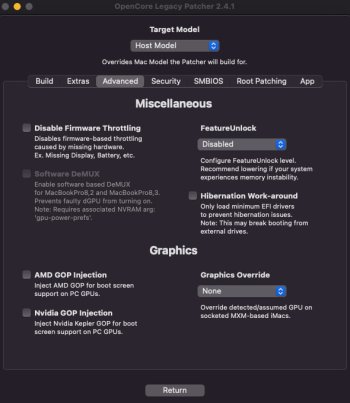
What version of OCLP? What are your settings under Advanced tab > Graphics? Are you positive the Mac freezes completely? Turn on Settings > General > Sharing > Remote Login and see if you can remotely log into the Mac when it "freezes".
 
Hello everyone! I've upgraded my iMac 12,2. I installed an i7-2600 CPU, an Nvidia Quadro K4100M GPU (by nikey22), and used OCLP for Monterey. However, my Mac periodically freezes completely, and I have to force a restart.

If anyone has encountered this, could you please advise how to fix it and what might be causing the issue? Sorry for my English, I'm using a translator.

Performed SMC + PRAM reset after OCLP install?

Using SSD? what brand and model? <= 12,2 iMacs have lots of problems with older SSDs including popular Samsung.
 
What version of OCLP? What are your settings under Advanced tab > Graphics? Are you positive the Mac freezes completely? Turn on Settings > General > Sharing > Remote Login and see if you can remotely log into the Mac when it "freezes".
OCLP 2.4.1. It is impossible to connect remotely to the frozen iMac.
 

Attachments

  • photo_2025-12-02 23.58.47.jpeg
    photo_2025-12-02 23.58.47.jpeg
    49.4 KB · Views: 9
Performed SMC + PRAM reset after OCLP install?

Using SSD? what brand and model? <= 12,2 iMacs have lots of problems with older SSDs including popular Samsung.
Samsung SSD 850 Pro 512GB.
SMC and PRAM were reset after installation. The installation was clean.

Also, frequent freezes occur during 4K video playback. The CPU usage spikes to 500% and everything freezes (using the IINA player).
 
Samsung SSD 850 Pro 512GB.
SMC and PRAM were reset after installation. The installation was clean.

Also, frequent freezes occur during 4K video playback. The CPU usage spikes to 500% and everything freezes (using the IINA player).

<= 12,x has a lot of problems with older SSDs espacially Samsungs. I've experienced Samsung 850 EVO and 850 vNAND Pro problems. Don't know if 850 Pro + 12,2 combo is problem. Read through the linked thread.

 
<= 12,x has a lot of problems with older SSDs espacially Samsungs. I've experienced Samsung 850 EVO and 850 vNAND Pro problems. Don't know if 850 Pro + 12,2 combo is problem. Read through the linked thread.

Strange, but this drive worked perfectly for me on High Sierra, and didn't even require installing a temperature sensor.
 
Strange, but this drive worked perfectly for me on High Sierra, and didn't even require installing a temperature sensor.

Yeah, don't know if this is just an issue with higher macOS. Have an iMac 14,2 on an old Intel SSD. Boot stalls a long time about 1/2 way through booting OCLP Sequoia (Other SSDs I've tried on OCLP Sequoia doesn't do this) but not stock macOS (Catalina)

Been having lots of crashes currently upgrading 2x 12,2 + K2000M using various older and Samsung SSD. WD Blue 250GB worked on 1 and have another incoming so we'll see if that clears up too or crash from some other reason. My crashes just blanks out the screen and reboots the iMac instantly.
 
Upgarding the logic board rom is described in this forum: you have to install High Sierra on the original HDD! This OS installation process will update the Boot ROM if it is not already at the highest version (iMac12,1 and iMac12,2 87.0.0.0.0). Attention: with WX4130 and WX4150 you have to connect an external display (or a dummy stick) otherwise you will have a black screen when installing High Sierra!

Hope this helps.
Which gpu rom should be used for wx4150? I may have an old one. Am I supposed to get a boot screen or only open core efi screen?
 
Which gpu rom should be used for wx4150? I may have an old one. Am I supposed to get a boot screen or only open core efi screen?
I think I used "WX4150_EnableGop_ALT.rom" (I am not sure it is quite a while back). Anyway, you have to set "AMD GOP Injection" in the advanced tab of OCLP to get a boot screen.
 
Hello everyone! I've upgraded my iMac 12,2. I installed an i7-2600 CPU, an Nvidia Quadro K4100M GPU (by nikey22), and used OCLP for Monterey. However, my Mac periodically freezes completely, and I have to force a restart.

If anyone has encountered this, could you please advise how to fix it and what might be causing the issue? Sorry for my English, I'm using a translator.
I had a similar problem with M6100 GPU. The graphic card worked but random freezes. I had a suspicion (that the card might have a defect) and bought another M6100 and this card worked fine. I discussed this with the seller (Ali-Express) and after some tedious email exchanges (including a video from the freezes) I got the money back.

So maybe your card has a defect?
 
I think I am having the same issues as snackbar, I can boot into recovery mode and use the installer fine, tired wiping the drive with disk utility and reinstalling sonoma multiple times. I keep getting the same issue where the install completes, apple logo and progress bar with timer completes, then after the computer tries to boot into the newly created macintosh hd it crashes to a black screen after getting the apple logo and progress bar for a minute.

Which SSD manufacturer did you use? I've assembled the 2nd machine (WX4130 but with the original HDD) and will try to install tomorrow. Both of my 12,1 will have the same hardware configuration except SSD vs. HDD. I'm using a budget Intenso SSD from Amazon Germany.

I was not successful holding shift during boot. Will try to do PRAM reset again.
 
Which SSD manufacturer did you use? I've assembled the 2nd machine (WX4130 but with the original HDD) and will try to install tomorrow. Both of my 12,1 will have the same hardware configuration except SSD vs. HDD. I'm using a budget Intenso SSD from Amazon Germany.

I was not successful holding shift during boot. Will try to do PRAM reset again.
I used a samsung ssd, I have all three sata connections filled so I also had a chinese ssd in that I was booting from but it seems like that one died as it’s no longer being recognized.

I am trying to update the boot rom firmware version now, I installed mac os high sierra on the original hdd but I had no luck as it was plugged in externally. I am going to try to update to sequoia now and try installing high sierra on a partition to the internal ssd to see if that fixes the firmware version.

I did need to shut down and boot several times while holding shift to install sonoma, sequoia however did not need shift to be held on install.

I believe these issues are due to the system firmware being outdated so if I can’t update the firmware with the internal ssd I will have to take apart the imac and install the original hdd and get high sierra running.
 
Looks like correct ROM flashed for your card :)


Post #8351 suggest to install HS. HS is when APFS was introduced so logic board ROM needed to be flashed (during HS update) so it knows how to boot macOS installed on APFS. Maybe there are other graphics related reasons too but I don't know. So its generally safer to get these iMacs first to HS so we can avoid APFS related problems.

I'm unclear of your OCLP installation process but sounds like you didn't install OC on the USB install stick? You can follow my steps
  • Erase SATA drive. iMac will search for bootable images in other places (on your USB stick with OC installed). HS installation already flashed the logic board ROM so logic board is setup properly.
  • USB installer need to have OC installed with 1) Correct Target Model 2) nvidia GOP injection and nVidia Kepler set. Should look like pic below for your 12,2 + K3100M
  • Follow my post #21491 step "Make Boot Stick #2 (OCLP macOS Install USB Stick)"
  • When iMac boots, it needs to find and boot OC (just OCLP's boot manager). Since internal SATA is empty, iMac will search in USB. It will find the USB install stick with OC on it. Boot OC, then OC will launch the macOS installer on the USB stick. This is also why once macOS is installed onto internal SATA drive, it is necessary to install OC onto that SATA drive to enable iMac to boot OC from SATA drive (so you don't need to keep on using USB stick with OC), then launch OCLP patched macOS image on the SATA drive.
View attachment 2405002


ok make sense.
How do I complete the High Sierra install properly? I have tried installing it on the original, internally connected, drive but I still have Boot rom version: 9999.999.999.999.999.

I am installing high sierra from a usb drive to the internal hard drive.
 
How do I complete the High Sierra install properly? I have tried installing it on the original, internally connected, drive but I still have Boot rom version: 9999.999.999.999.999.

I am installing high sierra from a usb drive to the internal hard drive.
I tried installing multiple times on a partition of the original HDD. I tried a usb drive and using the installer from in the usb drive to install HS directly from the os. I still have firmware version 9999… please help.
 
Are you trying to boot without OpenCore or eliminate OpenCore?

Boot without OpenCore hold down Option key. This macOS boot Picker. Pick High Sierra install.

To remove OpenCore, you need to mount internal drive EFI partition and delete OC folder…

Or nuclear option. You still have OC EFI on internal drive. Boot USB and then erase the internal drive using Disk Utility. Make sure to select Show All Devices and erase device. Then install macOS HS to internal.
 
How do I complete the High Sierra install properly? I have tried installing it on the original, internally connected, drive but I still have Boot rom version: 9999.999.999.999.999.

I am installing high sierra from a usb drive to the internal hard drive.

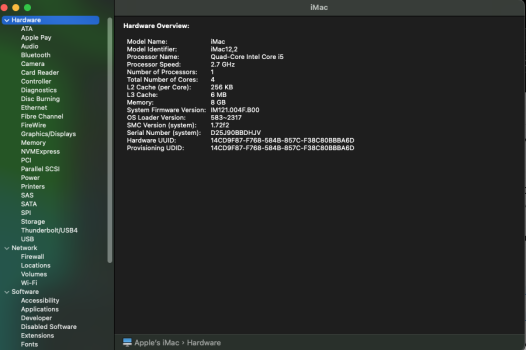
Here is my iMac 12,2 + K2000M System Firmware and SMC Version. Upgrade process was
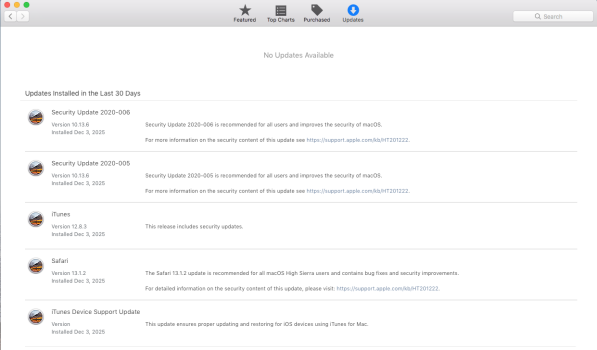
  • Install High Sierra 10.13.6 on stock iMac (ran HS installer after booting El Capitan on external USB SSD, don't know history so chose a El Cap that I the iMac surely ran previously and have compat firmware) skipped latest HS security patches from 2020 (2020-005 and 006)
  • Install SSD, do fan temp mod, Install and setup OCLP Sequoia on stock GPU
  • Build and install Kepler OC to EFI, Revert root patch
  • Install K610M, boot, root patch
  • Install K2000M, fresh install (wiped SSD) and setup OCLP Sequoia for Kepler
Running OCLP Sequoia

Screenshot 2025-12-03 at 6.16.01 PM.png

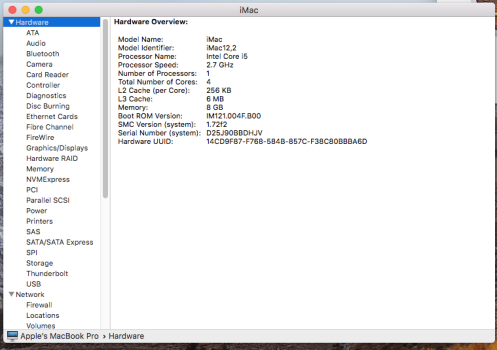
Boot and run High Sierra 10.13.6 from external USB drive (Using OC boot picker with Option key) on OCLP Sequoia updated 12,2+K2000M

Screen Shot 2025-12-03 at 6.19.25 PM.png

I found the following links that matches my numbers


Also have a iMac 12,1 with factory GPU+HDD running High Sierra 10.13.6 + 2020-005/006 security patches

Screen Shot 2025-12-03 at 7.34.22 PM.pngScreen Shot 2025-12-03 at 7.34.06 PM.png
 
Last edited:
I tried installing multiple times on a partition of the original HDD. I tried a usb drive and using the installer from in the usb drive to install HS directly from the os. I still have firmware version 9999… please help.
It seems like you installed High Sierra with OCLP. You have to install High Sierra without OCLP.
 
Here is my iMac 12,2 + K2000M System Firmware and SMC Version. Upgrade process was
  • Install High Sierra 10.13.6 on stock iMac (ran HS installer after booting El Capitan on external USB SSD, don't know history so chose a El Cap that it surely ran previously and have compat firmware) skipped latest HS security patches from 2020 (2020-005 and 006)
  • Install SSD, do fan temp mod, Install and setup OCLP Sequoia on stock GPU
  • Build and install Kepler OC to EFI, Revert root patch
  • Install K610M, boot, root patch
  • Install K2000M, fresh install (wiped SSD) and setup OCLP Sequoia for Kepler
Running OCLP Sequoia

View attachment 2584762

Boot and run High Sierra 10.13.6 from external USB drive (Using OC boot picker with Option key) on OCLP Sequoia updated 12,2+K2000M

View attachment 2584761

I found the following links that matches my numbers


Also have a iMac 12,1 with factory GPU+HDD running High Sierra 10.13.6 + 2020-005/006 security patches

View attachment 2584785View attachment 2584784
Why do you have to use stock gpu first?
It seems like you installed High Sierra with OCLP. You have to install High Sierra without OCLP.
Does this mean I must put the old graphics card back in and update to high sierra? I am having trouble getting the mac to boot into el capitan
 
Does this mean I must put the old graphics card back in and update to high sierra? I am having trouble getting the mac to boot into el capitan
Again, if you have OC EFI installed on disk with El Crapitan, hold down Option key while booting to get macOS native Book Picker. Select El Crapitan boot disk and you bypass OC. And, Yes... you may need to install orig GPU and sometimes original Apple storage (w/out OC EFI on it) as macOS installs include firmware updates.
 
Again, if you have OC EFI installed on disk with El Crapitan, hold down Option key while booting to get macOS native Book Picker. Select El Crapitan boot disk and you bypass OC. And, Yes... you may need to install orig GPU and sometimes original Apple storage (w/out OC EFI on it) as macOS installs include firmware updates.
I don’t see the active boot screen, only OC EFI. If this is because of GPU vbios and not the ROM firmware could I reflash the GPU to get native boot screen?

Otherwise I have to reinstall the old GPU. Then I install HS after el capitan. Reinstall the WX4150. And it would work again without reflashing?

What are my options to fix this issue?
 
Last edited:
Register on MacRumors! This sidebar will go away, and you'll see fewer ads.