Become a MacRumors Supporter for $50/year with no ads, ability to filter front page stories, and private forums.

MultiFinder17

macrumors 68030
Original poster
Jan 8, 2008
2,883
2,298
Tampa, Florida
I'm having some trouble with upgrading my 2013 Mac Pro. It originally had the 8-core Xeon, and I got a 12-core to replace it with. Upon reassembly, it chimes and boots, but the fan ramps up to full speed and the system is slow as molasses. I tried swapping the original CPU back in and got the same result. Any idea what it's doing and how I can help the poor thing out? Thank you ^_^
 
Check if the AirPort Extreme cable is fully connected, inspect both sides of the flat cable. If the cable is not connected absolutely perfectly, the Mac Pro slows to a crawl.

iFixit teardown step number 8:


This is the iFixit repair guide for the AirPort:


You can also try to run Apple Diagnostics and see any error codes.
 
  • Like
Reactions: bmoraski
Check if the AirPort Extreme cable is fully connected, inspect both sides of the flat cable. If the cable is not connected absolutely perfectly, the Mac Pro slows to a crawl.

iFixit teardown step number 8:


This is the iFixit repair guide for the AirPort:


You can also try to run Apple Diagnostics and see any error codes.
Thank you for the tips. I tried reseating the cable on both ends, no dice.

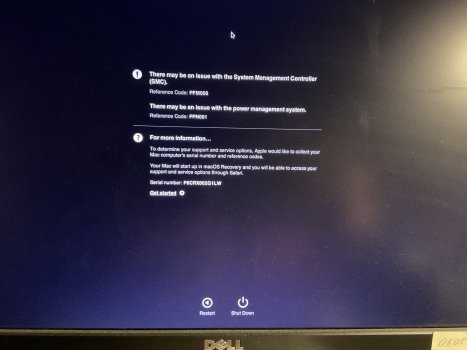
In addition I ran Apple Diagnostics and got this from it, any ideas from here? Everything I read online seems to indicate that it’s one of the cables that’s not quite seated perfectly, so I’m going to do a complete tear down and rebuild once again to double check every connection.

IMG_0045.jpeg
 
Last edited:
Thank you for the tips. I tried reseating the cable on both ends, no dice.

In addition I ran Apple Diagnostics and got this from it, any ideas from here?

View attachment 2586974

 
Thank you, I found that post on iFixit while googling and reseated the cable. I just finished with my rebuild, same symptoms. Running diagnostics again to see if the errors are any different or not.
 
Register on MacRumors! This sidebar will go away, and you'll see fewer ads.