
Got a tip for us?
Let us know
Become a MacRumors Supporter for $50/year with no ads, ability to filter front page stories, and private forums.
2018 MacBook Pros crashing with "Bridge OS" error
- Thread starter kryptticAZ
- Start date
- Sort by reaction score
You are using an out of date browser. It may not display this or other websites correctly.
You should upgrade or use an alternative browser.
You should upgrade or use an alternative browser.


SDColorado
macrumors 601
I've only seen one person so far mention doing an SMC reset. Apple support hasn't asked me to do one, I erased the SSD and reinstalled HS on my own.
But a clean install doesn't necessarily reset SMC. I'm 100% sure the clean install didn't overwrite NVRAM.
Apple had me do and SMC reset. I played along and did it, but it of course made no difference.


beageek
macrumors newbie
As a user who has tried every suggestion from here, now I am very suspicious of hardware defect.
There are two main reasons in terms of the issue.
1. Users who have the issue, keep increasing slightly but MOST have no issue.
2. Once it happens, it crashes again. (no matter what you do your best to fix it)
After all processes, I got tired of trying to fix it by myself and gave up due to constantly appearing crashes. (time consuming & loosing flow for work)
In the end, had returned and reordered it (CTO).
Plus, still software update hasn't been released yet.
iMac 2017 using T2 chip, also had similar problem but it hasn't been fixed it by software update either.
There are two main reasons in terms of the issue.
1. Users who have the issue, keep increasing slightly but MOST have no issue.
2. Once it happens, it crashes again. (no matter what you do your best to fix it)
After all processes, I got tired of trying to fix it by myself and gave up due to constantly appearing crashes. (time consuming & loosing flow for work)
In the end, had returned and reordered it (CTO).
Plus, still software update hasn't been released yet.
iMac 2017 using T2 chip, also had similar problem but it hasn't been fixed it by software update either.
Last edited:

beageek
macrumors newbie
I’m still waiting a bit longer to pull the trigger on a 13inch 2018, you guys think it’ll be worth it? I can get it for around 2300/2400 CAD to get the 8th gen specs and some potential kp issues that hopefully will be fixed soon...or save 400/500 CAD and get the nontouchbar (basically 2017 model) they still sell to get a dual core but no kp issues?
If you're not a heavy user, go for it.
Just let you know if you run many applications, 2017 MBP makes a very high pitch noisy that personally I didn't like.

Hakiroto
macrumors 6502a
2. Once it happens, it crashes again. (no matter what you do your best to fix it)
Maybe for some people but this hasn't been my experience. My 13" crashed on day 16 when it was asleep. I had a replacement delivered just over 2 weeks after the crash and in that time it hadn't crashed again. That means there were 2 weeks either side of the crash without problem. During the last 2 weeks before the replacement came I tried everything I could to make it crash and had no luck. It's a strange one. The replacement goes back tomorrow, too, despite being fine at the moment. I'm in no crazy rush so I'd rather fall back to my older 2015 work MacBook Pro for now and wait this out to see what happens. Everyone's different here but I really don't want to end up with a computer that crashes months after buying it (like the iMac Pro for some people) with no chance of a return within the 14 day window.
That said, I love the new MacBook Pro and this 2015 13" feels ancient now (and really slow for what I do). If there's a definitive fix in the coming months I'll almost certainly buy again. I might also be tempted by a new iMac instead if there's anything good coming to that line.
matthewadams
macrumors 6502
Just had a total KP that shut my iMac Pro down and went into a really slow reboot. The machine was NOT sleeping either. All I was doing was changing the desktop wallpaper on my second screen. 10.13.6 THIS HAS GOT TO GET FIXED!
View attachment 778423
That's a macOS Kernel Panic caused by the GFX Card. (See "Extension in Backtrace").
In case the KPs are all different, have you ever ran something like memtest to rule out you have faulty memory if you're seeing those that often?
L e
Leaving the party so soon? I thought we were having fun in this thread 😛Maybe for some people but this hasn't been my experience. My 13" crashed on day 16 when it was asleep. I had a replacement delivered just over 2 weeks after the crash and in that time it hadn't crashed again. That means there were 2 weeks either side of the crash without problem. During the last 2 weeks before the replacement came I tried everything I could to make it crash and had no luck. It's a strange one. The replacement goes back tomorrow, too, despite being fine at the moment. I'm in no crazy rush so I'd rather fall back to my older 2015 work MacBook Pro for now and wait this out to see what happens. Everyone's different here but I really don't want to end up with a computer that crashes months after buying it (like the iMac Pro for some people) with no chance of a return within the 14 day window.
That said, I love the new MacBook Pro and this 2015 13" feels ancient now (and really slow for what I do). If there's a definitive fix in the coming months I'll almost certainly buy again. I might also be tempted by a new iMac instead if there's anything good coming to that line.
Hakiroto
macrumors 6502a
Leaving the party so soon? I thought we were having fun in this thread 😛
Haha. Nah, I'm sticking around. I need to see how this plays out. 😉


guillone
macrumors newbie
bingo....As an amateur following this thread, Im beginning to think that those of us who are casual or light users such as web surfing, e-mail, texting, etc. aren't seeing the problem because we aren't stressing the device. Those who are professional users and are attaching all kinds of equipment are getting the crashes and when they get a replacement the same thing happens because their use hasn't changed. It would be unlikely for the majority to have no problem and a few to be unlucky enough to keep getting multiple machines with the same flaw. Unfortunately that may mean all 2018 MacBook Pros are affected.
[doublepost=1535529500][/doublepost]
Some might argue that statement; it's looking like the bottom of the tech chain more and more to me.....lolBefore all of this, I was genuinely thinking, these guys must be really unlucky or plugging in some DODGY third party/aliexpress/shipped from china/back of a garage - peripherals. Bank Holiday in the UK today, you forget the rest of the world is still working, so we should be getting close to something tangible?
Mine has nicks in the aluminium along the keyboard. They stated the same thing, must have happened during shipping, I mean come on, you're going to blame UPS for a nick on the keyboard. Even packaging, I imagine these things happen there either, it's because you didn't pick it up on the belt as a defect, and some poor soul is going to accept this as 'okay'.
I definitely recommend extending your 14 days out mate. That's the first thing I'm doing when I receive mine, I would love to ride to 2022 without a fault, but I'm not leaving £3000 in the hands of hope and Applecare (which is awesome, but if it can be prevented in the first place i'll do that). But I'm worried about my replacement, after hearing about light bleeding.
When you start paying these prices you can be picky, you can return your device multiple times, you can ask for 30 days return period. It's not like we're buying hardware from the bottom of the tech chain #aliexpress

danielllb
macrumors newbie
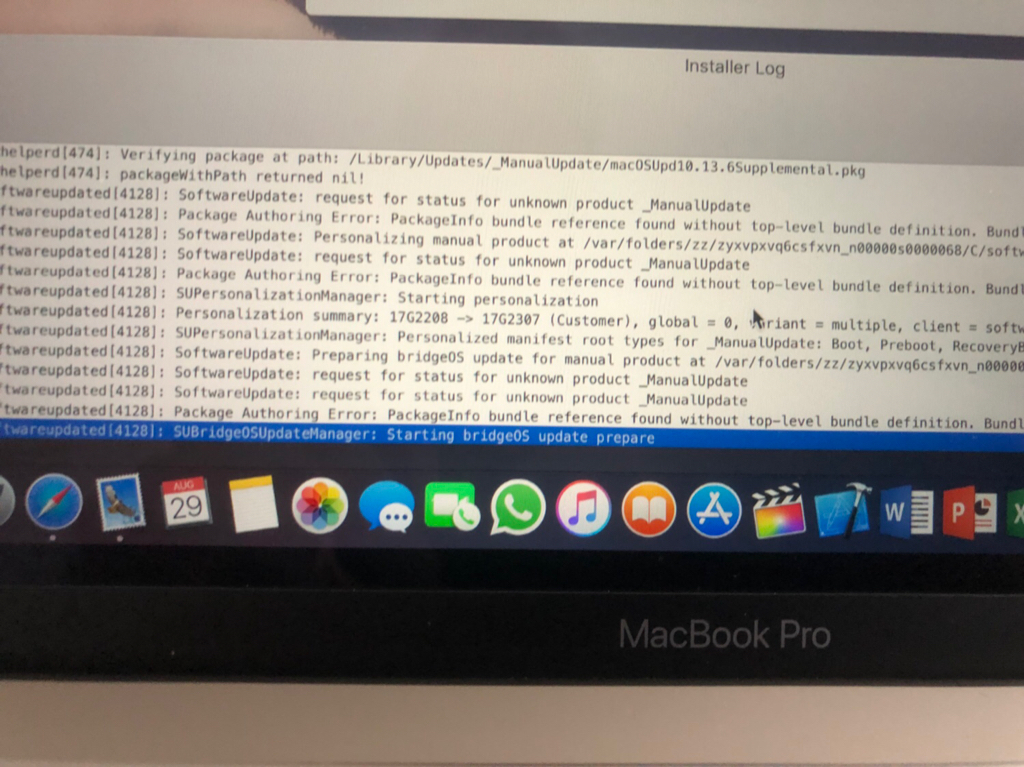
Supplemental Update 2 seems to include an update for BridgeOS, according to the installer log.
guillone
macrumors newbie
I lost (3) macs to this problem, just bought a Dell this week, switching to Ableton Live 10/Windows 10 rig. Nine years invested in Logic Pro gone... thanks for the post about Universal Audio, glad I stayed away from them.....I have reported this to Universal Audio quite awhile ago. Of course they are playing the “contact Apple it’s not our fault” game. Even worse, they are trying to insinuate that I have bad hardware. That’s when I told them that would mean I have had 4 bad machines in a row. Then I pointed them to this forum... 😉
[doublepost=1535469220][/doublepost]
I have had 4 machines... This is why when members here are asking if they should take a replacement, I say they are wasting their time.
bye, Apple, bye, Timmy.....

Premal212
macrumors 6502
Aaaand yesterday's update doesn't fix the sleep / wake issue 🙁
Just returned to my machine (hooked up to a Caldigit TS3+ and 2 4K LG screens) to find it switched off.
On boot there wasn't even an error to be seen.
*Sigh*
Ah man. All that is left to try is the forced method of trying to copy over 30gigs. Would like to see if this has made an improvement though. I.e. stopped random panics.

drdaz
macrumors member
All that is left to try is the forced method of trying to copy over 30gigs.
Huh? =)
I've formatted and reinstalled several times (as well as NVRAM and SMC resets) on the request of Apple Support if that's what you mean?

Queen6
macrumors G5
I lost (3) macs to this problem, just bought a Dell this week, switching to Ableton Live 10/Windows 10 rig. Nine years invested in Logic Pro gone... thanks for the post about Universal Audio, glad I stayed away from them.....
bye, Apple, bye, Timmy.....
This is the problem with Apple today, having no regard for it's professional audience, just pandering to trendy school kids & the Starbucks crowd, while Apple keeps the BS train rolling on how it values it's professional's 🙄
Apple only wants pro's onboard so it can make it's base consumers feel like pro's when it fleeces them for it's overpriced half-baked hardware & software. If Apple was truly invested in it's professional users non of this nonsense would be occurring, nor would they release hex core notebooks with the same cooling solution as the previous generation with far less demanding quad cores 😡😳😵
Apple in 2018 may be worth a trillion $, equally as provider of professional hardware & software little more than a joke...
Q-6
Premal212
macrumors 6502
Huh? =)
I've formatted and reinstalled several times (as well as NVRAM and SMC resets) on the request of Apple Support if that's what you mean?
Sorry just woke up. There is someone who posted sth here on how to produce an error every time. Basically you need to transfer around 20gb+ and it will bring on the kernel crash.
So by virtue of that, if I was to render sth overnight. I would wake up to a crash, I’ll try it tonight.

maflynn
macrumors Broadwell
I have my MBP attached to an Apple Cinema Display, USB hub, and of course power. I don't know of that info help, but I've not incurred any KPs, the machine is always on, I don't put it in sleep, at least overtly. I'm using this as I use my other Macs, so I'm not treating it any different. My iMac is left on all the time as well.I’ve noticed that a majority of the kp’s happen when there’s an external display being used... has anyone had the same issues natively without displays?
Hakiroto
macrumors 6502a
the machine is always on, I don't put it in sleep
Interesting. Well, everyone should be able to use their computers in a way that suits their needs but this gets me wondering if you'd also have such issues if you did let it sleep, as most kernel panics mentioned here seem to be related to the MacBook sleeping. Ignorance is bliss in this situation, and it's great that you've had no problems, but I'd have to know by letting it sleep more, work and time permitting. 😉
maflynn
macrumors Broadwell
I don't prevent the sleep, I just don't engage it from the menu. As you can see the Prevent Computer from sleeping is NOT checked.if you did let it sleep
Premal212
macrumors 6502
Interesting. Well, everyone should be able to use their computers in a way that suits their needs but this gets me wondering if you'd also have such issues if you did let it sleep, as most kernel panics mentioned here seem to be related to the MacBook sleeping. Ignorance is bliss in this situation, and it's great that you've had no problems, but I'd have to know by letting it sleep more, work and time permitting. 😉
I let mine sleep all the time. Again I don’t engage from the menu. But it’s the same principle?
No KP on new machine so far.
drdaz
macrumors member
Sorry just woke up. There is someone who posted sth here on how to produce an error every time. Basically you need to transfer around 20gb+ and it will bring on the kernel crash.
So by virtue of that, if I was to render sth overnight. I would wake up to a crash, I’ll try it tonight.
Yeah I don't know about that; I've copied *way* more than 20GB numerous times on this machine without issue (if nothing else, a full restore from Time Machine and copying my whole documents folder from a backup).
At the very least whatever issue this someone is having is different to the issue that I'm having. I'm getting crashes on sleep / wake; nothing else that I can see (nothing in Disk Utility either).
The trouble with this thread is that everybody who experiences a crash with these new machines will see 'Bridge OS' and come here with it, even though the issue may have nothing to do with the new hardware.
Has anybody seen a KP from these machines that *doesn't* reference Bridge OS?
EDIT: Although I may have been a little hasty saying I've seen nothing else wrong...
When Apple asked me to format and reinstall, I did so using the same disk encryption password and login credentials as my previous install.
When the install was finished and I logged in, there was a file sitting in the trash can that I created on the previous install.
*That* was really messed up, and should be absolutely impossible. (I've filed a bug, but I can't reproduce it)

afir93
macrumors 6502a
So is there any info or testing from those affected by the issue if the High Sierra Supplemental Update 2 fixed or at least improved the issue? We know that BridgeOS was updated by it, and the crash issues would fit the vague description of the Supplemental Update 2 about improving stability and the like (but so would a lot of other unrelated things). Has anyone already had a crash like that after installing the update?
drdaz
macrumors member
So is there any info or testing from those affected by the issue if the High Sierra Supplemental Update 2 fixed or at least improved the issue? We know that BridgeOS was updated by it, and the crash issues would fit the vague description of the Supplemental Update 2 about improving stability and the like (but so would a lot of other unrelated things). Has anyone already had a crash like that after installing the update?
Yes, I have. I wrote a comment about it in the middle of this page.