
Got a tip for us?
Let us know
Become a MacRumors Supporter for $50/year with no ads, ability to filter front page stories, and private forums.
2019 MacBook Pro 16 - battery health at 87%
- Thread starter anoobis
- Start date
- Sort by reaction score
You are using an out of date browser. It may not display this or other websites correctly.
You should upgrade or use an alternative browser.
You should upgrade or use an alternative browser.


ChrisChaval
macrumors 6502a
there is your problem, right thereI'm plugged in 90% of the time.

ISKOTB
macrumors 65816
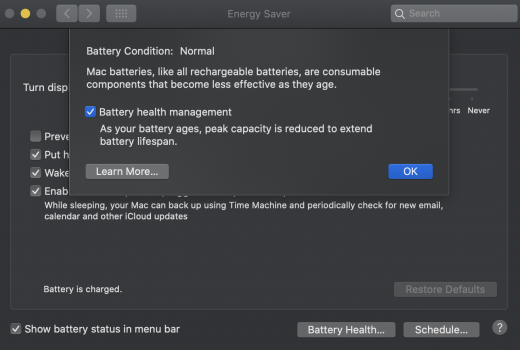
Any battery eventually will be consumed. Even if the laptop is always plugged in, you still lose charges while plugged in. Right now it's at 92% and says "Battery Is Not Charging", it will charge again later on because this part of the new battery health managment check below.there is your problem, right there
Attachments
ChrisChaval
macrumors 6502a
it is the "always plugged in" part that is wearing out the battery prematurelyAny battery eventually will be consumed. Even if the laptop is always plugged in, you still lose charges while plugged in. Right now it's at 92% and says "Battery Is Not Charging", it will charge again later on because this part of the new battery health managment check below.
it might save you charging cycles but puts the battery under constant stress
keep it around 40-60% and it will last longer
of course, over time, any battery will eventually fail
ISKOTB
macrumors 65816
How often do you unplug your laptop?it is the "always plugged in" part that is wearing out the battery prematurely
it might save you charging cycles but puts the battery under constant stress
keep it around 40-60% and it will last longer
of course, over time, any battery will eventually fail
ChrisChaval
macrumors 6502a
use it unplugged most of the time, actually. it is a laptop, after allHow often do you unplug your laptop?
I use it as you would your ordinary smartphone or tablet
Another older, stationary MacBook is plugged in all the time (when in use) with aldente keeping its battery at a constant 50% charge (which is what you would want to keep it at when storing it)
planteater
Cancelled
My MBP spent most of its first year plugged in and the battery health was falling fast to the upper 80 percent range.
I then started using it on battery mostly and charging it in a non-uniform manner, mostly when it needed it, often not fully. Basically I started using the laptop without regard to when, how much, or how often I charged it. The battery health has been responded well to that. It’s now 4 years old, 541 cycles and at 81 percent.
I then started using it on battery mostly and charging it in a non-uniform manner, mostly when it needed it, often not fully. Basically I started using the laptop without regard to when, how much, or how often I charged it. The battery health has been responded well to that. It’s now 4 years old, 541 cycles and at 81 percent.

canuckRus
macrumors 6502a
Hi,
I have a 2019 16" MacBook Pro that I bought at the end of February 2020.
My battery health is already down to 87%. Does that seem in-line with other owners?
118 cycles
I'm plugged in 90% of the time. 20% of that time through my LG Ultrafine.
Battery readings vary between the actual laptop, Coconut Battery and Apple in store. None will be in agreement. Which is most accurate and trustworthy?
It being constantly plugged in is likely contributing. Combine that with heat and IIRC those factors multiply the impact of the other. Apple's Optimization feature isn't very aggressive, unfortunately. I'm at 95% health on 80 cycles over I guess about 2.5 months of ownership. If you use the Mac really intensely, another factor that may also impact it is not having the full 96 watts of power on hand.
planteater
Cancelled
As far as I can tell, the most accurate reading is obtained by doing the following.Battery readings vary between the actual laptop, Coconut Battery and Apple in store. None will be in agreement. Which is most accurate and trustworthy?
From the terminal, run:
ioreg -l | grep Capacity
Then divide:
MaxCapacity / DesignCapcity

ISKOTB
macrumors 65816
I was doing that but then I have it plugged at work but while I am home I run it off the battery.

I use mine plugged in almost 100% of the time. The cycles are only from the 100w charger not being able to handle the full load of the laptop. It's not going well. Oh well that is what Applecare+ is for.
View attachment 1707573
Hello,
I have my MBP 2018 for about 2 years and 4 months
Nowadays I always plug it for 2 full week then let it rest for one cycle then repeat.
I do that because I game a lot (looking at you StS and celeste)
And i just calculated it using post #13 method and my battery health is at 91%, And 221 cycle count.
Is that ok for my battery ?
I have my MBP 2018 for about 2 years and 4 months
Nowadays I always plug it for 2 full week then let it rest for one cycle then repeat.
I do that because I game a lot (looking at you StS and celeste)
And i just calculated it using post #13 method and my battery health is at 91%, And 221 cycle count.
Is that ok for my battery ?
ISKOTB
macrumors 65816
Yes, mine is less than 2y/45cycle and I am at 85%
Islam
Islam
Hello,
I have my MBP 2018 for about 2 years and 4 months
Nowadays I always plug it for 2 full week then let it rest for one cycle then repeat.
I do that because I game a lot (looking at you StS and celeste)
And i just calculated it using post #13 method and my battery health is at 91%, And 221 cycle count.
Is that ok for my battery ?

Jmgilliam18
macrumors regular
How do you have 45 cycles? lol. Mine is 2019 model, 15 months in, 364 cycles. Mine stays plugged in a lot or it did till I saw this and other threads. I installed a charge limiter and tried to keep it below 80% when "Fully charged" and not letting get below 40. If plugged in all day will set it at 50% and just leave it plugged in. But it was like I was battery managing more than work so finally just said forget it and use it off plug and if it runs down to 10% so be it and charge it up to full (since new oS came out w/ management) and now I'm at 82% health...Yes, mine is less than 2y/45cycle and I am at 85%
Islam
Jmgilliam18
macrumors regular
How in the world? I"m 15 months in - 2019 version MBP. 82% health 364 cycles.Unacceptable.
2014 MBP, 392 cycles (on the charger 99% of the time) = 91% of original capacity. After 6.5 years of use.

gim
macrumors 6502
Simple, the batteries in newer Apple products are garbage. I've seen this from some family members who have upgraded their devices but didn't change their usage or charging patterns.
My wife's iPad Pro 2017 degraded much faster than her original iPad Air (2013). As of today, the Pro has lost more capacity than the Air, even though it's 4 years newer and has a thousand cycles (!!) less.
iPhone 6 Plus went a strong 5 years on its original battery (90%). New iPhone 11 on the other hand has already lost 10% capacity after less than 1.5 years.
I could go on with further examples, but basically all of them indicate that the batteries in newer products degrade faster. At best it's just 2x as fast, at the worst it's more like 3-4x as fast.
I assume Apple simply discovered the potential of planned obsolescence when they noticed that people tend to hang on to their devices much longer than before.
My wife's iPad Pro 2017 degraded much faster than her original iPad Air (2013). As of today, the Pro has lost more capacity than the Air, even though it's 4 years newer and has a thousand cycles (!!) less.
iPhone 6 Plus went a strong 5 years on its original battery (90%). New iPhone 11 on the other hand has already lost 10% capacity after less than 1.5 years.
I could go on with further examples, but basically all of them indicate that the batteries in newer products degrade faster. At best it's just 2x as fast, at the worst it's more like 3-4x as fast.
I assume Apple simply discovered the potential of planned obsolescence when they noticed that people tend to hang on to their devices much longer than before.
228 Cycles, 84%, ~13 months
Intermittently tells me that battery needs to be serviced. That last part is pretty rough for $4700 out the door. Glad I bought Applecare. ^^ Yes they now are all about maximizing profits and to do that they need you buying new equipment repeatedly. Will be interesting to see how Silicon line turns out.
Intermittently tells me that battery needs to be serviced. That last part is pretty rough for $4700 out the door. Glad I bought Applecare. ^^ Yes they now are all about maximizing profits and to do that they need you buying new equipment repeatedly. Will be interesting to see how Silicon line turns out.
My 11 month old iPhone 11 is still at a 100%. Never had a better battery and longer lasting phone - coming from an 8 Plus and 6/S Plus.iPhone 6 Plus went a strong 5 years on its original battery (90%). New iPhone 11 on the other hand has already lost 10% capacity after less than 1.5 years.
My refurbished and 9 month old MacBook Pro 16 on the other hand is down to 87% already. The MacBook Air 2011 that I used for over 8 years was down to 78% when I sold it. Plugged in most of the time with around 400 cycles. What a great machine that was. 🥲