Become a MacRumors Supporter for $50/year with no ads, ability to filter front page stories, and private forums.

ero87

macrumors 65816
Original poster
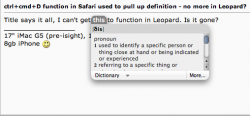
Title says it all, I can't get this to function in Leopard. Is it gone?
 
Still there

Picture 1.png
 
It might have gotten turned off in your Keyboard preferences. It's definitely still there. (it's not a Safari function either)
 
I haven't used Leopard yet but is it possible the shortcut is not on by default? See if it's checked off within the "keyboard shortcuts" tab of the keyboard & mouse system prefs.
 
I haven't used Leopard yet but is it possible the shortcut is not on by default? See if it's checked off within the "keyboard shortcuts" tab of the keyboard & mouse system prefs.

oh you were right, it was turned off for some reason.

thanks! 🙂
 
THANKS so much

It's not ctrl+cmd+D

It's CMD+CTRL+D.In that order.

Thank you so much!!! Was very annoying and this is the weirdest solution I ever encountered. Just switching two keys!!
It should say that in the Keyboard shortcut list!! instead of Ctrl-cmd-D, it should say cmd-ctrl-D

but thanks again.
George
 
Almost fine

Guys thank you for this thread. It's working for me too finally. But what I got is a new Dictionary window — not a pop up window.
 
Register on MacRumors! This sidebar will go away, and you'll see fewer ads.