
Got a tip for us?
Let us know
Become a MacRumors Supporter for $50/year with no ads, ability to filter front page stories, and private forums.
Safari 4 is... brown?
- Thread starter britboyj
- Start date
- Sort by reaction score
You are using an out of date browser. It may not display this or other websites correctly.
You should upgrade or use an alternative browser.
You should upgrade or use an alternative browser.

Ivan P
macrumors 68030
In thumbnail view, your pic does look brown-beige, but when I opened it within Safari 3, it matches my Grey Safari perfectly.
When I tilt my monitor/display, they both turn brown though.
Its definitely brown on my MBP, even when I open up the larger image, comparing to my copy of Safari.

Ivan P
macrumors 68030
It's definitely brown for me...but then I realised I was viewing it in Firefox. For some reason it looks, like with yours, brown in the thumbnail yet grey in the full-size image in Safari, but it's brown in both in Firefox...weird.
EDIT: If you're looking at my bookmarks, yes, I'm a member at ABBA and Bond forums, and if you must know the random 'Museum' and 'Stuff' files/folders are for my work 😛
EDIT: If you're looking at my bookmarks, yes, I'm a member at ABBA and Bond forums, and if you must know the random 'Museum' and 'Stuff' files/folders are for my work 😛
Attachments


brent0saurus
macrumors regular
It's definitely brown for me...but then I realised I was viewing it in Firefox. For some reason it looks, like with yours, brown in the thumbnail yet grey in the full-size image in Safari, but it's brown in both in Firefox...weird.
EDIT: If you're looking at my bookmarks, yes, I'm a member at ABBA and Bond forums, and if you must know the random 'Museum' and 'Stuff' files/folders are for my work 😛
woah how'd you get the time and date on your desktop?? that looks awesome!

messedkid
macrumors 6502
woah how'd you get the time and date on your desktop?? that looks awesome!
https://forums.macrumors.com/threads/628023/

benthewraith
macrumors 68040
woah how'd you get the time and date on your desktop?? that looks awesome!
GeekTools.

upaymeifixit
macrumors 6502a
This is way weird.
I don't think this has to do with anything anybody has recommended so far. Obviously posting screenshots will not work because results vary, instead I would recommend digital pictures. For me the thumbnail is brown and the full size it normal color, same for a friend.
My theory would be that something is able to detect and fix it (you lost yours), that's why it didn't get the thumbnail. I have no idea why though.
What site did you visit when it did this?
Try re-installing the browser. Or re-setting if you haven't already. On second thought though, if it worked with firefox I don't think it's safari.
This is probably the most interesting topic I've seen in a long time. And I know GUI problems. (still)
I don't think this has to do with anything anybody has recommended so far. Obviously posting screenshots will not work because results vary, instead I would recommend digital pictures. For me the thumbnail is brown and the full size it normal color, same for a friend.
My theory would be that something is able to detect and fix it (you lost yours), that's why it didn't get the thumbnail. I have no idea why though.
What site did you visit when it did this?
Try re-installing the browser. Or re-setting if you haven't already. On second thought though, if it worked with firefox I don't think it's safari.
This is probably the most interesting topic I've seen in a long time. And I know GUI problems. (still)
Do you still have this problem? And what site did you visit when it did this?
This is probably the most interesting topic I've seen in a long time.
I reset the NVRAM and the Trash Can changed back to silver. (WTF there)
The site that appears to change the colour in Safari is blogger. ANY link within blogger that opens a new window changes the colour. If I open them in a new tab, nothing changes.
EDIT: It appears that ANY website launching a new window (not a new tab) will cause that window to go brown. If I close it before closing the original, silver window, nothing changes when I open up Safari again.
If I close the silver window and THEN close the brown window, Safari is brown. Launching Safari links from Mail, for instance, also show up brown. The Activity and Downloads windows, when open, are still silver.
What. The. Hell.
Okay, I've removed the Safari 4 beta and gone down to Safari 3 - this solves the brown in Safari but certain shades of silver appear to still be brown.
Load the Apple homepage and the navigation bar at the top is brown.
The trash can is still brownish as well (have reset the NVRAM again)
It almost seems like the graphics card or display can't or won't display certain colours correctly.
EDIT: Seems like it's no longer just Safari 4 Beta, although that appears to be where the problem started. Numbers shows weird too. I'm starting a new thread in the MBA forums, as that's what I have.
Load the Apple homepage and the navigation bar at the top is brown.
The trash can is still brownish as well (have reset the NVRAM again)
It almost seems like the graphics card or display can't or won't display certain colours correctly.
EDIT: Seems like it's no longer just Safari 4 Beta, although that appears to be where the problem started. Numbers shows weird too. I'm starting a new thread in the MBA forums, as that's what I have.
Your display colour profile is simply very different.
I get the thumbnail being brown, but the picture actually silver (in either Safari or Preview).
If I open the picture in Preview, and apply a standard sRGB to it (assign, not match), it goes brown, suggesting that your colour profile you have for your display is simply very different.
Not that Firefox, by default, is not colour aware, so will apply an sRGB colour profile to all files, regardless of what profiles are attached, thus why Firefox displays as brown. Safari is fully colour aware.
Whenever you take screen shots, the attached colour profile to the resulting image will be your display profile.
Note, the display profile, even after you change it, is typically stored in cache, so to make sure everything is applied, log out and re log in.
Try changing to the original "Color LCD" colour profile and log out and in and see if this fixes some of your issues.
I get the thumbnail being brown, but the picture actually silver (in either Safari or Preview).
If I open the picture in Preview, and apply a standard sRGB to it (assign, not match), it goes brown, suggesting that your colour profile you have for your display is simply very different.
Not that Firefox, by default, is not colour aware, so will apply an sRGB colour profile to all files, regardless of what profiles are attached, thus why Firefox displays as brown. Safari is fully colour aware.
Whenever you take screen shots, the attached colour profile to the resulting image will be your display profile.
Note, the display profile, even after you change it, is typically stored in cache, so to make sure everything is applied, log out and re log in.
Try changing to the original "Color LCD" colour profile and log out and in and see if this fixes some of your issues.

upaymeifixit
macrumors 6502a
I will second that, if I can follow it.
That's weird, I have a MacBook Air with graphics problems too. When I get a chance I will take this question to an apple store to see if there is anything to do other than reinstall.
Could you post a link to your MBA forum? Thanks.
Dude, this guy sounds like he knows what he's talking about I'm sticking with that.Your display colour profile is simply very different...
That's weird, I have a MacBook Air with graphics problems too. When I get a chance I will take this question to an apple store to see if there is anything to do other than reinstall.
Could you post a link to your MBA forum? Thanks.
I still thinks it's a colour profile issue at some level. Hve you tried repairing your colour profiles using the color sync utility? Also try repairing permissions and logging out.
Done and done.
Nothing changes. Repairing using ColorSync says "No problems found" or "No repairs needed."
The only thing I HAVEN'T done at this point is completely reinstall OSX, which is apparently because my discs go "Hey, no."
messedkid
macrumors 6502
@ messedkid I don't mean to pull off topic, but how do you get your Adium contacts on that semi-transparent window on the left?
Open the Adium Preferences and open the Appearance tab.
I use:
Color Theme: HUD
List Layout: Decay 2.0
Window Style: Borderless Window
Opacity: 25%
Done and done.
Nothing changes. Repairing using ColorSync says "No problems found" or "No repairs needed."
The only thing I HAVEN'T done at this point is completely reinstall OSX, which is apparently because my discs go "Hey, no."
Did you try removing your custom display profile? (don't forget to log out).
Seriously the picture you attached looks completely fine in any colour aware program on my end. I get it to go brown if I remove the colour profile.
Did you try looking at your picture within safari?
I can make it look how I want, depending on what I do with the embedded colour profile. Of course that's because of your screen shot. I'm not sure what can necessarily be done with your OS:
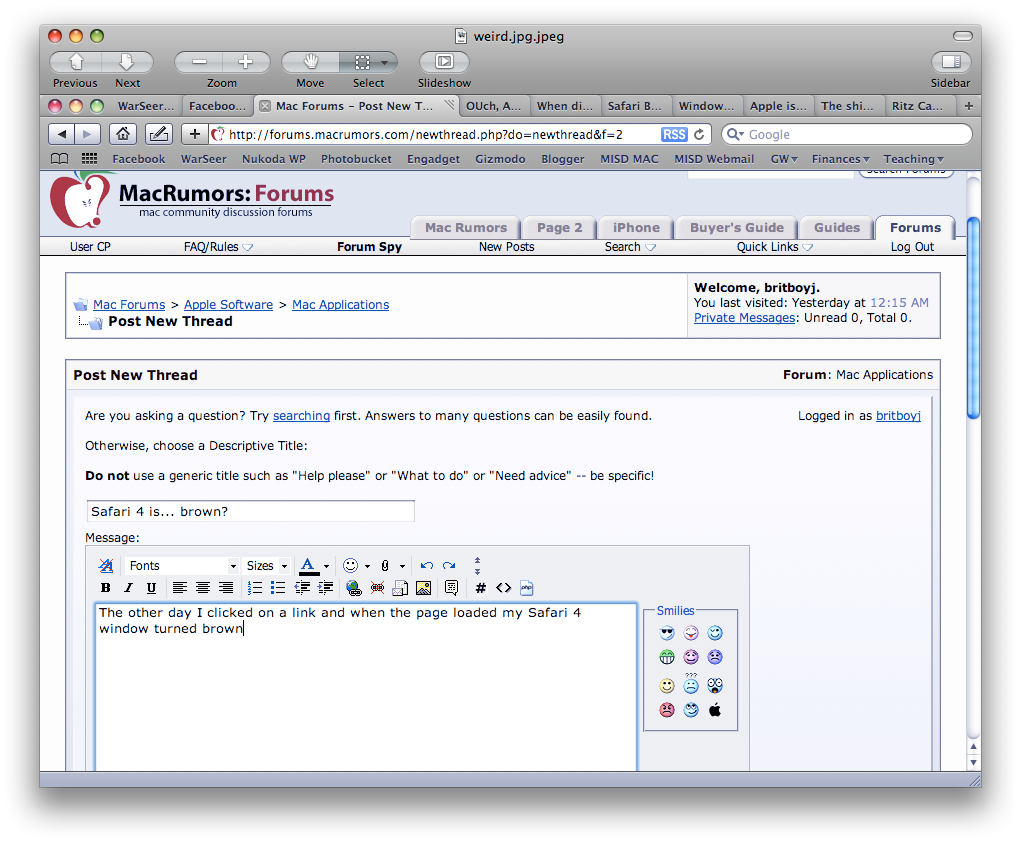
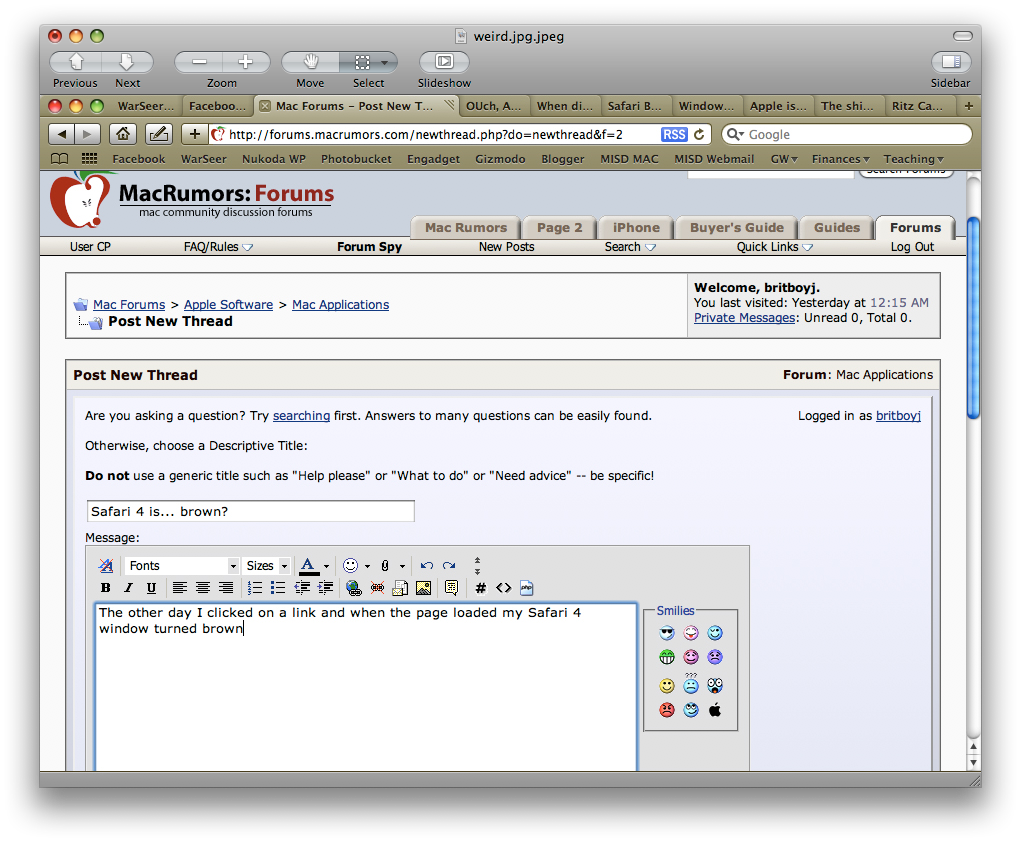
It could be something like certain programs are not using your display profile. What is your set up? Do you have an external monitor? ARe you using a custom display profile? If so, what profile is it and where is it? (ie. user or system?)