Become a MacRumors Supporter for $50/year with no ads, ability to filter front page stories, and private forums.

stanton119

macrumors newbie
Original poster
Oct 6, 2007
23
0
As an Amazon Associate, MacRumors earns a commission from qualifying purchases made through links in this post.
I have a old powerbook g4, 667mhz. It has a card slot on the side. As far as im aware only the g3, and g4 powerbooks do, and no other macs do.
 
Just to let you all know, Ive ordered the edimax, it should arrive soon, so ill report back then.
 
I don't think it will work with your Mac laptop. A Wifi card only works inside a Mac laptop (under the keyboard), not on the port on the side. I tried it with another Apple WiFi card and it didn't succeed.
 
I don't think it will work with your Mac laptop. A Wifi card only works inside a Mac laptop (under the keyboard), not on the port on the side. I tried it with another Apple WiFi card and it didn't succeed.

I just found this on the net from here http://www.xlr8yourmac.com/feedback/802_11N_Mac_reports.html
"Hi Mike, Have gained much info and help from your site over years now, so delighted to be able to give something back.
I have a 15" 1GHz TiBook which I've used wirelessly since I got it, first with an inbuilt Airport 802.11b card, then with a Buffalo WLI-CB-G54A 802.11g cardbus card, and now successfully with a new Edimax EW-7708PN 802.11n draft 2.0 cardbus card. I can confirm that this uses the Ralink RT2860 chipset.

Installation and configuration of the card was very simple using the Ralink OSX drivers and utility from http://www.ralinktech.com/ralink/Home/Support/Macintosh.html and of course it was from xlr8yourmac that I learned of their existence.

The EW-7708PN connects flawlessly to my aged Belkin 802.11g base station. This is Broadcom based and is doing WDS with an 802.11g Airport Extreme, to which the EW-7708PN also connects fine. The network is rejoined on wake from sleep, but not as rapidly as with a native Airport card.

The Ralink utility shows that signal strength is apparently better than it was with the Buffalo card, with a significant signal associated with each antenna. Certainly performance in g mode is very good. I'm waiting for an Apple pre-N base station to make further tests, but so far I'm delighted.
(Update: I asked the Neville if the Edimax 802.11N PCMCIA card had Multiple antennas/MiMo support. He sent a screenshot from the RAlink utility showing the 3 antennas' signal strength.-Mike)
 
The Edimax is offered on OWC as Mac compatible. The only thing about those is, they are 2.4GHz only so you don't get the advantages of Wireless N at 5GHz (although most wireless N routers don't support 5GHz either, but the AEBS does)
 
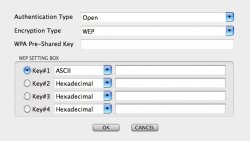
I now have the card installed. It works, but I have an issue with a WEP password. Im using my iMac G5 with internet sharing via airport for the wireless network. It is set up with a WEP 40-bit password. When you click connect it comes up with the attached screen. The two options are HEX and ACSII. Im not sure what to put here. I have typed in a 5-character password in internet sharing, and the same in ACSII on the laptop but it doesnt connect.
 

Attachments

  • Wifi.jpg
    Wifi.jpg
    48.7 KB · Views: 130
Did you ever get this to work? I just received an Edimax EW-7708pn PCMCIA (cardbus) card and am having a similar problem.

For the password, you should probably enter ASCII, unless you know the HEX equivalent. I'm trying to connect to an 802.11n network with WPA security and get a similar problem. The Ralink utility sees the network, but won't seem to connect. I can connect to the same network with the built-in Airport wireless, but only at 802.11g speeds.

Info: Powerbook G4 (1.5GHz) 17", D-Link DIR-655 802.11n router (1.10 firmware), Edimax EW-7708Pn PCMCIA/Cardbus adapter.

-FJW
 
Did you ever get this to work? I just received an Edimax EW-7708pn PCMCIA (cardbus) card and am having a similar problem.

For the password, you should probably enter ASCII, unless you know the HEX equivalent. I'm trying to connect to an 802.11n network with WPA security and get a similar problem. The Ralink utility sees the network, but won't seem to connect. I can connect to the same network with the built-in Airport wireless, but only at 802.11g speeds.

Info: Powerbook G4 (1.5GHz) 17", D-Link DIR-655 802.11n router (1.10 firmware), Edimax EW-7708Pn PCMCIA/Cardbus adapter.

-FJW

I did indeed. I had to change 'open' to 'shared' then put in HEX equivalent password. Although after that, I got more problems concerning self assigned ip addresses, I sorted that out, but its not 100% flawless.

Im not sure if the same solution would work for you, as I believe WPA is another setting under 'shared'. I basically just tried every setting until it worked if that helps.
 
Register on MacRumors! This sidebar will go away, and you'll see fewer ads.