
Got a tip for us?
Let us know
Become a MacRumors Supporter for $50/year with no ads, ability to filter front page stories, and private forums.
MP 1,1-5,1 802.11ac, BT 4.0, Continuity, and Handoff Working on Mac Pro 2010
- Thread starter MacProSector
- Start date
- Sort by reaction score
You are using an out of date browser. It may not display this or other websites correctly.
You should upgrade or use an alternative browser.
You should upgrade or use an alternative browser.


Stageshoot
macrumors regular
Just an update I purchased on of the above cards and it works 100% perfect out of the boxHi
Just purchased the PCIe Bluetooth/Wifi card in the link below
Has anyone used this successfully in a MP 4.1 to get the full OS handoff features etc
The listing refers to using it in a hackintosh rather than a full Mac
A bit concerned about the 9 pin USB header referred to is there one available on the MP board.
Link to item
https://www.amazon.co.uk/gp/product/B00MBP25UK/ref=oh_aui_detailpage_o00_s00?ie=UTF8&psc=1
Bluetooth 4.0 LE and AC wifi straight away
Absolute bargain I think for £39
Now may handoff etc all work fine and am ready for Sierra
As an Amazon Associate, MacRumors earns a commission from qualifying purchases made through links in this post.

barry.pearson
macrumors member
Just an update I purchased on of the above cards and it works 100% perfect out of the box
Bluetooth 4.0 LE and AC wifi straight away
Absolute bargain I think for £39
Now may handoff etc all work fine and am ready for Sierra
Hi just wondering if you have had any trouble with this card, I was really tempted to pick one up last week but couldn't find any information on whether it only worked in Hackintosh systems or in a MacPro too. Every time I'm looking for ways to add wifi and upgrade the bluetooth in my cMP4,1 I seem to be pushed towards solutions that cost £100+!
Stageshoot
macrumors regular
Hi just wondering if you have had any trouble with this card, I was really tempted to pick one up last week but couldn't find any information on whether it only worked in Hackintosh systems or in a MacPro too. Every time I'm looking for ways to add wifi and upgrade the bluetooth in my cMP4,1 I seem to be pushed towards solutions that cost £100+!
The card is great all features work,
It came supplied with a USB lead with 9 pins on it for boot power to the bluetooth, but there is no connector inside the mac pro, so I swapped it for a standard USB lead and routed it out to a USB socket on the outside of the machine. I am sure you could do it internally but I was not confident messing around looking for internal power.
But for £39 its great Handoff, Continuity Calls etc all work straight away now.
Images show power lead for Boot Bluetooth rerouted out of case
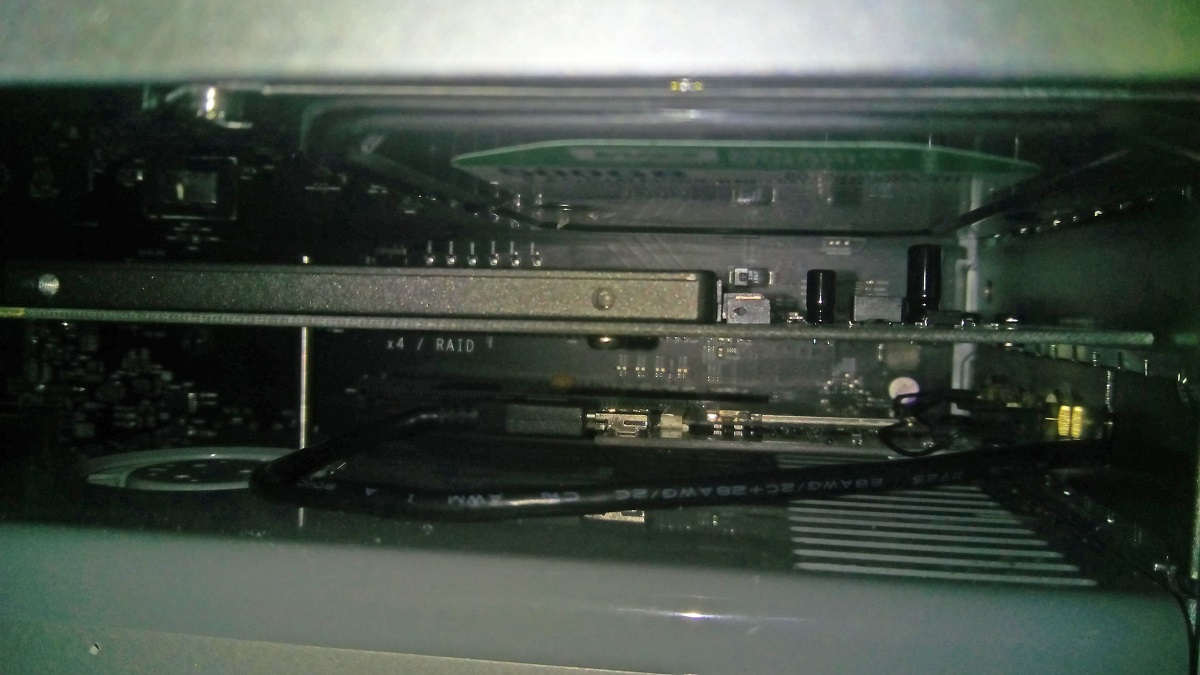
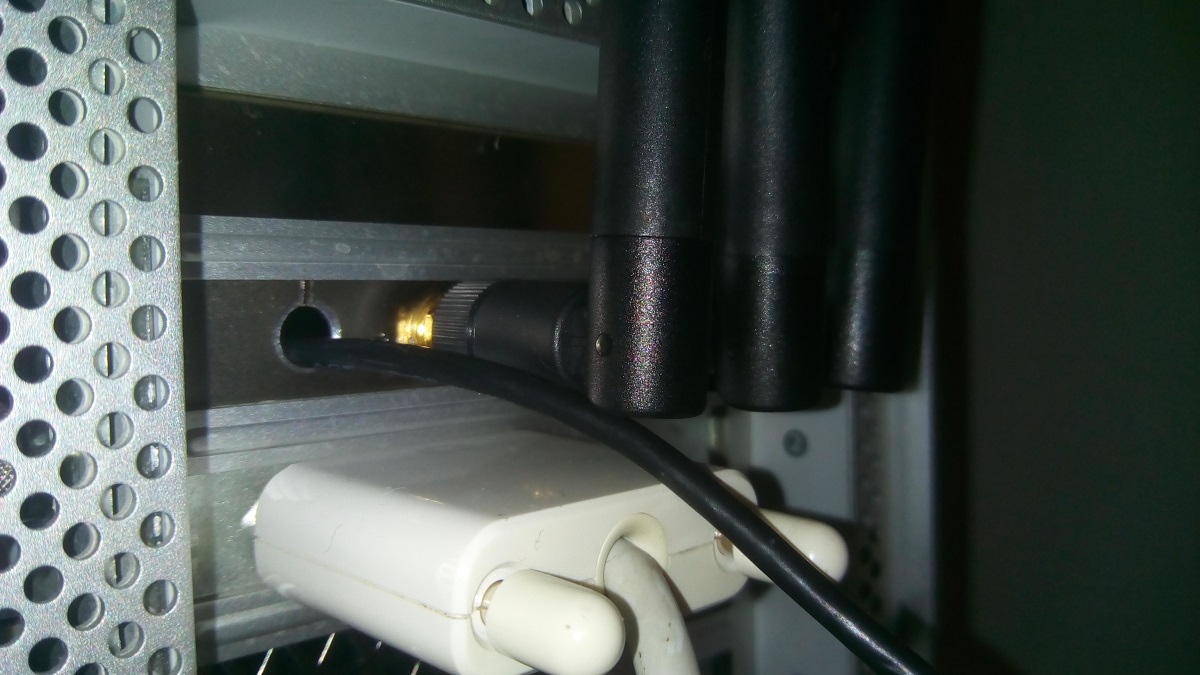
Last edited:

barry.pearson
macrumors member
@Stageshoot Thank you for the quick reply and the images, I wasn't actually aware that there was an opening for the USB cable until I saw your image. That's now been added to my basket 🙂
This looks a great find especially given the very iffy Bluetooth on the cMP having external aerials seems a great idea but of course this presupposes that you have a spare PCIe slot.Just an update I purchased on of the above cards and it works 100% perfect out of the box
Bluetooth 4.0 LE and AC wifi straight away
Absolute bargain I think for £39
Now may handoff etc all work fine and am ready for Sierra

h9826790
macrumors P6
This looks a great find especially given the very iffy Bluetooth on the cMP having external aerials seems a great idea but of course this presupposes that you have a spare PCIe slot.
Yes, so, e.g. Slot
1. GPU
2. PCIe SSD
3. USB 3.0 / eSATA
4. This WiFi / BT card
It seems a pretty good way to fully utilise the 4 slots.
Stageshoot
macrumors regular
@Stageshoot Thank you for the quick reply and the images, I wasn't actually aware that there was an opening for the USB cable until I saw your image. That's now been added to my basket 🙂
The only Mod you need is the little hacksaw cut on the backplate so it can be twisted slightly to get the cable in then twsited back into place.
Yes, so, e.g. Slot
1. GPU
2. PCIe SSD
3. USB 3.0 / eSATA
4. This WiFi / BT card
It seems a pretty good way to fully utilise the 4 slots.
YES I have mine as
1: GTX980
2: GT120 (For Boot Screen)
3: 500GB SSD on PCIe Card
4: Wifi/Bluetooth Card
Just debating dropping the GTX120 as I dont really need the boot screen that much, but its handy having it
Not decided if best to keep the GT120 in all the time, or I will get a longer life out of it if I just install it when needed for updates etc

waimtrp
macrumors member
http://www.ebay.com.hk/itm/40CM-Pig...162023920406?ssPageName=ADME:L:EOISSA:HK:1123any one know where can buy BT antenna extend?
i think this is the one you looking for?
I've just received the Chinese kit as recommended above.
As I suspected the usb connector supplies is a 9 pin and not the same as the small 4 pin connector on the 5,1 and 4,1 backplane board.
Not sure what to do as I don't know how to make connectors. They supply a cable with bare wires which I could use to try and make a 4 pun connector. Just need to source the correct one.
As I suspected the usb connector supplies is a 9 pin and not the same as the small 4 pin connector on the 5,1 and 4,1 backplane board.
Not sure what to do as I don't know how to make connectors. They supply a cable with bare wires which I could use to try and make a 4 pun connector. Just need to source the correct one.
http://www.ebay.com.hk/itm/40CM-Pig...162023920406?ssPageName=ADME:L:EOISSA:HK:1123
i think this is the one you looking for?
i found this one much cheap and working fine:
http://www.data-alliance.net/u-fl-e...-to-u-fl-female-18-inch-2ft-28-inch-low-loss/
BCM94360CD:
http://www.aliexpress.com/item/Broa...1672716461.html?spm=2114.13010608.0.54.0mJ3YQ
BT cable extend:
http://www.data-alliance.net/u-fl-e...-to-u-fl-female-18-inch-2ft-28-inch-low-loss/
Adapter for BCM94360CD :
https://www.amazon.com/gp/product/B00OVVI4Y8/ref=oh_aui_detailpage_o00_s00?ie=UTF8&psc=1
easy to install for 2010 mac pro5,1, but i only can see buletooth,can't find wifi hardware, anyone know why?
i use old buletooth to test BT extend cable is working.
dont know how to test bcm9436cd and adapter.
http://www.aliexpress.com/item/Broa...1672716461.html?spm=2114.13010608.0.54.0mJ3YQ
BT cable extend:
http://www.data-alliance.net/u-fl-e...-to-u-fl-female-18-inch-2ft-28-inch-low-loss/
Adapter for BCM94360CD :
https://www.amazon.com/gp/product/B00OVVI4Y8/ref=oh_aui_detailpage_o00_s00?ie=UTF8&psc=1
easy to install for 2010 mac pro5,1, but i only can see buletooth,can't find wifi hardware, anyone know why?
i use old buletooth to test BT extend cable is working.
dont know how to test bcm9436cd and adapter.
As an Amazon Associate, MacRumors earns a commission from qualifying purchases made through links in this post.
BCM94360CD:
http://www.aliexpress.com/item/Broa...1672716461.html?spm=2114.13010608.0.54.0mJ3YQ
BT cable extend:
http://www.data-alliance.net/u-fl-e...-to-u-fl-female-18-inch-2ft-28-inch-low-loss/
Adapter for BCM94360CD :
https://www.amazon.com/gp/product/B00OVVI4Y8/ref=oh_aui_detailpage_o00_s00?ie=UTF8&psc=1
easy to install for 2010 mac pro5,1, but i only can see buletooth,can't find wifi hardware, anyone know why?
i use old buletooth to test BT extend cable is working.
dont know how to test bcm9436cd and adapter.
How did you connect USB power cable to backplane board?
I just bought this kit and the supplied 9 pin cable is different to the 4 pin connector in the Mac Pro.
As an Amazon Associate, MacRumors earns a commission from qualifying purchases made through links in this post.
the adapter i bought with 4 TO 2 pin connector,easy to installHow did you connect USB power cable to backplane board?
I just bought this kit and the supplied 9 pin cable is different to the 4 pin connector in the Mac Pro.
[doublepost=1468441172][/doublepost]
How did you connect USB power cable to backplane board?
I just bought this kit and the supplied 9 pin cable is different to the 4 pin connector in the Mac Pro.
So you've spliced wires and made your own connector?
I can see where your putting the white connector into the adapter but I'm confused by the picture on what you're doing to connect to backplane.
It looks like the bare wires of cable 1 are going to USB connector of cable 2, then white connector of cable 2 is going to backplane board.
Is this correct?
I can see where your putting the white connector into the adapter but I'm confused by the picture on what you're doing to connect to backplane.
It looks like the bare wires of cable 1 are going to USB connector of cable 2, then white connector of cable 2 is going to backplane board.
Is this correct?
So you've spliced wires and made your own connector?
I can see where your putting the white connector into the adapter but I'm confused by the picture on what you're doing to connect to backplane.
It looks like the bare wires of cable 1 are going to USB connector of cable 2, then white connector of cable 2 is going to backplane board.
Is this correct?
Attachments


rGiskard
macrumors 68000
So you've spliced wires and made your own connector?
I can see where your putting the white connector into the adapter but I'm confused by the picture on what you're doing to connect to backplane.
It looks like the bare wires of cable 1 are going to USB connector of cable 2, then white connector of cable 2 is going to backplane board.
Is this correct?
It will work but the pin pitch of the logic board header is a little wider than the pitch of the little two pin connector. I also had to solder the two cables together because the tinned wires wouldn't "plug" into the 9 position female USB plug.
I think I found the appropriate connector for the logic board USB header. After it arrives from China and I test it I'll post a source.
This is the u.fl to rp-SMA cable I use. I mount the rp-SMA connector to a PCIe plate (either a blank or one with room - mine is on a PCIe SSD adapter). Then a BT antenna attaches directly or one can connect an rp-SMA extension base to enable even better placement.
Last edited:
As an Amazon Associate, MacRumors earns a commission from qualifying purchases made through links in this post.

zoomfinder
macrumors member
I have just successfully installed a Chinese 802.11ac/BT4.1 kit in my Mac Pro 5,1 but I encountered a weak BT signal issue in the process and for those of you who are having the same problem (jaggy carsol movement on the screen and frequent signal disruption and all) but don't want to read all past topics on these forums to find out the basic remedy I want to share what I did to fix it. It's easy.
Connect BT cable to port 1 instead of port 3 and connect WiFi 1 cable to port 3. The rest of WiFi cables can go to port 2 and 4. That's it.
As I remember in my old Mac Pro 3,1, I had a similar problem when I installed 802.11n/BT2.1 card and I swapped cable 1 for cable 2. These thin wires are antenna cables and they are attached to different parts of Mac Pro's aluminum body and depending on where they are attached on the other end the signal strength varies. Very simple to understand but very difficult to find out for us novices because this antenna swapping technic is assumed to be a common knowledge and does not get mentioned too often in these forums.
Connect BT cable to port 1 instead of port 3 and connect WiFi 1 cable to port 3. The rest of WiFi cables can go to port 2 and 4. That's it.
As I remember in my old Mac Pro 3,1, I had a similar problem when I installed 802.11n/BT2.1 card and I swapped cable 1 for cable 2. These thin wires are antenna cables and they are attached to different parts of Mac Pro's aluminum body and depending on where they are attached on the other end the signal strength varies. Very simple to understand but very difficult to find out for us novices because this antenna swapping technic is assumed to be a common knowledge and does not get mentioned too often in these forums.
I have just successfully installed a Chinese 802.11ac/BT4.1 kit in my Mac Pro 5,1 but I encountered a weak BT signal issue in the process and for those of you who are having the same problem (jaggy carsol movement on the screen and frequent signal disruption and all) but don't want to read all past topics on these forums to find out the basic remedy I want to share what I did to fix it. It's easy.
Connect BT cable to port 1 instead of port 3 and connect WiFi 1 cable to port 3. The rest of WiFi cables can go to port 2 and 4. That's it.
As I remember in my old Mac Pro 3,1, I had a similar problem when I installed 802.11n/BT2.1 card and I swapped cable 1 for cable 2. These thin wires are antenna cables and they are attached to different parts of Mac Pro's aluminum body and depending on where they are attached on the other end the signal strength varies. Very simple to understand but very difficult to find out for us novices because this antenna swapping technic is assumed to be a common knowledge and does not get mentioned too often in these forums.
Did you connect the 2 wires like what xnathanh said in #543?
zoomfinder
macrumors member
I can't tell exactly what the picture indicates but the USB cable seems to be different from mine. My cable fit the connector on the mother board very nicely and I had no concern what so ever.
I can't tell exactly what the picture indicates but the USB cable seems to be different from mine. My cable fit the connector on the mother board very nicely and I had no concern what so ever.
Thanks.
Do you have the link to the product you bought?
zoomfinder
macrumors member
Thanks.
Do you have the link to the product you bought?
I bought it off eBay and the exact item I bought is no longer shown but the card/adapter combo is similar to this:
http://www.ebay.com/itm/Genuine-App...9d370c&pid=100012&rk=1&rkt=10&sd=252317542350
Hope this will be helpful.

rGiskard
macrumors 68000
$110...Holy schnikes!
I could make a tidy profit if sold them for $80, and that's with having to import all the parts from China! Hell, for a $110 I could offer the kit with an magnetized Bluetooth antenna that you can slap on top of your Mac Pro (there is more steel in the case than you would think). I actually thought about it but figured nobody would still be interested...
Edit: here's a link to two 35cm u.fl IPX extension cables. Before the seller only sold them in lots of ten but with a little persuasion he listed the smaller quantity special for Mac Pro users. If anyone needs a single extension cable just pm me - but it still has to get here from China.
I could make a tidy profit if sold them for $80, and that's with having to import all the parts from China! Hell, for a $110 I could offer the kit with an magnetized Bluetooth antenna that you can slap on top of your Mac Pro (there is more steel in the case than you would think). I actually thought about it but figured nobody would still be interested...
Edit: here's a link to two 35cm u.fl IPX extension cables. Before the seller only sold them in lots of ten but with a little persuasion he listed the smaller quantity special for Mac Pro users. If anyone needs a single extension cable just pm me - but it still has to get here from China.
Last edited: