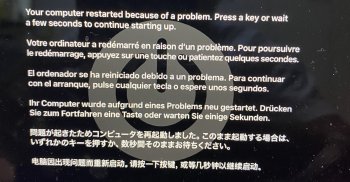
Yeah. There can be many reasons for kernel panics. Sometimes just rebooting is enough, if it's just state that got wonky or the rare bit flip that couldn't be recovered from. But it could also be hardware. - Trying to reboot in Safe mode and also running Apple Hardware Test can give some pointers as to potential issues, but they aren't definitive proofs. Apple Hardware Test can give false negatives, and successfully booting safe mode doesn't necessarily mean it's not a hardware issue, if the affected silicon is just not touched in the limited operation of safe mode, but it gives some clues. A reinstall is a fast way to mostly rule out macOS issues though
hopefully its not a hardware issue, will try reinstalling OS after filevault stops decrypting. I accidentally ran it 😡 and might take awhile. do you know a way to stop or pause this?
bummer, i was going to stop the "decryption" by unplugging charger and reinstall OS via CMD + R but i cant use the volume because it is currently being decrypted even though I already unplugged the charger. I guess the only option right now is to wait for it to finish decrypting? I dont even see the progress bar to know how much time is left decrypting.