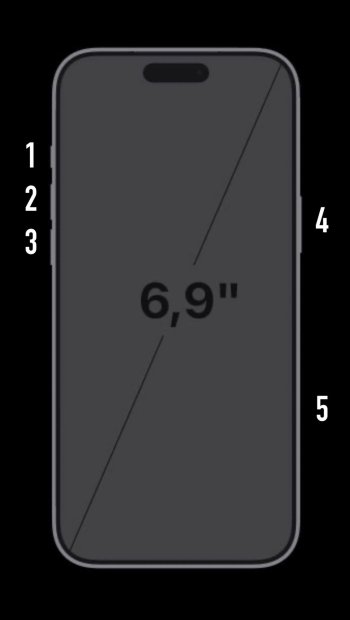
What exactly is this AI thing you’re seeing? On my Air pressing the camera button opens the Camera app and further presses take photos. Works nice and fast for me. Have you looked at the settings for the camera control button to make sure you haven’t got it set to do something funky? First time I’ve had the camera control button and I’m just using it on default settings.
Sounds like you're holding the Camera Control button. Just press/click the button to open the camera app. Holding the button will invoke Apple Intelligence.
You can change the behavior in Settings > Camera > Camera Control.
Sounds like you're holding the Camera Control button. Just press/click the button to open the camera app. Holding the button will invoke Apple Intelligence.
You can change the behavior in Settings > Camera > Camera Control.
Sounds like you're holding the Camera Control button. Just press/click the button to open the camera app. Holding the button will invoke Apple Intelligence.
You can change the behavior in Settings > Camera > Camera Control.
@aperfectcircle > What exactly is this AI thing you’re seeing?
It's the AI that informs me I can to search more to identify what is on my screen, or it shows the outline thing
Yes; but I wanted to make sure everyone was on the same page since it's also possible to reassign the Action Button (1) to open the Camera app, or trigger Visual Intelligence (which is what you're opening by holding down the Camera Button (5).