Become a MacRumors Supporter for $50/year with no ads, ability to filter front page stories, and private forums.

dwomack59

macrumors newbie
Original poster
I am running Tahoe 26, and this morning I sat down to open my mail (Mail 16), but the "All Inboxes" is missing. I have searched, and everyone says to hover your mouse over Favorites, and a (+) will show up. This does not happen. There is NO (+) to add anything. I need help, please, to figure out how to add my "All Inboxes" back to Favorites. I have far too many emails to scroll through each one to see new ones. The All Inboxes simplified this process, and I am desperate to get it back. Can anyone help me, please?
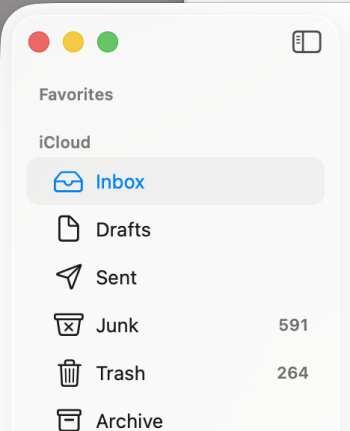
 
It's there. Don't worry. Do you know how to take a screenshot? A screenshot of your Mail sidebar would be helpful–something like this. I only have one account, so I don't group anything under Favorites. I just use the boxes within my one iCloud email account.

Screenshot 2026-05-29 at 9.53.27 AM.png
 
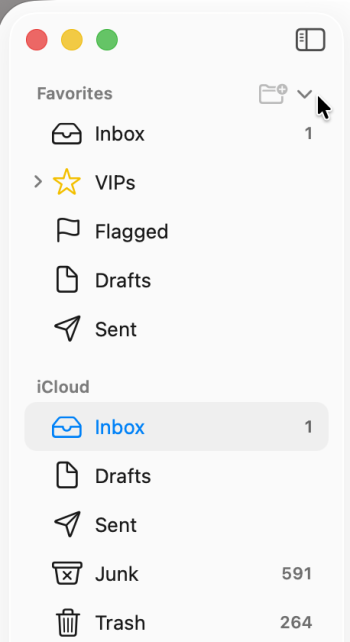
Here it is with my mouse hovering over the right side of Favorites. You can see the little disclosure triange and the plus sign. I don't think you need to add anything. You've probably just hidden it. Click the triangle to open.

Screenshot 2026-05-29 at 9.56.16 AM.png
 
As you can see the only items under Favorites are (3) VIPS, All Drafts, All Sent. But my All Inboxes is gone.
 
Thanks. Apple's documentation might be useful.


All you have to do is hover over the right side of Favorites, as I did in post #2, click on the plus sign, and choose your inbox. Or...you can drag your inbox from under iCloud up to Favorites. Either way works.
 
Thank you! I finally got the (+) sign to come up and was able to restore All Inboxes. I appreciate your assistance. I was just having a very difficult time getting the (+) to show up...
 
Register on MacRumors! This sidebar will go away, and you'll see fewer ads.