Become a MacRumors Supporter for $50/year with no ads, ability to filter front page stories, and private forums.

M@rc

macrumors newbie
Original poster
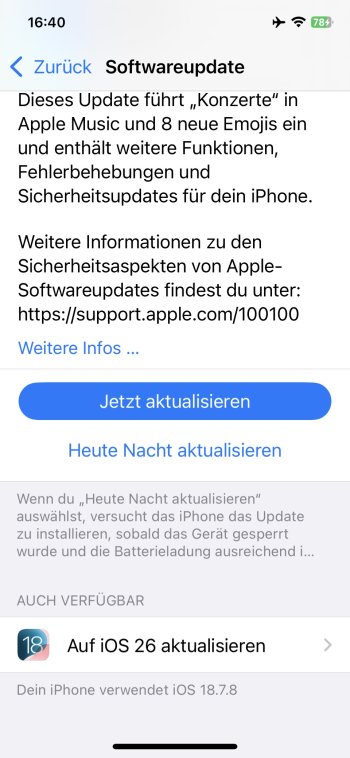
I am on iOS 18.7.8 on my iPhone 14. I just received a notification for an iOS 18 update. It it looks suspicious. There is an option to install 26.6, but at the bottom there is an option to ‘Upgrade to iOS 26’, with an iOS 18 logo. And when I click on it, it seems like it is iOS 18.7.8, but that was already running on this iPhone.

I do not want 26, so I think I should avoid this update, right? It’s confusing.
 

Attachments

  • IMG_0287.png
    IMG_0287.png
    217.2 KB · Views: 70
  • IMG_0286.png
    IMG_0286.png
    529.9 KB · Views: 75
You should be good to install what the first screenshot is telling you, but not the second screenshot if you want to avoid iOS 26.

Also have to say that I love your profile picture! What a great show that was
 
  • Like
Reactions: M@rc
You should be good to install what the first screenshot is telling you, but not the second screenshot if you want to avoid iOS 26.
Not so fast... There is definitely something weird going on here.
  1. The second screenshot says "Your iPhone is using iOS 18.7.8".
  2. The description of the update in the first screenshot is actually for iOS 18.4.
@M@rc, what does Settings > General > About > iOS Version show?

If you are indeed on 18.7.8, I would restart the phone to see if anything changes with the update screens. You could also go to Settings > General > iPhone Storage and delete whatever update it already downloaded to see if that straightens anything out.
 
  • Like
Reactions: theapplehead
Careful! 😲
If you really run on iOS 18.7.8, everything is ok. That is the last version of 18 offered to iPhones capable of iOS 26!
If there is anything, that wants to update, you'll finally end up being on 26! 😱
 
  • Love
Reactions: SalisburySam
Not so fast... There is definitely something weird going on here.
  1. The second screenshot says "Your iPhone is using iOS 18.7.8".
  2. The description of the update in the first screenshot is actually for iOS 18.4.
@M@rc, what does Settings > General > About > iOS Version show?

If you are indeed on 18.7.8, I would restart the phone to see if anything changes with the update screens. You could also go to Settings > General > iPhone Storage and delete whatever update it already downloaded to see if that straightens anything out.
Good point - I agree with this too and definitely think you should double check your current iOS version before anything else. Might be some strange glitch going on
 
What exact version (build) are you on? You can see it in settings, general, about. You might have an earlier 18.7.8 build that was superseded by the build that it’s offering now. There are 2 versions, 22H351 is the older one, if your iPhone shows you are currently running 22H351 then it shows you correctly that there is a newer version of 18.7.8 available.

Either way, forget about this update. Wait for the next iOS 27 beta to release next week and then you can switch over and skip iOS 26 entirely. The next beta version will be one of the last ones before iOS 27 releases in September and that's the point where the big issues (before Apple considers it ready) have already been found and fixed.

I am already on iOS 27 on my iPhone 15 now (public beta 2) and it's fine but looking back at previous years it's better to wait for one more version (public beta 3). There are typically 3 more versions (public beta 4, 5, and 6) before the new version launches officially for everybody.

Or simply leave your iPhone as is and update to iOS 27 in September.

Keep in mind there is no way back to iOS 18 once you do upgrade. If you don't like iOS 27 or it ends up not working well your only choice at that point would be a factory reset to a fresh iOS 27 or downgrade to iOS 26.
 
  • Like
Reactions: SalisburySam
Settings shows that I am currently running iOS 18.7.8 (22H352).

I deleted the update that was downloaded, as suggested, and after checking for updates again the size of the suspicious update is now 7.99 GB! Surely that means it’s iOS 26. I will stay away from it for sure. Thanks everyone for sharing your thoughts.
 
  • Like
Reactions: UliBaer
Settings shows that I am currently running iOS 18.7.8 (22H352).

I deleted the update that was downloaded, as suggested, and after checking for updates again the size of the suspicious update is now 7.99 GB! Surely that means it’s iOS 26. I will stay away from it for sure. Thanks everyone for sharing your thoughts.
I confirm that Apple is indeed trying to trick you into installing iOS 26.
Yesterday, I received a notification that a new version of iOS 18.7.8 was available. Without thinking much about it, I clicked "update now" and, as a result, received iOS 26, which I had intentionally avoided until now.
Given how hard Apple has pushed people to install iOS 26 over the past year, I have no doubt this is a deliberate action by Apple, not a bug.
I'm so mad at Apple now that I could throw my phone in the trash. They took control of my phone and installed something without my consent. This is unacceptable.
 
That is
I confirm that Apple is indeed trying to trick you into installing iOS 26.
Yesterday, I received a notification that a new version of iOS 18.7.8 was available. Without thinking much about it, I clicked "update now" and, as a result, received iOS 26, which I had intentionally avoided until now.
Given how hard Apple has pushed people to install iOS 26 over the past year, I have no doubt this is a deliberate action by Apple, not a bug.
I'm so mad at Apple now that I could throw my phone in the trash. They took control of my phone and installed something without my consent. This is unacceptable.
Sorry to hear that, I totally get your frustration 🙁 I installed macOS 26 on my Mac Mini a few weeks ago and it is awful. So ugly.
 
  • Haha
Reactions: A.W..
Yeah OP, I have no clue what’s happening there on that screenshot, but if you’re already on iOS 18.7.8, there’s absolutely no reason at all for you to hit that update button if you don’t want 26.

There’s no newer version of iOS 18, and there’s no point in trying to update. If you did, it would be for… what exactly? You’re already running iOS 18.7.8 regardless.

Somebody reported that the same thing happened and it went to 26. An utterly pointless endeavour, honestly, there’s no reason to hit that button if you’re on iOS 18.7.8.

Just to clarify, this glitch isn’t there if you’re running an older version of iOS 18:
IMG_5282.png
 
In my case, I clicked on a notification in the start page, not on the software update page inside settings. There, I only had a message saying that a new version of iOS18 was available and the button to update. No mention of iOS26 at all!
 
Settings shows that I am currently running iOS 18.7.8 (22H352).

I deleted the update that was downloaded, as suggested, and after checking for updates again the size of the suspicious update is now 7.99 GB! Surely that means it’s iOS 26. I will stay away from it for sure. Thanks everyone for sharing your thoughts.
I prevented all actions like that by switching my phone to the iOS 18 beta profile. That way Apple can't trick me into "accidentally" installing 26 and the constant nagging to install 26 also vanished. I did the same with iOS 17 until app compatibility forced me to switch to iOS 18. 😠
Wow… it is apparently a glitch and this is indeed happening! See: https://forums.macrumors.com/threads/accidental-update-to-26-can-i-go-back-to-18.2486484/

OP, do NOT update to anything. You will be forced to 26 regardless.
Wow, that's really an indicator Apple is going rogue on tricking users to install 26. 😡
 
  • Like
Reactions: M@rc
I prevented all actions like that by switching my phone to the iOS 18 beta profile. That way Apple can't trick me into "accidentally" installing 26 and the constant nagging to install 26 also vanished. I did the same with iOS 17 until app compatibility forced me to switch to iOS 18. 😠

Wow, that's really an indicator Apple is going rogue on tricking users to install 26. 😡
Interesting, I will switch to the 18 beta channel then 🙂
 
I just gained access to an iPhone 16 already running iOS 18.7.8

I checked the Software Update section and it is the same as the screenshot above. I also checked the build and it is already 22H352 but when checking the Also Available, it shows iOS 18.7.8

I don't know whether something changed from the initial non-beta iOS 18.7.8 to the current iOS 18.7.8 that is available to iPhone models that can upgrade to iOS 26.x

Maybe it is indeed a trap from Apple. iOS 18.7.9 is available but only for iPhone XR, iPhone XS, iPhone XS Max
 
For test purposes I switched off the 18 beta channel and searched for updates. Take a look at this screenshot, taken just a moment ago:

2026-08-06 16.40.jpg

Take a look at the icon placed down below! 😡👎

[edit] Of course I immediately enabled the iOS 18 beta channel again and the threat is gone - phew! 😅 [/edit]
 
Last edited:
Settings shows that I am currently running iOS 18.7.8 (22H352).
I’m on the same version. I have been on the iOS 18 beta channel for a while, so am not getting any update notifications. I’m also not inclined to switch the channel just to see what happens. 😉
 
Register on MacRumors! This sidebar will go away, and you'll see fewer ads.