Become a MacRumors Supporter for $50/year with no ads, ability to filter front page stories, and private forums.
Okay, I appreciate the concern, but to clarify I live in Seattle which is 86% hydro and 5% wind. Two sources that generate electricity regardless.

According to this article, “You only save a watt or two by turning off a computer vs. placing it in sleep mode. Forgetting to shut down your computer just a handful of times will negate an entire year's worth of incremental energy savings.”

This article says The difference in power consumption between sleeping the Mac and turning it off is only .98 W, meaning that over a year, I’m using an additional 5.7 kWh (kilowatt-hours) of power (assuming I actively use the Mac eight hours per day). At the current average residential electricity rate in my part of the country (12.04 cents per kWh), turning off that Mac each night would only save me about $0.69 per year.”

So yeah, it really doesn’t seem like turning off your Mac every day is going to really save people money or help the environment all too much. UNLESS maybe you for some reason never use sleep mode. That’s not to say power efficiency doesn’t matter - it very much matters in notebooks that are on battery, but also matters simply due to thermals. The more power needed, the hotter it gets.
I appreciate your concern as well.

Clearly I wasn’t comparing against sleep mode; I think we’re all aware that sleep mode uses little power. The comparison was between leaving it idle and turning it off, and I said that.

Regardless of whether those two sources generate energy “regardless” or not, the energy could be used for other purpose, rather than wasted on leaving machines on when not required. That’s the point.

If you’re comparing sleep vs. turning it off, I tend to agree that (while more gains are always better) this wouldn’t be the first thing I’d argue about.
 
I appreciate your concern as well.

Clearly I wasn’t comparing against sleep mode; I think we’re all aware that sleep mode uses little power. The comparison was between leaving it idle and turning it off, and I said that.

Regardless of whether those two sources generate energy “regardless” or not, the energy could be used for other purpose, rather than wasted on leaving machines on when not required. That’s the point.

If you’re comparing sleep vs. turning it off, I tend to agree that (while more gains are always better) this wouldn’t be the first thing I’d argue about.

I think it’s a silly hypothetical argument then. It’s assumed that the majority of people use sleep mode since that’s the default setting.
 
I think it’s a silly hypothetical argument then. It’s assumed that the majority of people use sleep mode since that’s the default setting.
Please read post #1, which clearly indicates that OP is doing that due to Homebridge software, which is what started this entire thread.

”Idle”, rather than sleep, is exactly why this thread exists.
 
Last edited:
I am running Homebridge software that connects incompatible devices to Apple HomeKit. It needs to constantly run.
I wonder if you've considered running Homebridge on a different device. I have it on a Raspberry Pi Zero 2 which works perfectly. Although there's no harm in leaving your Studio on, you might feel happier using a Pi (or similar).

If I decide to put my Studio to sleep instead, will the Homebridge software still run under that condition?
No. If it's sleeping, Homebridge will not run.
 
I wonder if you've considered running Homebridge on a different device. I have it on a Raspberry Pi Zero 2 which works perfectly. Although there's no harm in leaving your Studio on, you might feel happier using a Pi (or similar).


No. If it's sleeping, Homebridge will not run.

Hi Feek!

I could buy a Raspberry Pi device. It seems cheap enough, but I know so little about it. If I could do an entire setup for under $100 I would definitely think about it. I would need to look at YouTube tutorials on how to get started and set up Homebridge on it.

But at the moment, it seems after reading all these responses, there is no harm in keeping my Mac Studio idle 24/7 in order to run Homebridge software.

And, I suspect in another year, as MATTER becomes more prominent in the home automation community, I may not need to run Hombebridge at all since updates to many devices should make them integrate more fluently with each other.
 
Less than $100 is feasible. There are tons of info and guides on line as well as images. If you know a bit about Unix, its a breeze. Otherwise follow the instuctions and in an hour or so magic happens. I run Hombridge and an network controller on the Pi. Read documentation before buying, there are many versions of the Pi and there are certain minimums and recommended models.

On the other hand, why try to fix something not broken. I did it for more of a learning exercise.
 
Last edited:
On Amazon, at least, Rpi prices are in the stratosphere. It’s insane. I see a RPi Zero 2 W, bare, for $105! It’s a $15, low end, 512mb SBC! And you’ll typically want between $20 and $50 worth of extras to make it fully usable.

Even the super basic 1GB RPi 4 is $150 in kit form, which I’d argue is the best starting point for most due to its’ easier output, video, ethernet, etc. features. That’s wild; they were half that in the before times.
 
  • Like
Reactions: ColdCase
Less than $100 is feasible. There are tons of info and guides on line as well as images. If you know a bit about Unix, its a breeze. Otherwise follow the instuctions and in an hour or so magic happens. I run Hombridge and an network controller on the Pi. Read documentation before buying, there are many versions of the Pi and there are certain minimums and recommended models.

On the other hand, why try to fix something not broken. I did it for more of a learning exercise.


I don't know anything about Unix but I have gotten very good at doing complex OS X tasks that often involve terminal commands. So, I am pretty confident I could figure it out.

Just not certain it's worth the trouble of buying extra equipment when I have Homebridge running fine on my Mac.


On Amazon, at least, Rpi prices are in the stratosphere. It’s insane. I see a RPi Zero 2 W, bare, for $105! It’s a $15, low end, 512mb SBC! And you’ll typically want between $20 and $50 worth of extras to make it fully usable.

Even the super basic 1GB RPi 4 is $150 in kit form, which I’d argue is the best starting point for most due to its’ easier output, video, ethernet, etc. features. That’s wild; they were half that in the before times.

I went directly to the Raspberry Pi site and saw it for $15. The problem is, as I mentioned, I know nothing about Pi Raspberry, what accessories I need to buy, and how to connect and install the software. Again, I am pretty confident I could figure it out with a few YouTube videos.

Thanks, everyone, for the help.
 
I went directly to the Raspberry Pi site and saw it for $15.

Agreed. But it's almost unobtanium at that price. https://www.canakit.com/raspberry-pi-zero-2-w.html?cid=usd&src=raspberrypi Canakit is one of their big vendors; it's all sold out... and has been for a while.

The problem is, as I mentioned, I know nothing about Pi Raspberry, what accessories I need to buy, and how to connect and install the software. Again, I am pretty confident I could figure it out with a few YouTube videos.

Thanks, everyone, for the help.
It's trivial. Stick a USB SDCard reader into your Mac, stick the SDCard into the reader, download the image from here (https://homebridge.io/ - and then here: https://github.com/homebridge/homebridge-raspbian-image/wiki/Getting-Started), stick the card into the RPi you bought, boot it up, and start configuring it. It's a breeze.
 
Agreed. But it's almost unobtanium at that price. https://www.canakit.com/raspberry-pi-zero-2-w.html?cid=usd&src=raspberrypi Canakit is one of their big vendors; it's all sold out... and has been for a while.


It's trivial. Stick a USB SDCard reader into your Mac, stick the SDCard into the reader, download the image from here (https://homebridge.io/ - and then here: https://github.com/homebridge/homebridge-raspbian-image/wiki/Getting-Started), stick the card into the RPi you bought, boot it up, and start configuring it. It's a breeze.

Oh Wow. That easy? Thanks for the quick-start instructions.

Well, if the Raspberry is sold out and I have to pay that kind of premium to buy it on Amazon, it doesn't seem like a viable option at the moment.
 
Please read post #1, which clearly indicates that OP is doing that due to Homebridge software, which is what started this entire thread.

”Idle”, rather than sleep, is exactly why this thread exists.
My original comment that you quoted was in response to this comment:

Example:
Let’s say it draws 5 watts sleeping X 8 hours = 40 watts wasted every day X 365 = 14.6 kWh wasted every year.

Multiply 14.6 kWh/year X 50,000,000 users = 730,000,000 kWh wasted every year- doing absolutely nothing.

Yes I know OP was talking about idle, but the convo you jumped into was talking about sleeping. And my comments were pointing out how this persons math and numbers are wrong and how this is a silly hypothetical argument to get upset over.
 
My original comment that you quoted was in response to this comment:


Yes I know OP was talking about idle, but the convo you jumped into was talking about sleeping. And my comments were pointing out how this persons math and numbers are wrong and how this is a silly hypothetical argument to get upset over.

You specifically said idle, which was the term the OP used (rather than sleep) to indicate the machine was idle (rather
than, say, sleeping, which was another part of his question). :)
 
I agree with Shazaam above.
Leaving it on 24 hours (much of the time which will be spent idling), is just gonna pull more dust into/through it sooner rather than later.
 
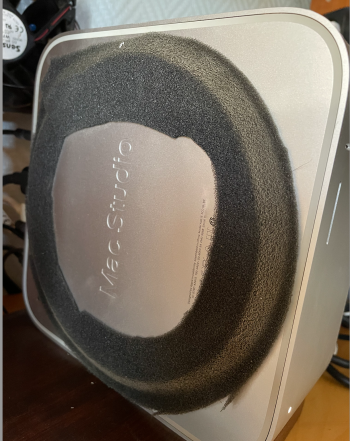
I ended up to use DustEND G3 filter fo my Studio. That stuff is made for computers and don't affect the airflow, but seems to keep the dust away. Good is that it has a sticky side that "glues" it to the object. Just cut a strip from the roll and then put it over the intake holes. Easy to take off and vacuum clean the strip, and when it doesn't want to stick anymore, just cut a new one. You can have many strips from the roll.

"G3 - FINE PURIFICATION FILTER
Polyfoam with an open cell (60ppi). Material is of high efficiency of
filtration, sifting large and minute particles of dust up to 5 microns.
Best for PCs that need high cleanliness"

www.dustend.com

My Studio is on 24/7
 
I ended up to use DustEND G3 filter fo my Studio. That stuff is made for computers and don't affect the airflow, but seems to keep the dust away. Good is that it has a sticky side that "glues" it to the object. Just cut a strip from the roll and then put it over the intake holes. Easy to take off and vacuum clean the strip, and when it doesn't want to stick anymore, just cut a new one. You can have many strips from the roll.

"G3 - FINE PURIFICATION FILTER
Polyfoam with an open cell (60ppi). Material is of high efficiency of
filtration, sifting large and minute particles of dust up to 5 microns.
Best for PCs that need high cleanliness"

www.dustend.com

My Studio is on 24/7

Could you provide photos of how you applied it and/or what it looks like? I may buy this. Just not sure how it is applied. Thanks.
 
Could you provide photos of how you applied it and/or what it looks like? I may buy this. Just not sure how it is applied. Thanks.
I cutted that one with a scissor, next one I will cut it with a knife. You just wrap the material around the base so that the holes are covered and it sticks well and holds well on place. As you can see from the picture it really works. To clean that I use a vacuumcleaner at full speed so I can have the nozzle few centimeters away from the Studio.
 

Attachments

  • filter.png
    filter.png
    2.8 MB · Views: 101
I cutted that one with a scissor, next one I will cut it with a knife. You just wrap the material around the base so that the holes are covered and it sticks well and holds well on place. As you can see from the picture it really works. To clean that I use a vacuumcleaner at full speed so I can have the nozzle few centimeters away from the Studio.


That's great. How do you secure the filter/foam? Is it self-adhesive?

Thanks for the help, guys.
 
  • Like
Reactions: Kim Larni
I cutted that one with a scissor, next one I will cut it with a knife. You just wrap the material around the base so that the holes are covered and it sticks well and holds well on place. As you can see from the picture it really works. To clean that I use a vacuumcleaner at full speed so I can have the nozzle few centimeters away from the Studio.

I was about to order this

It's a great idea, but $30 is a lot of money for all that material for which I will only need a small piece.

I wish they sold this in smaller sizes.

Going to think about this and perhaps go for the cheaper solution on Amazon and just sit the Studio upon it...

 
As an Amazon Associate, MacRumors earns a commission from qualifying purchases made through links in this post.
..

Going to think about this and perhaps go for the cheaper solution on Amazon and just sit the Studio upon it...

I tried this recently on my base Studio. I had to cut a circle out of the top layer for the vents of the Studio to sit in. Otherwise it was not heavy enough to compress the foam much. There is quite a bit of filter surface area, so it should be awhile before it needs cleaned.
 
As an Amazon Associate, MacRumors earns a commission from qualifying purchases made through links in this post.
This seems like the no-brainer thing to do

It's $70 on Spigen's website but $34 on Amazon

 
As an Amazon Associate, MacRumors earns a commission from qualifying purchases made through links in this post.
This seems like the no-brainer thing to do

It's $70 on Spigen's website but $34 on Amazon

Interesting. I hope it's available in Europe as well so we don't need to pay the expensive custom duties.
 
As an Amazon Associate, MacRumors earns a commission from qualifying purchases made through links in this post.
This seems like the no-brainer thing to do

It's $70 on Spigen's website but $34 on Amazon

Nice, stylish. The downside is that the filter area is small, which means more often cleaning, not as convenient when the studio is not readily accessible. It is probably not all that effective filtering out small particles, if thats a concern. Much better than nothing, however.
 
As an Amazon Associate, MacRumors earns a commission from qualifying purchases made through links in this post.
  • Like
Reactions: Shazaam!
Register on MacRumors! This sidebar will go away, and you'll see fewer ads.