Become a MacRumors Supporter for $50/year with no ads, ability to filter front page stories, and private forums.

kmarketing

macrumors 6502
Original poster
Mar 26, 2004
416
0
Hi,

Just wondering if any of you decorated your powerbook to make it different. Post some pics or links of your powerbook with a different paint job, stickers/decals, etc.

Thanks!
 
Well, my Titanium has lost lots of paint and is covered in scratches, so I've seriously been considering painting it a glossy black for a while now. I had a friend in an auto shop that could have set me up with some great paint, but the cost was just too prohibitive. There are also some online places that'll do it, but I don't have that kind of money. So for now, no, I haven't decorated my Powerbook. My gf's old G3 iBook, though... woo! That thing is (was) sweet!
 
The PowerBook has such beauty to behold. I prefer the natural look. My concern also would be my technique of adding the decoration and how long it would look nice.
 
wdlove said:
The PowerBook has such beauty to behold. I prefer the natural look. My concern also would be my technique of adding the decoration and how long it would look nice.
I agree. I wouldn't have the guts to do anything to mine!! :confused: :eek:
 
Decorate? You have got to be kidding.

iBooks though, I see people put stickers on those all the time. But a PowerBook? No that's just wrong.
 
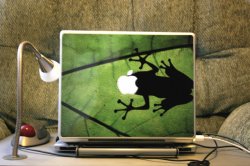
It's just a skin I got on-line. Not for everyone but there are lots to choose from. I got it mainly to protect the finish after reading a few "I scratched my PBook!" posts and Green is my favorite color. There is a site somewhere that allows you to upload your own pics or artwork and will custome make a skin for you (about $30, I think). The apple shape is already cut out for you so the bezel shows through.
 

Attachments

  • IMG_0545.jpg
    IMG_0545.jpg
    164.5 KB · Views: 221
erickkoch said:
It's just a skin I got on-line. Not for everyone but there are lots to choose from. I got it mainly to protect the finish after reading a few "I scratched my PBook!" posts and Green is my favorite color. There is a site somewhere that allows you to upload your own pics or artwork and will custome make a skin for you (about $30, I think). The apple shape is already cut out for you so the bezel shows through.
Looks quite nice... I still prefer the natural look, though. :)
 
I guess it's sorta like a tattoo. To some it's "really cool!" and to other it's, "what the hell were they thinking when the got that!" At least the skin can be peeled off.

I like my "Kermit motif."

:p
 
Color Apple Logo

I got part way to colorizing the backlit logo on my brandnew PB lid. There are links elsewhere on how to colorize the logo for iBooks. I got as far as printing out the color bands of an old rainbow apple logo onto a transparency for overhead projectors. I made one attempt at cracking the top open, but I couldn't figure out how to get behind the screen. If I ever figure it out I'll proceed. I figure at some point someone will post directions on how to replace the screen. I think it would look pretty sweet. It would retain the very clean look of the powerbook, but spice it up with some nice color.
 
I work at a skate shop so i have WAY too many stickers so my car has many and such but i would NEVER put one on my PB! It is too beautiful for that sort of thing
 
im thinking of adding some stickers to mine, but haven't decided just yet... i post pictures if i do, the thing is two years old now.... it could use some sprucing up.
 
I changed the color of the apple on the lid to magenta.
I simply put a LEE (#126, normally used for lighting) gel inside the lid. Quite cool, esp. at night.
 
fwhh said:
I changed the color of the apple on the lid to magenta.
I simply put a LEE (#126, normally used for lighting) gel inside the lid. Quite cool, esp. at night.

i really really want to change the color of the apple, but i am afraid of Fing up the LCD panel while doing it...... i nice deep blue would be awesome.
 
PlaceofDis said:
i really really want to change the color of the apple, but i am afraid of Fing up the LCD panel while doing it...... i nice deep blue would be awesome.
The risk is not sooo big when changing the color. But deep blue (e.g. LEE#120) will be quite faint, because the backlight isn't bright enough support dark colors. If you change it to a dark color, i would suggest to remove the original frost filter.
 
fwhh said:
The risk is not sooo big when changing the color. But deep blue (e.g. LEE#120) will be quite faint, because the backlight isn't bright enough support dark colors. If you change it to a dark color, i would suggest to remove the original frost filter.

hmmm thanks for the info, you have the same powerbook as me too, maybe if i am feeling adventurous one weekend. would it be hard to take off the 'frost filter'?
 
PlaceofDis said:
hmmm thanks for the info, you have the same powerbook as me too, maybe if i am feeling adventurous one weekend. would it be hard to take off the 'frost filter'?
No. Actually it is just a piece of plastic attached with some sticky tape to the back of the lid. :rolleyes:
 
fwhh said:
No. Actually it is just a piece of plastic attached with some sticky tape to the back of the lid. :rolleyes:

gotcha, i will be looking into this sometime soon then..... maybe i will just go for a lighter blue..... thanks for the info
 
I like that skin!! Mine is currently natural, but I'm not opposed to a skin. It lives in a RadTech Sleeve to avoid scratching. Can you give the link for the skins, please? :)
 
Register on MacRumors! This sidebar will go away, and you'll see fewer ads.