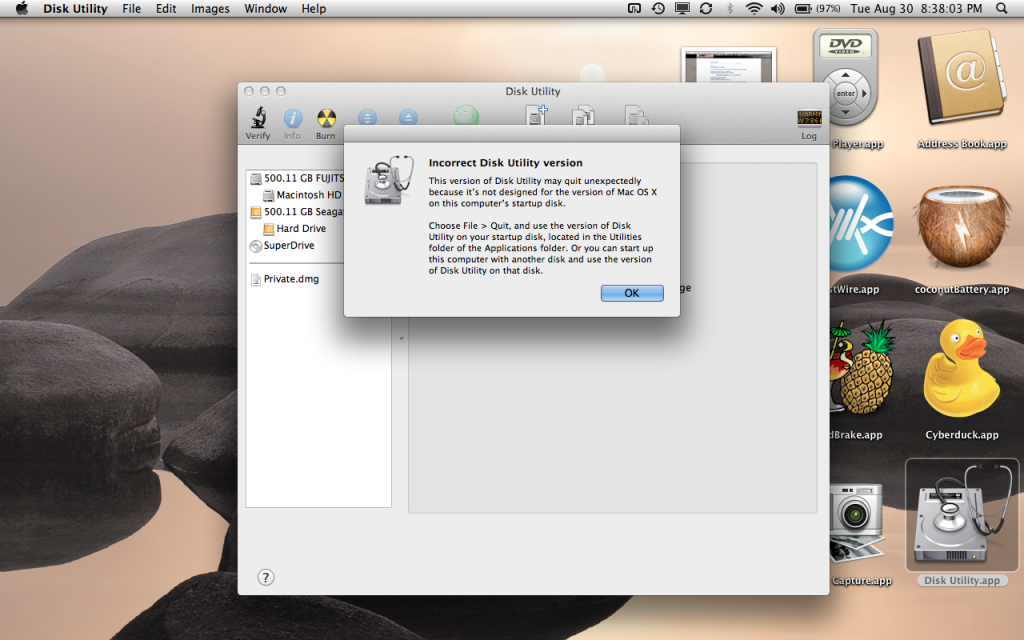
Did you do any restores at any point for the Applications folder? You must have replaced disk utility with a backed up version at some point. It could be dangerous using disk utility till you fix this problem. Apple made some major changes that older versions of disk utility won't know about.
EDIT: Wait a sec... Why is that on the desktop? It should be in your utilities folder. You must have moved it at some point. Get the copy in the Utilities folder in the Applications folder and use that. You really shouldn't relocate basic system applications like that. Make a shortcut instead. Don't move that old copy back into the utilities folder.
kinda strange to have all those apps on your desktop too...thats what the applications folder and the wonderful included app launcher called Spotlight are for 🙂
Leave him/her alone!
kinda strange to have all those apps on your desktop too...thats what the applications folder and the wonderful included app launcher called Spotlight are for 🙂
aye, if they've been located there from prior to an upgrade to Lion then chances are they're SL versions - Lion upgrade install cheerfully ignored any copies of SL utils that I had in non standard directories (leaving me with both Lion ones in Apps and Apps/Utils and the SL versions that were in those other locations)
These apps are the ones I use often, and it was a little inconvenient to have to go to finder, apps, then locate the app i use. Why not just leave it on the desktop? All of that space is just wasted.