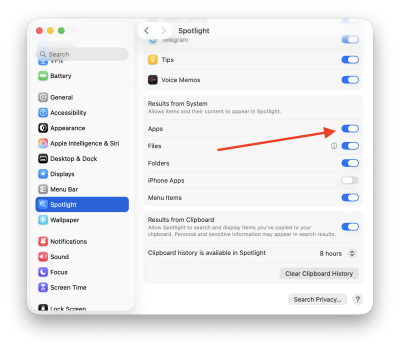
Obviously the app launcher is a hot mess - along with most changes in Tahoe. But aside from UX design issues, the impotence of the actual Search feature itself is an astounding frustration. Am I missing something? Is mine the only one that doesn't work?
Put simply, ALMOST ALL apps simply never appear in search results, forcing me to scroll to find them. I have to do this ALL THE TIME, and it drives me crazy. For example, you can see here I have Lightroom installed - but it cannot be found by searching.


Same goes for almost all other Apps, including Utilities. BTW, when scrolling, the utility apps are listed under "Other", instead of "Utilities", unlike the name of the tab you click to bring them up. Using Spotlight instead of Apps delivers the same problem, except with lots more irrelevant results to wade through.
WTF Apple.
And of course, Launchpad is now just "Apps", which is not disambiguated. How tf are we (esp new users unfamiliar with macos) supposed to search the web to troubleshoot apps with generic names like "Apps" and "Passwords". We used to have poetically named products - "Keychain" and "Launchpad", and more. Now they've renamed them for NO reason and dumped the iconic work of past marketing teams in favor of generic terms that make it harder and boring-er for us to use. Apple keeps taking insanely great software and making it insanely trash.
Put simply, ALMOST ALL apps simply never appear in search results, forcing me to scroll to find them. I have to do this ALL THE TIME, and it drives me crazy. For example, you can see here I have Lightroom installed - but it cannot be found by searching.
Same goes for almost all other Apps, including Utilities. BTW, when scrolling, the utility apps are listed under "Other", instead of "Utilities", unlike the name of the tab you click to bring them up. Using Spotlight instead of Apps delivers the same problem, except with lots more irrelevant results to wade through.
WTF Apple.
And of course, Launchpad is now just "Apps", which is not disambiguated. How tf are we (esp new users unfamiliar with macos) supposed to search the web to troubleshoot apps with generic names like "Apps" and "Passwords". We used to have poetically named products - "Keychain" and "Launchpad", and more. Now they've renamed them for NO reason and dumped the iconic work of past marketing teams in favor of generic terms that make it harder and boring-er for us to use. Apple keeps taking insanely great software and making it insanely trash.
Last edited: