

Become a MacRumors Supporter for $50/year with no ads, ability to filter front page stories, and private forums.

MacRumors

macrumors bot
Original poster
Apr 12, 2001
70,580
42,303


Apple is once again testing its new Background Security Improvement feature that first rolled out in iOS 26.1, iPadOS 26.1, and macOS Tahoe 26.1. Following a previous test earlier this week, developers and public beta testers who are running iOS 26.3, iPadOS 26.3, or macOS Tahoe 26.3 can now install a second Background Security Improvement update for testing purposes.
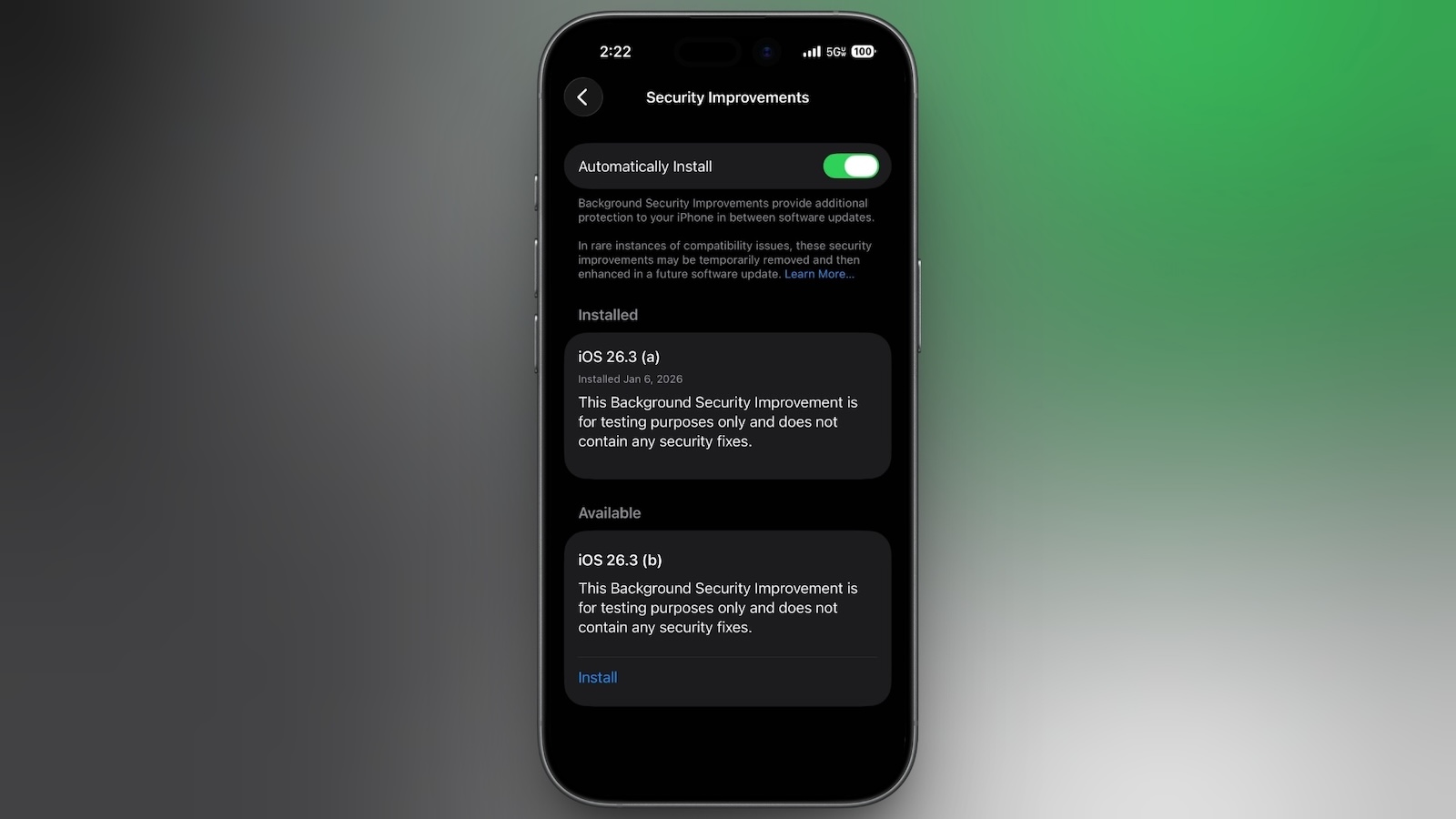
background-security-improvements-2.jpg

Apple says Background Security Improvements provide additional security protections between software updates for Safari, WebKit, and other system libraries.

Background Security Improvements can be installed by going to the Privacy and Security section of the Settings app, scrolling down to Background Security Improvements, and selecting the "Install" option. If "Automatically Install" is toggled on, Background Security Improvements will be automatically installed when they come out with no need to manually install them.

Apple says that users who opt not to install the Background Security Improvements will receive the updates in a standard software update.

Apple previously had a Rapid Security Response update feature for delivering security improvements, but it wasn't used often after it was introduced in iOS 16, and was ultimately phased out in favor of Background Security Improvements. At one point in 2023, there was a Rapid Security Response bug that prevented some websites from displaying properly.

Apple warns that Background Security Updates can result in "rare instances of compatibility issues." Should that occur, the updates may be temporarily removed and enhanced in a subsequent software update.

Article Link: Apple Again Tests Background Security Updates in iOS 26.3 and macOS Tahoe 26.3
 
But Apple is just prepping for a time when there will not be any choice. They have a constant history of removing options.

So "turn it off" works for now, but what about later?
First of all, this feature has been an iOS for four years now and you’ve always been able to turn it off, even though Apple hasn’t really used it. And they specifically state you can remove the security updates in case of compatibility issues, and you will get the security update in the future software revision.
But also… Why are you worrying about some hypothetical that might maybe possibly but also might possibly not probably won’t happen someday?
For now, they are removable, and you can turn the feature off.
If that policy changes, cross that bridge when you get to it, literally absolutely no point in fixating on it today.
It’s like the complaints in 2010 that Apple was going to make macOS “AppStore only” and your finder and terminal and all of your cool computer things are going away. It’s been 16 years and you can still download apps to your Mac from the Internet and fly through Finder and use the terminal to your heart’s content. You can even do those things at the same time..
 
like the complaints in 2010 that Apple was going to make macOS “AppStore only” and your finder and terminal and all of your cool computer things are going away. It’s been 16 years and you can still download apps to your Mac from the Internet and fly through Finder and use the terminal to your heart’s content. You can even do those things at the same time..

Make no mistake, they really wanted to do this.

But I think they realized it would have been the end of the Mac.
 
First of all, this feature has been an iOS for four years now and you’ve always been able to turn it off, even though Apple hasn’t really used it. And they specifically state you can remove the security updates in case of compatibility issues, and you will get the security update in the future software revision.
But also… Why are you worrying about some hypothetical that might maybe possibly but also might possibly not probably won’t happen someday?
For now, they are removable, and you can turn the feature off.
If that policy changes, cross that bridge when you get to it, literally absolutely no point in fixating on it today.
It’s like the complaints in 2010 that Apple was going to make macOS “AppStore only” and your finder and terminal and all of your cool computer things are going away. It’s been 16 years and you can still download apps to your Mac from the Internet and fly through Finder and use the terminal to your heart’s content. You can even do those things at the same time..
Some people just don’t feel right in the morning unless they wake up complaining about hypothetical things.
 
I like the idea of breaking out security updates so you don’t have to wait for a full OS release to get them.

I just wish they had a decent “listing” in settings that showed what was installed, when and what CVE it addresses and have the link right there to initiate the uninstall if you have issues.
 
Or they could just rewrite everything in rust (the open source libraries they use thdt seem to cause a lot of trouble) or swift, so we don’t have to have this feature (yes I know that would be an insane amount of work).
 
Apple warns that Background Security Updates can result in "rare instances of compatibility issues." Should that occur, the updates may be temporarily removed and enhanced in a subsequent software update.
😂 Love how fixing buggy software updates is now considered an enhancement.
 
  • Haha
Reactions: darthgreen
According to recent reports (NineToFiveMac) most users are avoiding OS26.

"iOS 26 has been available for nearly four months, yet reporting from Statcounter indicates the iPhone update is lagging significantly behind predecessors in adoption, with most users opting to stay on iOS 18."

The only thing anyone wants from future v26 updates is a complete removal of all v26 garbage, all of it, and a full rollback to v18 as a base for any future updates. Get rid of the v26 garbage, get rid of the Tahoe garbage, chuck it all in the trash and start over.
 
  • Disagree
Reactions: SFjohn and robfoll
First of all, this feature has been an iOS for four years now and you’ve always been able to turn it off, even though Apple hasn’t really used it. And they specifically state you can remove the security updates in case of compatibility issues, and you will get the security update in the future software revision.
But also… Why are you worrying about some hypothetical that might maybe possibly but also might possibly not probably won’t happen someday?
For now, they are removable, and you can turn the feature off.
If that policy changes, cross that bridge when you get to it, literally absolutely no point in fixating on it today.
It’s like the complaints in 2010 that Apple was going to make macOS “AppStore only” and your finder and terminal and all of your cool computer things are going away. It’s been 16 years and you can still download apps to your Mac from the Internet and fly through Finder and use the terminal to your heart’s content. You can even do those things at the same time..

I agree, the point of this system is to have rapid and optional updates to marginal problems. If they do it right and don't break Facebook again (though I wouldn't mind) these can be useful for people who need top tier security, which means patches for all potential issues as soon as possible.

There's no reason for them to force these on everyone, that's what their flagship releases are for and they are clearly already pushing those hard. So no change there.

Slight aside to your second point, they are testing their boundaries with the mac app store. But it has the same problem as the Microsoft Store and Apple has adapted less well. People on actual computers do want package management, they do not want central authority. Microsoft actually eventually gave in on that, Apple still refuses.

That's why Microsoft has winget and the Mac still has to install Homebrew. Ironically Microsoft embraced Apple's original intention with OS X better than Apple today does.
 
Register on MacRumors! This sidebar will go away, and you'll see fewer ads.