Become a MacRumors Supporter for $50/year with no ads, ability to filter front page stories, and private forums.

Mity

macrumors 65816
Original poster
Short version: I bought a car in January that has only wired Apple CarPlay. Prior to me using CarPlay, my phone would drop from 100% to 90% at the end of the day. Since using CarPlay starting January, I now finish the day at 80% without any change in other usage.

Long version: I bought an iPhone 15PM brand new back in Sep 2025. Most of my phone use is just mail and WhatsApp - no games, very limited media consumption. My phone's battery life was fantastic until I bought a car in January that has only wired Apple CarPlay.

Since getting my car and using Apple CarPlay via my phone for navigation, I've noticed that my battery is running out much faster than it used to. In fact, the iPhone battery is draining at twice the rate that it used to prior to CarPlay.

Prior to me using CarPlay, my phone would drop from 100% to 90% at the end of the day. Since using CarPlay starting January, I now finish the day at ~80%. I think this is because the wired CarPlay unit continuous charges my phone. And limiting the max charge to 80% does not solve this problem since the phone continues to charge up to 80% while in use. Posts like these confirm my suspicion.

I know I don't use my phone like a typical person and my battery is still sufficient to last a few years but I don't like the fact that CarPlay did this! I wish there was an option to turn off charging completely until the battery drops to 20%.

My remedy for now is using my old Pixel 7a for navigation using Android Auto. If the battery degrades on that phone, I don't care. My iPhone is a 1TB model and I want to keep it as long as I can since I hate redesign of the newer iPhones with the camera tough bar and aluminum.

Does anyone have an alternate solution? 3rd party wireless CarPlay solution? I generally don't like to buy 3rd party devices from Chinese OEMs but I don't think I have a choice now.

rich text editor image
 

Attachments

  • 1774148925042.png
    1774148925042.png
    88.9 KB · Views: 61
Ending the day at 80% is not ruining your battery; not even close.
I don’t understand the issue… ending the day at 80% battery doesn’t seem like much of a problem to me??

Finishing the day at 80% wouldn't be an issue if I was already finishing the day at 80% prior to using CarPlay but that's not what's happening.

I used to end at 90%. In just 2 months of using CarPlay, I am ending at 80% with no other usage change. That's 2x degradation by using CarPlay. What makes this worse is the fact that it happened soo quickly. Literally just within 2 months of use.

Here's an A-B comparison:

1774149857334.png


This is very clearly caused by overcharging. There needs to be a Battery setting to allow use of CarPlay without charging. Or perhaps a systemwide setting to not charge anytime the USB cable is plugged in. There are times at which I just want to transfer things from my iPhone to my Mac and it's senseless to force a charge.
 
Finishing the day at 80% wouldn't be an issue if I was already finishing the day at 80% prior to using CarPlay but that's not what's happening.

I used to end at 90%. In just 2 months of using CarPlay, I am ending at 80% with no other usage change. That's 2x degradation by using CarPlay. What makes this worse is the fact that it happened soo quickly. Literally just within 2 months of use.

Here's an A-B comparison:

View attachment 2615646

This is very clearly caused by overcharging. There needs to be a Battery setting to allow use of CarPlay without charging. Or perhaps a systemwide setting to not charge anytime the USB cable is plugged in. There are times at which I just want to transfer things from my iPhone to my Mac and it's senseless to force a charce.
Ending the day with 80% battery left means you are barely using your iPhone. Using CarPlay like you are, isn't ruining your battery. You are worried over nothing.
 
Ending the day with 80% battery left means you are barely using your iPhone. Using CarPlay like you are, isn't ruining your battery. You are worried over nothing.

I'm not sure if you're deliberately changing the topic or whether you didn't read my post above but I'll say again: Wired CarPlay has caused 2x degradation in just 2 months. At that rate, my battery is going to end up like the person that I linked prevously.

My iPhone 15PM is a 1TB model that I bought to keep for ~5 years as I find the newer models are ugly, especially the camera touch bar and the cheap aluminum case. If you don't care about your battery degrading quickly because you want to buy a new phone every year, that's fine, but I do care.

Hopefully someone else can provide advice on a high-quality wireless CarPlay adapter or other potential solutions.
 
Last edited:
I'm not sure if you're deliberately changing the topic or whether you didn't read my post above but I'll say again: Wired CarPlay has caused 2x degradation in just 2 months. At that rate, my battery is going to end up like the person that I linked prevously.

My iPhone 15PM is a 1TB model that I bought to keep for ~5 years as I find the newer models are ugly, especially the camera touch bar and the cheap aluminum case. If you don't care about your battery degrading quickly because you want to buy a new phone every year, that's fine, but I do care.

Hopefully someone can provide advice on a high-quality wireless CarPlay adapter.
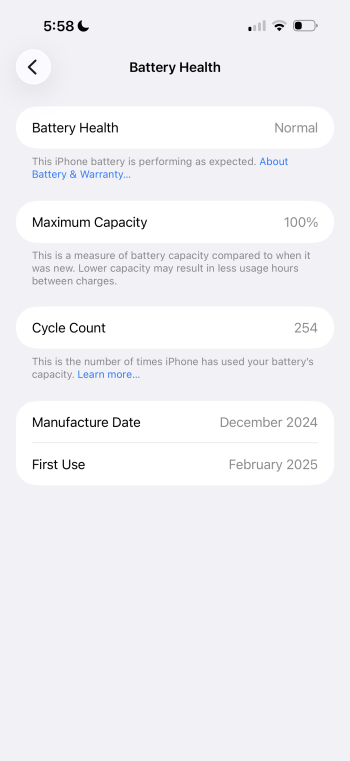
I didn't change the subject. I read your posts and saw your battery picture, which shows 100% battery with just 39 cycles. Like I said, you barely use your phone. You don't have a problem and your battery health is not down to 80%. I am not confused but, it appears you may be confused about the actual state of your battery.

I use wireless CarPlay almost every time I get in my car (with my iPhone Air) and my battery is still showing 100% capacity with 92 cycles. I usually end the day anywhere from 30-45% battery left.
 
I didn't change the subject. I read your posts and saw your battery picture, which shows 100% battery with just 39 cycles. Like I said, you barely use your phone. You don't have a problem and your battery health is not down to 80%. I am not confused but, it appears you may be confused about the actual state of your battery.

I use wireless CarPlay almost every time I get in my car (with my iPhone Air) and my battery is still showing 100% capacity with 92 cycles. I usually end the day anywhere from 30-45% battery left.

You are changing the subject by stating that I don't use my phone that much so that I shouldn't worry. That's not for you to decide and it's also not what I asked. I asked if some knew of any 3rd party CarPlay adapters or solutions to limit charging while using CarPlay.
Does anyone have an alternate solution? 3rd party wireless CarPlay solution? I generally don't like to buy 3rd party devices from Chinese OEMs but I don't think I have a choice now.

 
If anyone else does know of any ways to limit charging while using CarPlay, please let me know. The only short term solution I have is to create an automation that turns on low power mode when connected to CarPlay from the advice found here:
I also have this automation set up… I find that the phone heats up much less when low power mode is on while using CarPlay and I cannot notice any reduction in performance. I also don’t want my phone to be doing background updating or syncing tasks while I’m in the car switching towers constantly so that is also great too.

I couldn't find a shortcut that limits charging to 80% and it seems there isn't one yet but manually limiting charging to 80% and low power mode is the most I can do now.
 
Last edited:
Apple really should’ve been transparent about slowing iPhones down, it gets old having a new post of the week regarding battery health.

I've never posted in the CarPlay section before. Are you saying that this is a frequent concern with CarPlay?
 
gps uses power

I don't have a direct A-B comparison between Google Maps navigation using my iPhone alone vs Google Maps via CarPlay at least by using just my iPhone, I am able to manage charging my phone manually by either plugging in a USB cable or removing it. I can't do that with wired CarPlay.

I'm looking for a similar solution, meaning I would prefer to use battery to run CarPlay and then charge the phone when the battery depletes to 20%.
 
You are looking for a solution to a problem that doesn’t exist. There is nothing wrong with your battery, your phone, CarPlay, or your usage. If you don’t want your phone to charge while using CarPlay get a wireless dongle. Then watch how much your battery level drops.

If you actually look my screenshot more critically, you'd see that I began using my phone in Sep 2025 but I have only ~39 charge cycles. Those charge cycles increased rapidly AFTER I began using CarPlay in January. I don't recall the exact number I had in January but it had to be less than 30.

Meaning, given my very little usage, I didn't need to charge very frequently and thus I would finish my day from 100% to 90%. For the first 5 months, the charge cycles were very low. AFTER using CarPlay for 2 months, I now finish the day at 80%. The increase in charge cycles and finishing the day at 80% tell me that the rate of degradation increased.

For someone like me, who doesn't use their phone very much, the rate of degradation was incredibly noticeable! A night and day difference between pre-CarPlay and post. I stopped using it right away currently using my old Pixel 7a connected via Android Auto. If the Pixel 7a battery degrades, I don't care, as it's an old phone.
 
If you actually look my screenshot more critically, you'd see that I began using my phone in Sep 2025 but I have only ~39 charge cycles. Those charge cycles increased rapidly AFTER I began using CarPlay in January. I don't recall the exact number I had in January but it had to be less than 30.
And?


Again. GPS navigation uses a heap of power. if you don't want to burn a heap of power on your phone, don't use carplay.

The rest of us will carry on with life and use it as required.

Over 1 year of CarPlay twice a day at least along with heavy usage on iphone 16 pro max:
 

Attachments

  • IMG_3194.png
    IMG_3194.png
    322.4 KB · Views: 44
Last edited:
And?


Again. GPS navigation uses a heap of power. if you don't want to burn a heap of power on your phone, don't use carplay.

The rest of us will carry on with life and use it as required.

In my original post, I asked for recommendations on good 3rd party adapters or ways of limiting the charge. If you don't want to provide either, then why comment? You can choose to simply ignore my post. I'm not telling you and others to not use CarPlay or how to use your phone in general.
 
If you actually look my screenshot more critically, you'd see that I began using my phone in Sep 2025 but I have only ~39 charge cycles. Those charge cycles increased rapidly AFTER I began using CarPlay in January. I don't recall the exact number I had in January but it had to be less than 30.

Meaning, given my very little usage, I didn't need to charge very frequently and thus I would finish my day from 100% to 90%. For the first 5 months, the charge cycles were very low. AFTER using CarPlay for 2 months, I now finish the day at 80%. The increase in charge cycles and finishing the day at 80% tell me that the rate of degradation increased.

For someone like me, who doesn't use their phone very much, the rate of degradation was incredibly noticeable! A night and day difference between pre-CarPlay and post. I stopped using it right away currently using my old Pixel 7a connected via Android Auto. If the Pixel 7a battery degrades, I don't care, as it's an old phone.

Your reduced state of charge is from use, and your obsession over it is unfounded. Good luck to you.
 
Hello Mity, I've been lurking on this forum for years and I have (finally) decided to register because (I hope) I can shed some light on this topic.

When you unplug your phone from a charger, it instantly switches to running off its battery. This means that its battery is no longer full. If it said "100%" when you unplugged it, it should pretty soon say "99%".

Years ago, phone makers decided that that quick decrease made their products look bad. Leaving home with a phone that says "100%" is more reassuring than "99%". They wanted to make a good first impression with battery life, so they programmed their phones to lie – slightly.

What's really happening inside a phone is that its charging system is monitoring the battery's voltage and how much current has gone in and out, in order to accurately estimate how much usable energy is in the battery as it charges and discharges.

These measurements, in volts and coulombs, aren't of much use to us customers, so they programmed their phones to show these estimates on a scale of 0 to 100. (The scale is arbitrary – they could just as easily have programmed a scale of 1 to 20, or 53 to 274, or any other range of numbers. Older phones showed the battery level using bars, which is just another way of showing a number on a scale.)

Phone makers program their phones differently from each other, but the basic idea is to keep showing the same number for some time after you unplug your phone. What Apple does is to hide a few extra points in the scale. It's as if the iPhone's battery scale goes from 0 to about 105 points (I don't know the exact number) but it is programmed to never show above 100.

The way Apple does this is that, when you plug the phone in, the battery starts charging normally but the first few points of charge count towards a hidden reserve. When the reserve is full, the battery continues charging and the visible number starts to go up. That's why the first visible increase takes longer than the second – this is especially noticeable with a slow charger. Then, when you unplug the phone, it uses the hidden reserve first before the visible number goes down. (Time it if you don't believe me.)

You have a big new iPhone with a high-capacity battery, so your hidden reserve is relatively large. With light use, your phone will indicate the same number for quite a long time after you unplug it.

You have told your iPhone to limit its charge level to 80, or you have Optimised Battery Charging switched on and it is automatically limiting to 80. This helps because the battery is much less stressed at 80 than 100 – as long as you aren't frequently discharging it below about 20 (which you aren't).

I assume you are charging your phone while you sleep and while you drive to and from work, so it gets topped up three times every 24 hours. This is not a bad thing.

When you plug in your phone, it tops up its reserve, then tops itself up to 80 and stops charging. After it stops, if you leave it plugged in, it is neither charging nor discharging. This resting state causes the least stress to the battery, which means that, for most of your sleep time and drive time, your battery's health is being preserved.

With the iPhone 15 Pro Max's impressive battery life, you could use it for navigation on battery power alone (or plugged into a slower charger) but there would be no benefit – you might even wear out its battery faster by discharging more points per day.

Consider this: In six months, your battery has done 39 cycles, which is 3900 points of discharging (including points in the hidden reserve – that's still real battery use) which is quite a low number. It's about 20 points per day, while many people use about 100 points (one cycle) per day because they use their phones more and/or their phones have less battery life. Because of this, your battery should wear out noticeably slower than average.

I suspect that your battery usage is so light that your phone says "80%" nearly all the time (because of the hidden reserve, the charging limit and the frequent top-ups).

In January, your battery had done "less than 30" cycles. If that number was about 20 then your average battery usage has stayed constant since getting the phone. If it was 29 (as high as "less than 30" can be) then your battery usage has decreased since January, meaning that spending more time plugged in is actually helping it.

Since we don't know what the cycle count was in January (and these plausible guesses are quite close together) we can't draw the conclusion that wired CarPlay is harming the battery. More likely, given that navigation uses quite a lot of power, and plugging in the phone is the most efficient way to power it, wired CarPlay is probably the best way to use it for navigation.

Remember that you bought your phone to use it, not to burden yourself with another device to micromanage – and its battery will eventually wear out whatever you do, which is why they're replaceable.

That is to say, if you need to use your phone on battery power, then go ahead – that's what its battery is for – and if you need to use it while plugged in, don't create a problem where there isn't one. Apple's battery management has become very good (even if the hidden reserve is a bit strange – all phones are programmed to do something like that and people would misjudge iPhones if they didn't).

You don't have to believe me. You can measure this. Write down the Cycle Count and Maximum Capacity at regular intervals and see what happens. In my experience, the maximum stays high for years, then starts to decrease faster whatever you do, and then you'll need to replace the battery when it no longer lasts long enough for you.

Anecdotally, I've owned three iPhones and each one has lasted noticeably longer than the previous one. My iPhone 5 could barely make it through my day. My 6 Plus lasted all day but I had to replace its battery every couple of years. Today, my iPhone 11 is still on its first battery. It used to last me over two days on one charge. After more than six years of use, with 77% of its original capacity, it still lasts one day. Honestly, I'm somewhat in awe of that.

Apple makes phones that last longer than average but certainly not forever. I hope you enjoy your new iPhone. It will wear out eventually but try not to worry about that.
 
I assume you are charging your phone while you sleep and while you drive to and from work, so it gets topped up three times every 24 hours. This is not a bad thing...

Consider this: In six months, your battery has done 39 cycles, which is 3900 points of discharging (including points in the hidden reserve – that's still real battery use) which is quite a low number...

Yes, it is low because I live in a big city in the US and my daily walk to/from work (I don't drive to work) is 10mins door-to-door. Prior to getting my car, I had all grocery delivered by Costco Sameday (via Instacart).

Since buying the car in the first week of January, I drive for grocery shopping on the weekend and visit family members back home which requires a 4-hour trip each way. I took about 5 roundtrips back home since January.

In January, your battery had done "less than 30" cycles. If that number was about 20 then your average battery usage has stayed constant since getting the phone. If it was 29 (as high as "less than 30" can be) then your battery usage has decreased since January, meaning that spending more time plugged in is actually helping it.

Since we don't know what the cycle count was in January (and these plausible guesses are quite close together) we can't draw the conclusion that wired CarPlay is harming the battery. More likely, given that navigation uses quite a lot of power, and plugging in the phone is the most efficient way to power it, wired CarPlay is probably the best way to use it for navigation.

I didn't know I was going to have this issue or else I would've taken a screenshot of my cycle count in January but given my cycle counts, you can see how low my usage is. I was trying to be conservative but the number could in fact be half the current amount given CarPlay's constant charging.

Question for you: If an iPhone is at 80% and CarPlay charges is to 100%, does that count as a cycle? Or does the battery need to be depleted below a certain threshold to count as a cycle after charging?

I suspect that your battery usage is so light that your phone says "80%" nearly all the time (because of the hidden reserve, the charging limit and the frequent top-ups).

I don't think it was 80% before January, maybe 88% hence me rounding up mentally to 90% but definitely not 80%, though.

And that's exactly how I knew something was different. If I was one of those people that used 100 points daily, this wouldn't be noticeable as it would fall into normal behavior. But since I was barely using my phone and I was ending the day at 90% prior to January and now I'm ending at 80% and there has been no other change in usage, then I can conclude the constant charging via CarPlay was the main factor.

Phone makers program their phones differently from each other, but the basic idea is to keep showing the same number for some time after you unplug your phone. What Apple does is to hide a few extra points in the scale. It's as if the iPhone's battery scale goes from 0 to about 105 points (I don't know the exact number) but it is programmed to never show above 100.

The way Apple does this is that, when you plug the phone in, the battery starts charging normally but the first few points of charge count towards a hidden reserve. When the reserve is full, the battery continues charging and the visible number starts to go up. That's why the first visible increase takes longer than the second – this is especially noticeable with a slow charger. Then, when you unplug the phone, it uses the hidden reserve first before the visible number goes down. (Time it if you don't believe me.)

Thanks for the deep dive on charging above. Very interesting - all the reserve information was unknown to me.
 
Last edited:
Short version: I bought a car in January that has only wired Apple CarPlay. Prior to me using CarPlay, my phone would drop from 100% to 90% at the end of the day. Since using CarPlay starting January, I now finish the day at 80% without any change in other usage.

Long version: I bought an iPhone 15PM brand new back in Sep 2025. Most of my phone use is just mail and WhatsApp - no games, very limited media consumption. My phone's battery life was fantastic until I bought a car in January that has only wired Apple CarPlay.

Since getting my car and using Apple CarPlay via my phone for navigation, I've noticed that my battery is running out much faster than it used to. In fact, the iPhone battery is draining at twice the rate that it used to prior to CarPlay.

Prior to me using CarPlay, my phone would drop from 100% to 90% at the end of the day. Since using CarPlay starting January, I now finish the day at ~80%. I think this is because the wired CarPlay unit continuous charges my phone. And limiting the max charge to 80% does not solve this problem since the phone continues to charge up to 80% while in use. Posts like these confirm my suspicion.

I know I don't use my phone like a typical person and my battery is still sufficient to last a few years but I don't like the fact that CarPlay did this! I wish there was an option to turn off charging completely until the battery drops to 20%.

My remedy for now is using my old Pixel 7a for navigation using Android Auto. If the battery degrades on that phone, I don't care. My iPhone is a 1TB model and I want to keep it as long as I can since I hate redesign of the newer iPhones with the camera tough bar and aluminum.

Does anyone have an alternate solution? 3rd party wireless CarPlay solution? I generally don't like to buy 3rd party devices from Chinese OEMs but I don't think I have a choice now.

rich text editor image
I've been using the below for about 18 months, my then new car had only wired CarPlay while the previous one had wireless and I didn't want to plug in the phone all the time.
For me, the phone is a tool and the battery a consumable, so I agree with most of the other posters here, but you can treat the battery in your phone as you wish.


As an Amazon Associate, MacRumors earns a commission from qualifying purchases made through links in this post.
  • Like
Reactions: Mity
I’ve used built in wireless CarPlay in several cars. It is actually worse for your phone’s battery than wired CarPlay. It uses a combination of Bluetooth and Wi-Fi to interact with your car’s head unit. This has always caused my phones to heat up and drain the battery leading to more cycles being used, and the extra heat further degrading the battery. Also, the experience is not as good; there’s lag for every action you take over wireless CarPlay.
 
Last edited:
  • Like
Reactions: Mity
I've been using the below for about 18 months, my then new car had only wired CarPlay while the previous one had wireless and I didn't want to plug in the phone all the time.
For me, the phone is a tool and the battery a consumable, so I agree with most of the other posters here, but you can treat the battery in your phone as you wish.


I was only able to come across units that were clearly from Chinese OEMs. Is that your conclusion as well? Do you know if any reputable companies like Garmin or Anker make these?
 
As an Amazon Associate, MacRumors earns a commission from qualifying purchases made through links in this post.
I’ve used built in wireless CarPlay in several cars. It is actually worse for your phone’s battery than wired CarPlay. It uses a. combination of Bluetooth and Wi-Fi to interact with your car’s head unit. This has always caused my phones to heat up and drain the battery leading to more cycles being used, and the extra heat further degrading the battery. Also, the experience is not as good; there’s lag for every action you take over wireless CarPlay.

Makes sense - there are other threads here saying the same thing. I may try an adapter if a reputable company makes one but for the time being, I'm going to stick with using an older phone dedicated to navigation. Thanks
 
Register on MacRumors! This sidebar will go away, and you'll see fewer ads.