
anticipate
macrumors 6502a
Mac tooIs Generate Captions only available on Final Cut Pro on iPad? Or is it the Mac one too?

Mac tooIs Generate Captions only available on Final Cut Pro on iPad? Or is it the Mac one too?

The one time purchase feature does get all the updates. Final cut, motion, and compressor. Anyway, I just checked. They have the same.


Why is “iWork” included in this Creator Studio?
Apple today updated its Creator Studio apps, adding new AI features to Pixelmator Pro, Final Cut Pro, Logic Pro, and more.
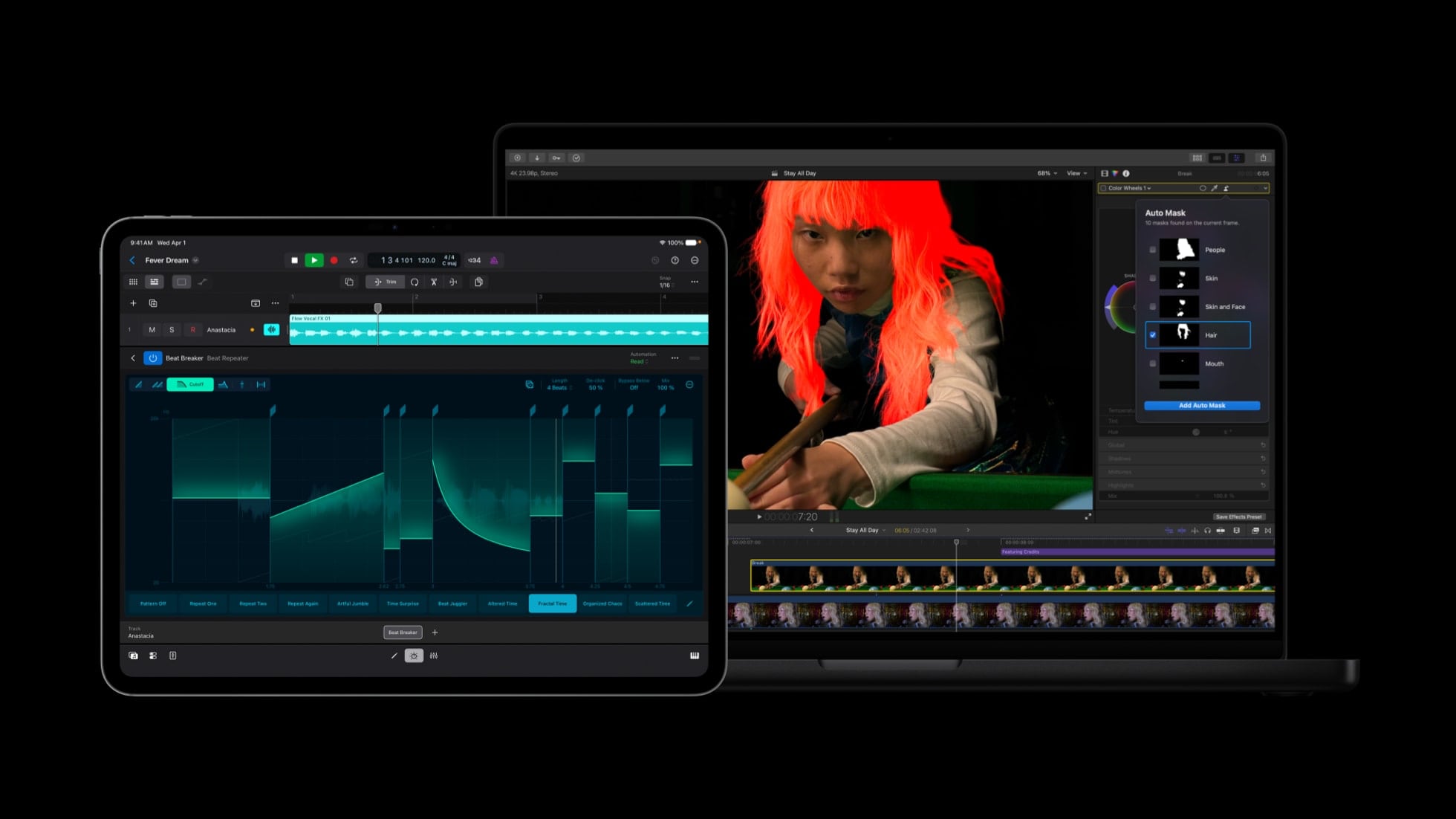
Apple is integrating Pixelmator Pro with Final Cut Pro, Keynote, Numbers, and Pages. Final Cut Pro users can send a frame to Pixelmator Pro to create thumbnails and social graphics. In Keynote, Numbers, and Pages, users can select an image in a document and open it in Pixelmator Pro to edit, with changes saved to the original document.
The three office apps support generating vector shapes using AI, and Pixelmator Pro is getting advanced image generation and a Content Hub. Users can generate AI images directly in Pixelmator Pro with natural language, and browse a curated collection of images in Content Hub. Freeform also integrates with Pixelmator Pro in iOS 27, iPadOS 27, and macOS Golden Gate.
Final Cut Pro is getting Generate Captions, an on-device AI feature that automatically adds subtitles to videos based on audio. Subtitles can have animations and custom fonts, colors, and positions.
Edit Detection is a new AI feature that analyzes rendered video and splits it back into the original clips on the timeline. Apple says editors can use the tool for edit refinements or assembling a cut-down highlight clip for social media.
On the Mac, Final Cut Pro has an Auto Mask feature that isolates and refines video elements like skin, hair, sky, foliage, and clothing. Users can hover over a clip and make precise adjustments with no manual tracking. Color Match now produces more accurate and natural color matches in different lighting conditions, plus Advanced Trimming lets users fine-tune incoming and outgoing frames one-by-one.
Motion gains native support for scaling vector graphics without affecting quality, and Compressor has an Immersive Metadata Viewer for the Vision Pro. Final Cut Camera is getting expanded ProRes Support, an option to disable digital zoom, and Clean HDMI Out for sending a pristine video signal to external monitors and recorders.
Logic Pro's Chord ID feature has been rebuilt and it is more accurate than before. Apple says Session Players will respond and perform chord changes more quickly. Both Logic Pro and MainStage have a new granular sync mode in Alchemy to open up "new dimensions of sound design."
More information on the updates can be found on Apple's website. Creator Studio Pro includes all of Apple's creative software, and it is priced at $12.99 per month or $129 per year. Up to six people can share a single membership.
Article Link: Apple Creator Studio Gets New AI Features

That's not true. They've removed the Tahoe icon jail from the Pixelmator Pro 3.8 icon.Still no Pixelmator Pro one time purchase update

Final Cut automated subtitles feature is very handy!
Apple today updated its Creator Studio apps, adding new AI features to Pixelmator Pro, Final Cut Pro, Logic Pro, and more.
Apple is integrating Pixelmator Pro with Final Cut Pro, Keynote, Numbers, and Pages. Final Cut Pro users can send a frame to Pixelmator Pro to create thumbnails and social graphics. In Keynote, Numbers, and Pages, users can select an image in a document and open it in Pixelmator Pro to edit, with changes saved to the original document.
The three office apps support generating vector shapes using AI, and Pixelmator Pro is getting advanced image generation and a Content Hub. Users can generate AI images directly in Pixelmator Pro with natural language, and browse a curated collection of images in Content Hub. Freeform also integrates with Pixelmator Pro in iOS 27, iPadOS 27, and macOS Golden Gate.
Final Cut Pro is getting Generate Captions, an on-device AI feature that automatically adds subtitles to videos based on audio. Subtitles can have animations and custom fonts, colors, and positions.
Edit Detection is a new AI feature that analyzes rendered video and splits it back into the original clips on the timeline. Apple says editors can use the tool for edit refinements or assembling a cut-down highlight clip for social media.
On the Mac, Final Cut Pro has an Auto Mask feature that isolates and refines video elements like skin, hair, sky, foliage, and clothing. Users can hover over a clip and make precise adjustments with no manual tracking. Color Match now produces more accurate and natural color matches in different lighting conditions, plus Advanced Trimming lets users fine-tune incoming and outgoing frames one-by-one.
Motion gains native support for scaling vector graphics without affecting quality, and Compressor has an Immersive Metadata Viewer for the Vision Pro. Final Cut Camera is getting expanded ProRes Support, an option to disable digital zoom, and Clean HDMI Out for sending a pristine video signal to external monitors and recorders.
Logic Pro's Chord ID feature has been rebuilt and it is more accurate than before. Apple says Session Players will respond and perform chord changes more quickly. Both Logic Pro and MainStage have a new granular sync mode in Alchemy to open up "new dimensions of sound design."
More information on the updates can be found on Apple's website. Creator Studio Pro includes all of Apple's creative software, and it is priced at $12.99 per month or $129 per year. Up to six people can share a single membership.
Article Link: Apple Creator Studio Gets New AI Features
They have new features is you own the subscriptionWhy is “iWork” included in this Creator Studio?

I mean Pixelmator 4.0 for the one time purchase since the other one is already on 4.0That's not true. They've removed the Tahoe icon jail from the Pixelmator Pro 3.8 icon.
Why is “iWork” included in this Creator Studio?
They have new features is you own the subscription
I also have been expecting (perhaps naively) that the dividing line will be the AI fluff. Some folks need help creating a spreadsheet but for those that don’t, they don’t need the AI ability to create them. In your analysis, it looks like they’re still improving the non-AI side of things across the board. Good to hear!When the Creator Studio was announced I was worried that with iWorks in the bundle there might come a point when interesting new features get introduced in Numbers that I had to subscribe to Creator Studio to get access to and end up paying money for ten apps of which only one app (Numbers) or at most 1.1 apps (I maybe open Pages 5 or 10 times a year - almost every document I get is in PDF now days and any text content I create is short enough to go in an email).
I still am a bit worried about the above but I was relieved to wake up this morning to an open notification Window on my MacBook telling me that Numbers had been updated and listing some new features classified as subscriber-only and for-everyone and I was reassured that ...
1 - at least not all developer resource is going to the what I perceive as more high profile apps like Pixelmator Pro, Final Cut Pro and Logic Pro and the lower profile workhorses like Numbers (and I assume Pages, Keynote etc) are still getting new features.
2 - The subscriber-only new features were all AI stuff that I didn't care about.
3 - There were actually a couple of new features in the "for everyone" category that at least for me are quite welcome which is the ability to hide sheets (useful if you have some sheet that is just full of behind-the-scenes stuff like a table of constants to get something like named variables in Excel) and the ability to colour code the tabs used to switch between sheets.
Fingers crossed Apple carries on adding worthwhile non-AI-related new features to Numbers and keeps those in the available-to-everyone category.
Right now as a Numbers user who doesn't have a Creator Studio subscription I'd say this is a good day for me and I'll give Apple a thumbs-up on this latest update.

I thought so, too. I’m tempted to get the free trial just to see what that means as creative use of vector shapes can be powerful.Generating vector shapes? Now that’s interesting.



