

Become a MacRumors Supporter for $50/year with no ads, ability to filter front page stories, and private forums.

MacRumors

macrumors bot
Original poster


Back in March with the release of macOS Tahoe 26.4, Apple introduced a new security popup that warns Mac users when they paste a command into the Terminal app that could be harmful. Apple has now published a support document explaining why the popup warning appears.
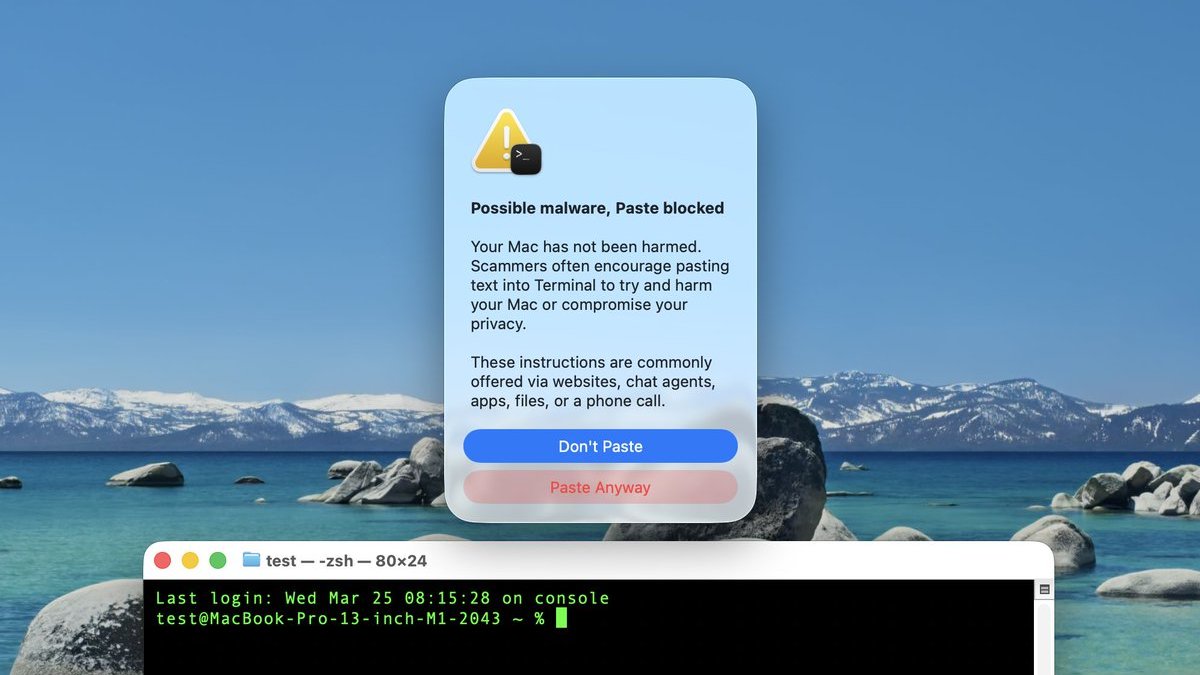
macOS-Tahoe-26-4-Terminal-Warning.jpg
Screenshot via "Mr. Macintosh"

The warning says the following when it appears:
Possible malware, Paste blocked

Your Mac has not been harmed.

Scammers often encourage pasting text into Terminal to try and harm your Mac or compromise your privacy.

These instructions are commonly offered via websites, chat agents, apps, files, or a phone call.
There is a "Paste Anyway" option for users to proceed if they wish.

In a document titled "If your Mac blocks a Terminal command paste or script," spotted by 9to5Mac, Apple explains that the alert appears if you don't regularly use Terminal and you copied the command from somewhere like a website, chat agent, or messaging or email app.

"Scammers use these channels to instruct people to paste malicious commands into Terminal to harm your Mac or compromise your privacy," says Apple. "This alert helps make sure that you aren't tricked into running a command that you didn't expect."

The document also mentions two other types of Terminal-related alerts that are more proactive. If a "Malware Detected, Paste Blocked" or "Malicious Script Blocked" alert appears, macOS has detected a command or script that contains known malware and has blocked it, according to Apple. In such cases, no "Paste Anyway" option is provided.

Apple says that if you believe the command or script was mistakenly blocked, it could be because a website that it tries to access was incorrectly reported as deceptive. In that case, users can report the error.

Article Link: Apple Details Terminal Anti-Scam Warning in macOS
 
Sites asking to use the Command Prompt utility on Windows to paste and execute code are getting to be an infamously popular scam. Too bad that scammers are also getting savvy to how to do the same with Mac users.

Any site that asks for command prompt or Terminal access should be avoided like the plague. I'm glad that Apple is seeing this trend and responding with verification as well.
 
An older relative of mine got taken in by a pop up that came up on her Mac from “Apple Security” with an 800 number to call. She called, and some very nice people took down her credit card details. She was able to reverse the charge, and I swept her machine for viruses and we reset all her bank passwords.

For all of us here, our radar would be up when we saw the pop-up, but for some people, everything on the computer is weird and confusing, so a janky pop up just seems par for the course. A warning like this with specific wording pertaining to the situation might well save a few people.
 
Last edited:
The people who lack the savvy to not fall for this are the same people who ignore all popups and will always click the proceed button without reading.

Maybe prompt with two randomzied multiple choice questions, where nobody could prompt you through it without you reading stuff to them and hopefully processing the info you're reading to them to realize you're being scammed.

IE, "Where did this come from?" is the first question and "How do you know it's not a scammer?" is the second.
 
Last edited:
  • Like
Reactions: centauratlas
Maybe it would be a good idea to just not ship the Terminal.app as part of the OS distribution. Advanced users will know how to get one, and there are many alternatives that are much better.
Saying this as someone who uses Terminal several times a week: Ship it but disable it by default. It would create an extra pain point for scammers to have to get through. 99.9% of users don’t need Terminal.
 
People and their (perhaps less tech-savvy) relatives should be aware of the "pastejacking" scam which is becoming more common. You come across a website (could be one mostly legit but with pages now hacked), asking you for a "verification".

I came upon one recently. It throws up an "I am not a robot" button to click, while at the same time dumping some text into your clipboard via javascript (which is actually a shell script command obscured from casual inspection by being encoded as base64). Underneath the "I am not a robot" button there are further instructions that ask you to, basically, open the Terminal app and "press certain keys".

Doing so pastes and executes the clipboard command, which silently downloads a script from a raw IP address in /tmp, saves it as a (leading-dot) hidden file, executes it with bash, and then covers its tracks (a -k flag on CURL disabling SSL certificate verification; a > /dev/null 2>&1 & sending all output to nowhere and running it in the background); then it deletes the command from your shell history via history -d $(history 1) 2>/dev/null; fc -p /dev/null 2>/dev/null and displays a fake "success" message with printf '\033[3J'; ... printf '\n \033[32m✓ Verification successful\033[0m\n\n'.

All this was revealed just by decoding the base64 text in the clipboard. I'm not going to download and run the script to find out what it actually does, but I can guess it's something like exfiltrating browser cookies, saved passwords, SSH keys and so-on.

I shouldn't think anyone on here would actually do the Terminal thing required by the malicious instructions, but many less tech-savvy folk might, and it's worthwhile reminding everyone never to follow instructions to press certain keys (especially if Terminal is mentioned).

Maybe this new dialog might be a good thing.
 
Last edited:
  • Like
Reactions: shamino and jchap
You Devs and Mac Admins you, FU.

-Apple

This alert appears if you don't regularly use Terminal and you copied the command from somewhere like a website, chat agent, or messaging or email app.
- Apple

...frankly, being forced to paste stuff into textedit or something first, to make sure the clipboard contained what you thought it contained, wouldn't be a bad discipline.
 
Apple should remove such advanced technology as this Terminal app. It is like the DOS Windows program which allows running non-GUI apps in the black window.
??? Why? There are a lot of reason why being able to work from a command line in terminal is a necessity. Working remotely on servers, for example.

The rule of thumb when using a Teminal app, irrespective of the platform, is pretty simple: a CLI will do exactly what you tell it to do, so don't enter anything into a Terminal unless you know exactly what you are entering and why you are doing so.

There's no justification for removing it. A computer is a tool, not a toy.
 
  • Haha
  • Like
Reactions: wyliej and tajmahal
I can appreciate the intent behind the idea to deactivate terminal on base macOS installs. Sadly, I think that would just nudge scammers to adapt… some other scam or walking users through activating terminal. Scammers suck.
 
  • Like
Reactions: jchap
...frankly, being forced to paste stuff into textedit or something first, to make sure the clipboard contained what you thought it contained, wouldn't be a bad discipline.
We already treat infrastructure as code and it's subject to CAB and review. By the time Jamf has the bash script for deployment/self service, at least 4 sets of eyes have looked it over.

On my personal Mac? Not really needed. Hopefully I can turn it off.
 
Apple should remove such advanced technology as this Terminal app. It is like the DOS Windows program which allows running non-GUI apps in the black window.
Macs are a thing in Enterprise precisely because of admins having terminal access.

For the most part, end users should see nothing and the only way that happens is with us doing it in bash.
 
  • Like
Reactions: Happy_John
Register on MacRumors! This sidebar will go away, and you'll see fewer ads.