

In macOS 27, you can now enable Back/Forward navigation controls in the toolbar. They look and feel similar to the implementation in Apple Mail on iPadOS, and many other apps on macOS.
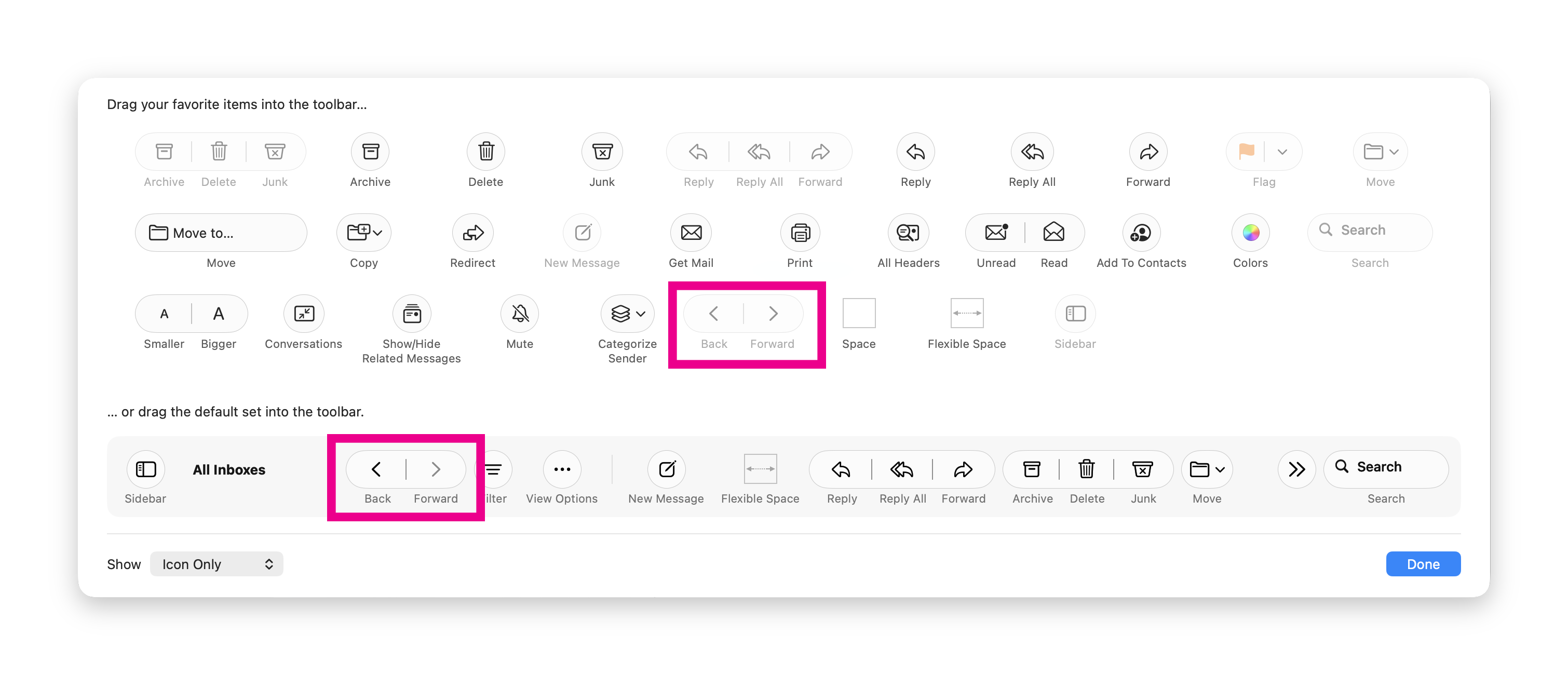
Interestingly, it seems that Apple is planning to include them in the default control set next to the Filter option once the controls are generally available.
To enable the FeatureFlags override, run the following command in the Terminal:
and restart your Mac. As always, this is a disabled feature, so the UI or implementation may be unstable.
To disable:
this is a pre-Beta 6 change, happy beta day!
Interestingly, it seems that Apple is planning to include them in the default control set next to the Filter option once the controls are generally available.
To enable the FeatureFlags override, run the following command in the Terminal:
Bash:
sudo mkdir -p /Library/Preferences/FeatureFlags/Domain && \
sudo defaults write /Library/Preferences/FeatureFlags/Domain/Mail NavigationButtons -dict Enabled -bool true
and restart your Mac. As always, this is a disabled feature, so the UI or implementation may be unstable.
To disable:
Bash:
sudo defaults delete /Library/Preferences/FeatureFlags/Domain/Mail NavigationButtonsthis is a pre-Beta 6 change, happy beta day!
