Become a MacRumors Supporter for $50/year with no ads, ability to filter front page stories, and private forums.
APPLENEWBIE said:
Really, thanks for all the suggestions. I guess I should give pages another shot. I churn out a lot of word processing each day in my job, and I guess it is the familiarity that I miss in Pages. Anybody know of a good book that describes / instructs in Pages? Being a convert several months ago I have several macs and I guess part of the reason I asked is that (I hear) microsoft word is made by the same guys that make Windows.... (joke) and MW is about the only program that tries to crash my macs with any regularity...

Oh, and I have tried NeoOffice. Seems a bit slow but the interface is.... pretty familiar. I guess the other reason I brought it up is that now with appleworks and it's (oldish) word processor gone, the new macs only have textedit, which really does seem a bit too basic, for me at least....

I suggest a compromise (this is what I do): Write the content of your documents in Textedit, because it's simple, quick, and not distracting. It's great for writing a draft. Then paste what you're written into MS Word for formatting, editing, and distribution. That way, you don't sacrifice elegance and simplicity for compatibility or familiarity. The best tools for the best jobs.
 
In its latest version Pages is excellent. I'd just like to see Macros like in Word, then it would be perfect (I OFTEN use a macro to transpose 2 letters I've typed in the wrong ordre )

I've written lots of stuff in Pages right up to an 80,000 word novel. It's fast on my dual G5 and flies on my new Macbook, but to be fair, speed was never a problem with Word.

But the best thing about Pages apart from how much nicer it looks is that its NOT Microsoft.
 
Another vote for Pages here...

I actually really like the Inspector - keeps the screen clean and (imho) makes for easier navigation than diving through all of Word's different menus.
 
I have office but ive been using neooffice lately. Its always nice to have something that works pretty damn well and is free.
 
APPLENEWBIE said:
I guess the other reason I brought it up is that now with appleworks and it's (oldish) word processor gone, the new macs only have textedit, which really does seem a bit too basic, for me at least....
I've been using TextEdit as my primary word processor for years now (since before Mac OS X).

The thing about TextEdit, which makes it the perfect app in my opinion, is that it comes with the basics and lets you add most anything else that you need.

I've put up two pages on TextEdit (here and here) and just gave a presentation on TextEdit to a Mac user group last week.

For me, the next step up from TextEdit is a page layout application.

MisterMe said:
Nisus Write Express is based on an app that Nisus purchased and renamed. It ain't no Nisus Writer.
No, it is better.

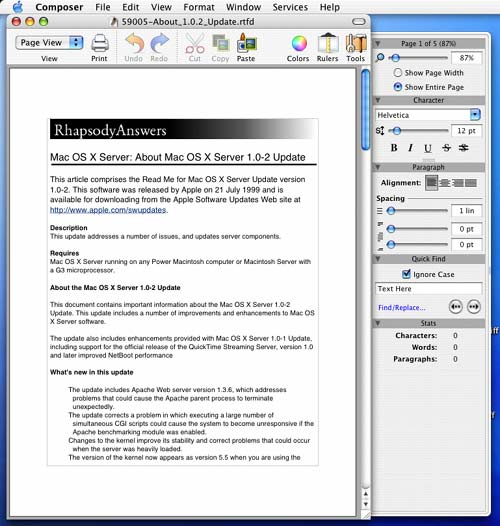
A port of Nisus Writer would have been Carbon, and that would have crippled the app in Mac OS X going into the future. I think the fact that they used Okito Composer was a great move on their part.

As a Carbon app Nisus Writer wouldn't have access to the system wide spell checking service, text services, or any other services. It would basically be as crippled as... well, MS Word.

The question I have is why run software on Mac OS X that isn't better because it is on Mac OS X? Carbon apps are hardly any better than they were in Mac OS 9... why use Mac OS X if you aren't actually benefiting from using it?


okito_comp.jpg

Okito Composer running on my
system today
 
The thing about TextEdit, which makes it the perfect app in my opinion, is that it comes with the basics and lets you add most anything else that you need.

I've put up two pages on TextEdit (here and here) and just gave a presentation on TextEdit to a Mac user group last week.
For me, the next step up from TextEdit is a page layout application.


Is there a way to do headers and footers / footnotes in Textedit?
 
I love Pages it does SO much more then MS Word(for me) i had a project in Soc St, and we had to make a "Making a Empire for Dummies" kind of book(but ours was to be much shorter), and my group did it in Pages and it looked the best BY FAR. And guess were the other groups did it..


In MS Word
 
I personally like Pages.

However I still don't know how to make it do an outline format like MS word (not sure if it even has that capability, haven't found it yet) That is the only problem I have with it thus far.
 
APPLENEWBIE said:
Is there a way to do headers and footers / footnotes in Textedit?
Both of those require having fixed page endings... up to the 10.4 version of TextEdit page breaks and the like were lost upon saving (they were not supported in TextEdit's Rich Text format).

Without that there is really no way to put them in.

I wouldn't be surprised if someone created a service for it now that page breaks are there... or that took advantage of TextEdit's ability to read/write Word formated documents.

I personally haven't touched footnotes in years, and headers/footers can be done with master layers in a layout app like Create.

I do have a number of Create templates with headers and page numbers. And Create supports drag-n-drop from a TextEdit document (because it used Apple's text services for text handling just like TextEdit).

If you need footnotes... you're looking for another app. I hope apple doesn't add too much more to TextEdit, it seems to have enough as it is. If people want more from it, then developers can create services for it and users can decide if they want those services or not.
 
RacerX said:
For me, the next step up from TextEdit is a page layout application.

In that case, Pages should do for you -- it handles page layouts quite nicely. I have little use for InDesign since I started using Pages. As far as TextEdit is concerned, I will often type up basic text in it, but I find to be of little use beyond that if only due to the lack of page numbers, headers and footers.

I'm happy to hear from all the approving Pages users. Makes a change. Even a few months ago this same question would have been answered with post after post of "Pages sucks because it isn't Word."
 
eva01 said:
I personally like Pages.

However I still don't know how to make it do an outline format like MS word (not sure if it even has that capability, haven't found it yet) That is the only problem I have with it thus far.
Look in Help and the User Manual.

Briefly ...
Show styles
Make sure "List Styles" is showing (click the button that looks like a bullet list at the bottom of the Styles drawer)
Select the list style type (harvard, etc)
Use the text>list inspector to demote/promote.

It does not work the same as Word - took me a while to work out how to use it effectively - but is ok.
 
RacerX said:
Both of those require having fixed page endings... up to the 10.4 version of TextEdit page breaks and the like were lost upon saving (they were not supported in TextEdit's Rich Text format).

Without that there is really no way to put them in.

I wouldn't be surprised if someone created a service for it now that page breaks are there... or that took advantage of TextEdit's ability to read/write Word formated documents.

I personally haven't touched footnotes in years, and headers/footers can be done with master layers in a layout app like Create.

I do have a number of Create templates with headers and page numbers. And Create supports drag-n-drop from a TextEdit document (because it used Apple's text services for text handling just like TextEdit).

If you need footnotes... you're looking for another app. I hope apple doesn't add too much more to TextEdit, it seems to have enough as it is. If people want more from it, then developers can create services for it and users can decide if they want those services or not.

Create is certainly an unusual solution. I didn't find it to be particularly usable but it had some interesting attributes. Of course, that could be applied to any NeXTStep-compatible applications.

It's nice that Cocoa is there but it's good that NeXT interface standards aren't used for applications. That would kill Apple in the marketplace.
 
Using iWork since its release, I have come to like it. You have to remember that it is only version 2, unlike Microsoft Word, which has been around forever.
 
flyfish29 said:
I am not a big fan of the inspector and other windows...they are always in the way on my little 12"ibook.

I've got a 12" PowerBook and used to think that. Command+Option+I shows/hides the Inspector. Command+T shows/hides the font pallet. Command+Shift+C shows/hides the color pallet. Now my screen is empty until I need something in one of those pallets. Then they appear and disappear within a few seconds.

You aren't supposed to have them open all the time-- only when you need them to show up.

thedude110 said:
I don't mean to come across as a total punk, but is there anything you need to do that TextEdit won't do?

I'm really becoming a TextEdit devotee. I produce a small poetry mag. and used TextEdit to produce the last issue. I could do everything I needed to do.

Then again, our mag is awfully low tech. Just paper and staples ...
I use TextEdit all the time. Works great, uses almost no CPU power. I get an extra 30 minutes of battery now, as Word isn't sucking 8%-14% CPU power at idle.

And yeah... that is a low-tech magazine. Not to put it down or anything, but if you ever need to do pagination, TextEdit will be dead in its tracks.
 
IJ Reilly said:
In that case, Pages should do for you -- it handles page layouts quite nicely. I have little use for InDesign since I started using Pages.
While I do think that Pages is a nice app... it isn't the app for me (I didn't use the NEXTSTEP version either).

When recommending page layout apps for clients usually I break up the recommendations into three areas: beginners, creative/mid-range/non-professionals and high end/professionals.

For the beginners the main thing I look for is either how much they want to actually do in terms of layout... and how they react to a blank page. Pages is a great app for over coming the terror of a blank page that some people get when faced with a new app.

For creative/mid-range/non-professionals I tend to recommend Create as it gives quite a bit of freedom, covers the areas of page layout , illustration and web design, while staying within a reasonable budget.

And for high end/professionals it usually comes down to preference... InDesign or QuarkXPress. If either will do I usually recommend InDesign as it comes with Adobe's Creative Suite anyways.

bousozoku said:
Create is certainly an unusual solution. I didn't find it to be particularly usable but it had some interesting attributes. Of course, that could be applied to any NeXTStep-compatible applications.
Create solved many problems for me on a number of systems...

On my IBM ThinkPad running Rhapsody 5.1 I use Create 5.1. There were few apps for Rhapsody and even fewer for Rhapsody for Intel. Create gives me the ability to do page layout, illustration and web design all in one app.

On my IBM ThinkPad while running OPENSTEP 4.2 I use Create 5.2.1. In this case I have quite a few apps for doing different tasks... Diagram! for creating flow charts (it was the basis for OmniGraffle and OmniGraffle opens Diagram! documents), Concurrence for presentations and OpenWrite for word processing. Still I find myself doing page layout and illustration work in Create.

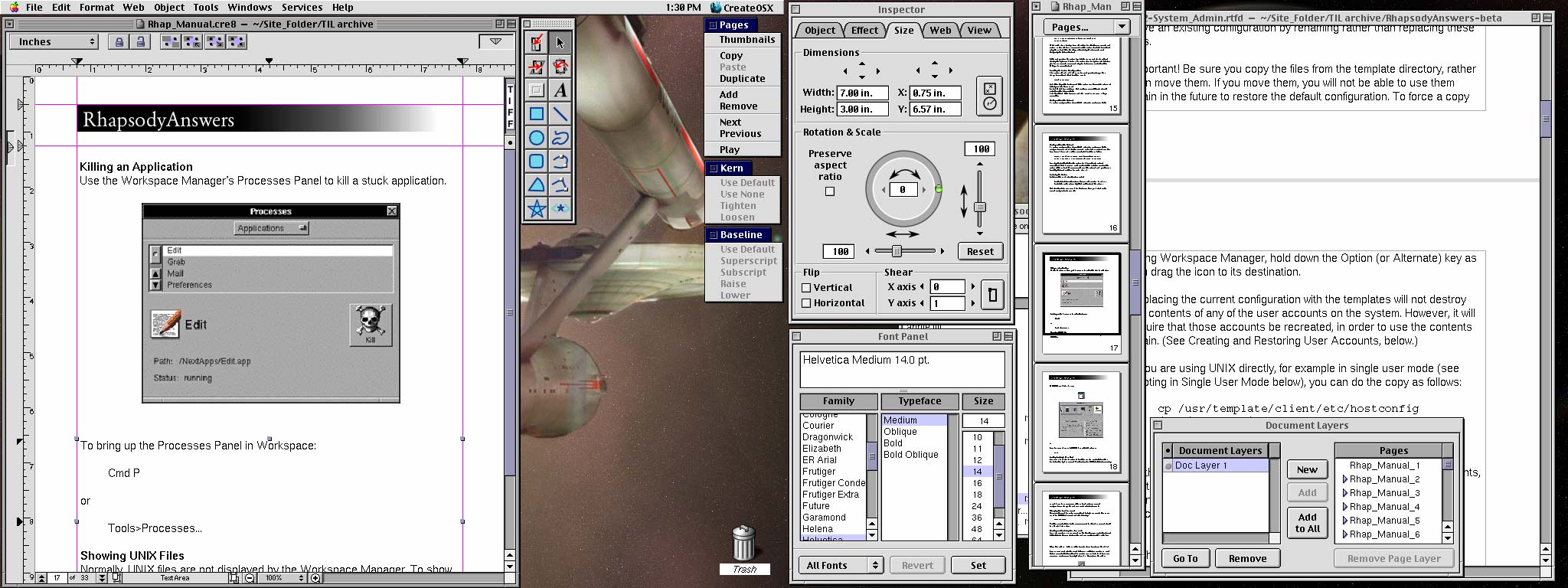
On my PowerMac 8600 running Rhapsody 5.6 I use Create 10.0. This version added a ton of features over Create 5 and made it much easier for me to get both my page layout and web design work done. Plus it helps that the interface of the app is not that different from the current version for Mac OS X. Below is a shot from my 8600 from yesterday while I was working on a project.


On my PowerBook and PowerMac running Mac OS X I use Create 12.5. Back when I was moving from Mac OS 8/9 to Mac OS X Create replaced both QuarkXPress and Illustrator for me. And it paid for itself (something all my apps must do). Not having access to Create is one of the things I miss the most when I use any of my Mac OS 8.6 systems.

Oddly enough, when I gave a presentation to a local Mac user group on web design solutions for Macs, people asked for more information about Create at the end... and it was one of a dozen apps I had talked about.

Also Create has been the first third party app for most versions of this operating system. It was (as TextArt) the first third party app for NEXTSTEP. It was the first third party app for Rhapsody (Apple gave Andrew Stone early access to Rhapsody so Create could be demo on Rhapsody at WWDC in 97). And it was the first third party app for Mac OS X during the developer previews. So in all those cases to do more than look at the OS, Create was the app you would turn too.

bousozoku said:
It's nice that Cocoa is there but it's good that NeXT interface standards aren't used for applications. That would kill Apple in the marketplace.
I guess I don't see the problem with NeXT interface standards... specially as the original NeXT interface was made by pretty much the same people who made the original Macintosh interface.

When switching back and forth between OPENSTEP and my other systems, the main thing that I have to get used to is the vertical scroll bars on the left side and the vertical menus (which I was never a fan of). Moving between Rhapsody and Mac OS 8/9 is very easy for me as, well, both got their GUI design from Copland.

The only NEXTSTEP app that I have never gotten a handle on was TIFFany... which while being a very powerful app, is completely unintuitive (specially for someone who is coming from years of working with Photoshop). I own TIFFany3 Professional but I still fired up Photoshop 6 in Classic back before Adobe released 7.

Even today, anything that I can't do in ToyViewer, PixelNhance and CuttingRoom in Rhapsody on my 8600 will be moved to Blue Box and Photoshop 5.5 before I would fire up TIFFany3 (but that is very rare considering what I am usually working on in Rhapsody anyways).

Most of the time when people talk about NeXT interface standards they are referring to apps by smaller developers. Illustrator, FrameMaker and WordPerfect all worked pretty much the same in NEXTSTEP as they did on Macs. In fact better in the cases of Illustrator and FrameMaker because the average screen size was much larger than on Macs of the same period. On actual NeXT hardware the vertical menus aren't nearly as bad as when you get restricted to 1024x768 on PC hardware/displays.

The comment I see most often from people who have started using Create for page layout is that it reminds them of PageMaker... which I tend to agree with. This may also be why I like using Create as I learnt page layout on PageMaker (and still use both 5.0a and 6.5 on my older Macs).

So yeah, for me, when TextEdit isn't enough... Create is the next app I turn to.

But TextEdit is usually where I do most things. In fact I just finished putting together my RhapsodyAnswers (a collection of technical articles on Rhapsody) using TextEdit on my 8600. It is only now that I'm planning on making a single PDF document that I've turned to Create (which is what I was working on in the screenshot above).

Also, this post is the 23rd "untitled" document in TextEdit on my PowerBook (and one of 8 currently open documents). So I really do spend a ton of time in TextEdit.

 
pages rocks, i use it because i hate using word, changing it to be like word would be like sacrilege, 90% of words features just piss me off.
 
Mechcozmo said:
I've got a 12" PowerBook and used to think that. Command+Option+I shows/hides the Inspector. Command+T shows/hides the font pallet. Command+Shift+C shows/hides the color pallet. Now my screen is empty until I need something in one of those pallets. Then they appear and disappear within a few seconds.

You aren't supposed to have them open all the time-- only when you need them to show up.

Great idea, but I tend to format as I type and I am not typing many long papers, etc so I need them open quite often- but maybe if I used it more I would get use to opening and closing commands.
 
zap2 said:
I love Pages it does SO much more then MS Word(for me) i had a project in Soc St, and we had to make a "Making a Empire for Dummies" kind of book(but ours was to be much shorter), and my group did it in Pages and it looked the best BY FAR. And guess were the other groups did it..


In MS Word
no way my groups was the best 😉
 
Mechcozmo said:
And yeah... that is a low-tech magazine. Not to put it down or anything, but if you ever need to do pagination, TextEdit will be dead in its tracks.

Low tech to the point that when we first began to produce it, we used a stapler that didn't close staples entirely/properly. We wanted our poetry to wound, give tetanus, etc.

Pagination in TextEdit isn't so invisible if you enable "Number Pages When Printing." You can preview your work as a .pdf as you go and make adjustments you need to make.

But this from someone who mainly used TextEdit as faux-politics (subversion/romance?) and in order to type poems that very rarely extended beyond one page.
 
eva01 said:
I personally like Pages.

However I still don't know how to make it do an outline format like MS word (not sure if it even has that capability, haven't found it yet) That is the only problem I have with it thus far.

OmniOutliner is the king of Mac outliners. The full version comes bundled with most macs; try it out.
 
Yeah, I have to vote for Pages over Word. It is actually a pretty silly comparison, though, as Word is just a word processor. Pages is a page-layout/desktop publishing program.
 
Another program that would satisfy many basic users would be Tom Bender's Tex-Edit Plus - v. 4.9.7b17. It is shareware and the asking price is a very reasonable $15.
 
Talking of Pages, which I'm just beginning to use, how do you set a default font and a default language? Doesn't seem to be in Preferences.
 
thedude110 said:
I don't mean to come across as a total punk, but is there anything you need to do that TextEdit won't do?

I'm really becoming a TextEdit devotee. I produce a small poetry mag. and used TextEdit to produce the last issue. I could do everything I needed to do.

Then again, our mag is awfully low tech. Just paper and staples ...

Yeah I use textedit too

I think this tread shoud be renamed "Apple needs a good text editor"
It can open word docs too!
 
Register on MacRumors! This sidebar will go away, and you'll see fewer ads.