I have a bit of a concern with the way Preview handles images. I am using it to change the dpi setting in the EXIF header from 72 dpi to 300 dpi. The problem that I am having is that I believe in completing that process I am degrading the quality of the images.
When I click adjust size and leave the image dimensions and all other setting unchanged I still have the option of clicking OK. I just am not clear on what OK does, other than that it reduces file size. Clicking OK causes the file size of the image to be reduced by as much as 3/4ths despite the dimensions remaining the same. This leads me to believe that some image degradation through compression must be occurring.
Ideally what I want to be able to do is change the DPI in the EXIF tag and not change the file quality. From what I understand changing the DPI should have no effect on file size, so something else must be going on.
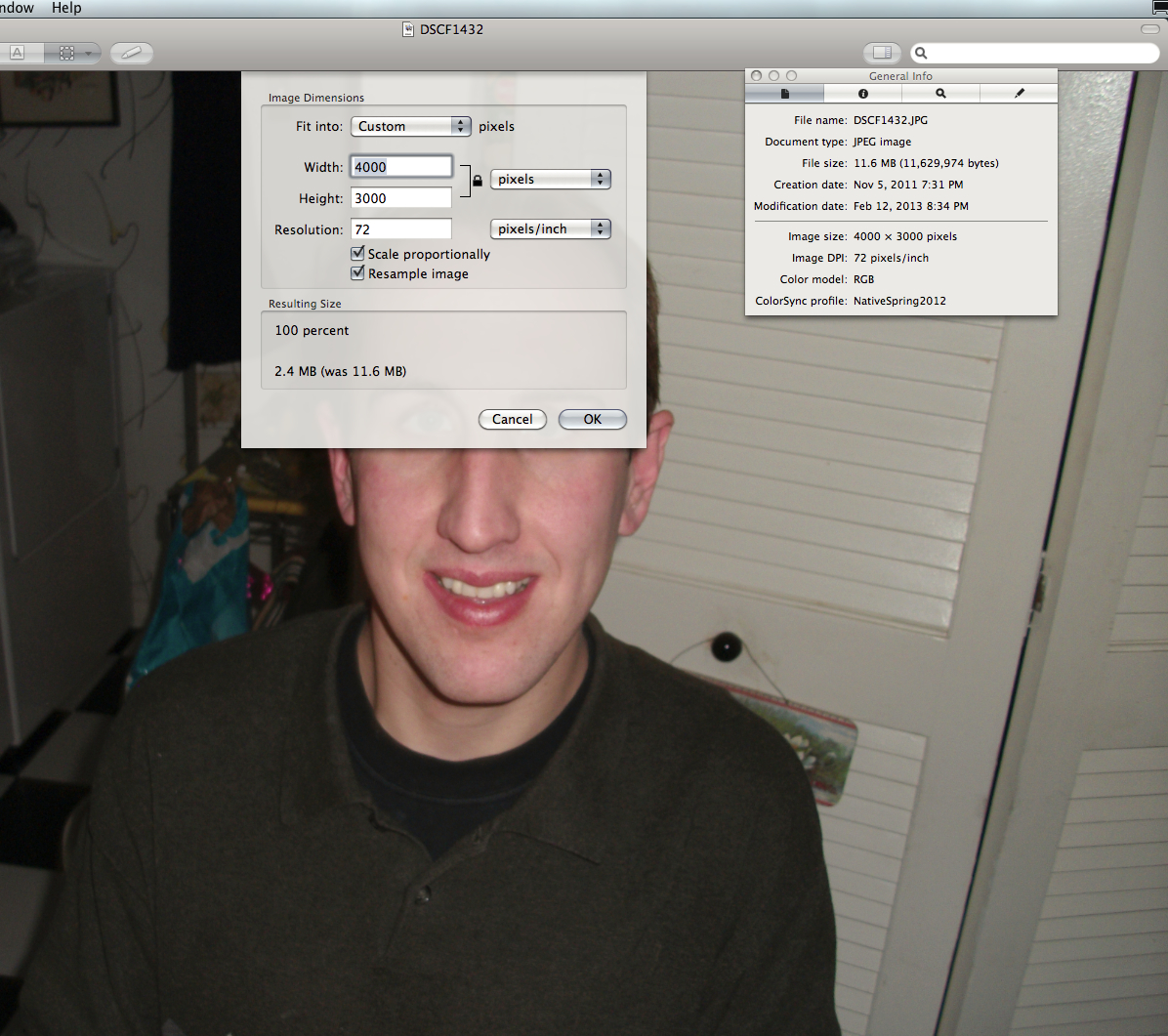
In the screenshot below you can see what I mean. I simply click on adjust size in the tool menu and the adjust size window pops up. The resulting file size states that the file will be reduced from 11.6 MB to 2.4 MB without changing anything. I just would like to be able to change that setting of 72 pixels/inch to 300 pixels/inch and have nothing else change. Any suggestions and can anyone tell me what is done to the file when I click OK?
When I click adjust size and leave the image dimensions and all other setting unchanged I still have the option of clicking OK. I just am not clear on what OK does, other than that it reduces file size. Clicking OK causes the file size of the image to be reduced by as much as 3/4ths despite the dimensions remaining the same. This leads me to believe that some image degradation through compression must be occurring.
Ideally what I want to be able to do is change the DPI in the EXIF tag and not change the file quality. From what I understand changing the DPI should have no effect on file size, so something else must be going on.
In the screenshot below you can see what I mean. I simply click on adjust size in the tool menu and the adjust size window pops up. The resulting file size states that the file will be reduced from 11.6 MB to 2.4 MB without changing anything. I just would like to be able to change that setting of 72 pixels/inch to 300 pixels/inch and have nothing else change. Any suggestions and can anyone tell me what is done to the file when I click OK?
Attachments
Last edited: