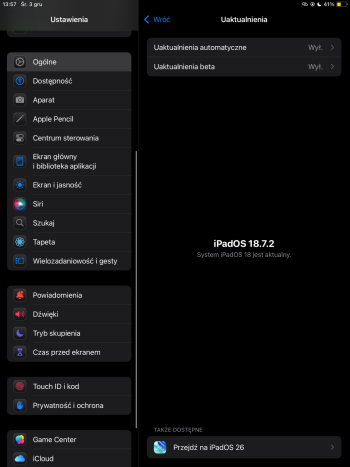
Great, now I have a little red notification on the Settings icon. Thanks for triggering my OCD Apple, guess I’ll just move the app off my Home Screen.


I felt the same. Was hesitant to update the 15 Pro with 93% battery. Just did it, 3 hours ago. It’s perfect for me. If your device isn’t older, don’t be afraid. It’s not as bad as they say. I would say it feels even better than iOS 18.Great, now I have a little red notification on the Settings icon. Thanks for triggering my OCD Apple, guess I’ll just move the app off my Home Screen.

Good, I am glad I jumped to iOS 18 because I love the dark theme icons, but honestly I remember iOS 17 as more stable and with less bugs.iOS 17.1.1 checking in.
You don’t speak for everybody.My wife updated her 13 Pro to iOS 26 when AirPods Pro 3 requested it and we couldn’t believe how bad it is. UI is horrendous but the biggest problem is performance and the battery. Swiping on the home screen seems to run at 20FPS, it takes up to 30 seconds for icons to appear when unlocking the phone, opening a folder takes 1 second, a ton of little bugs here and there and finally, the battery life halved from 5h to 2.5h when doing nothing.
I am happy to keep iOS 18 on my 13 Pro and would hold on the update until they return the performance of iOS26 back to iOS 18 levels.
Apple really screwed this up badly by delivering such bad OS all around…
I have a 15PM. I’m reluctant to upgrade because I’m running 26.1 on my iPad Air 4 and it hasn’t been fun. Worst part is Safari page rendering. I’m hoping that will be resolved with 26.2, but I’m not upgrading my phone anytime soon; I use it way more often than the iPad.I felt the same. Was hesitant to update the 15 Pro with 93% battery. Just did it, 3 hours ago. It’s perfect for me. If your device isn’t older, don’t be afraid. It’s not as bad as they say. I would say it feels even better than iOS 18.
Just my opinion.
I will still keep my old iPad Air 4 with iOS 18 though(?). It’s a 4GB RAM device… Anyone to share opinion on this?
Which fix are you referring to? 26.1 is solid on my 16eyeah no apple, fix your software and then I will upgrade. They created this mess of non-compliant upgrade due to have such a horrible roll out.

It’s sh*t on my sacrificial iPad gen 9. Especially the keyboard fiasco. I know, it’s the developers’ fault, right?No complaints here, all my devices are on the latest 26 (iPhone, watch, iPad, Mac)
Come on, man! Catch the 17yo Tik-Tok vibe! Embrace tomorrow even if it’s sh…I miss ios18! My ipad has 18 and my phone has 26, every time I use my iPad it's so smooth and put together, it was more my style... I also agree with the commenter about disabling the borders around the apps and widgets.
Maybe Apple needs to get a new CEO that is a raging lunatic like Steve Jobs was on making the Apple experience “magical”.So many naysayers here - maybe they should just buy a Samsung!
The persistent red bubble can no longer be dismissed. Use Shortcuts to make a gray icon with a gear and put that where you have parked Settings on your screen.I’m still on 18 on all of my iOS/iPadOS devices. And I’m still on MacOS 15 on my Mac Studio and MacBook Pro. As soon as 26 came out, the red “Updates Available” alert came up on all of my machines and it won’t go away - even if I’m up to date on the previous OS. This never happened in the past. So Apple’s passive-aggressive games to “encourage” one to update have been underway for a while.
I removed the app from the home screenThis is enraging tbh. The red notification badge on the settings app is there to harrass me to update to iOS26 and I don't want to, but I can't get rid of the notification badge. You can't turn notifications for the settings app off, so that red badge just stays there with no way to turn it off. Anyone know how to get rid of it? (and no I'm not updating).

Did I?You don’t speak for everybody.
Perhaps not, but others are sharing the same kinds of experiences.You don’t speak for everybody.
Apple customers are paying a premium for their products from a company that behaves as if it is infallible. Do you not think they have a right to expect, at the very minimum, a stable system update? The 26 builds are fully in the character of something that Microsoft would have hacked to hit a delivery deadline.So many naysayers here - maybe they should just buy a Samsung!

The persistent red bubble can no longer be dismissed. Use Shortcuts to make a gray icon with a gear and put that where you have parked Settings on your screen.
I waited for the 26.1s as well, but the jump was premature. I will be more cautious with the 27s.After the buggy update from iOS 17 to iOS 18 last year I decided to wait until 26.1 to update this time around. So far no major issues or bugs. I haven’t updated my Mac and probably won’t anytime soon as I rely on it too much for productivity to risk any major bugs to disrupt my workflow.
I have the 26.1 build on a 13. The system is far more stable than the iPadOS 26.1. In addition, iOS appears to be taking up 12 to 13 GB.I for only would only recommend iOS 26.1 to any iPhone that have 6 GB or more of RAM, which means only the iPhone 12 Pro, iPhone 13 Pro and all iPhone 14 and later models. All older iPhones that supposedly could run iPhone 26.1 (iPhone 11, 12, and 13 "regular" models) should only upgrade (in my opinion) to iOS 18.7.2.