Go to the App Store and click on Updates. It will show you updates installed in the last 30 days. It wasn't an automatic update for everyone. I had to authorize it before it would install.
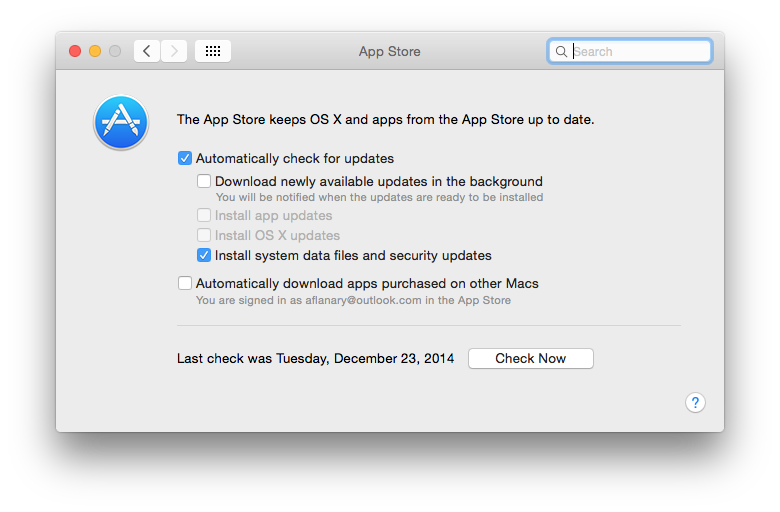
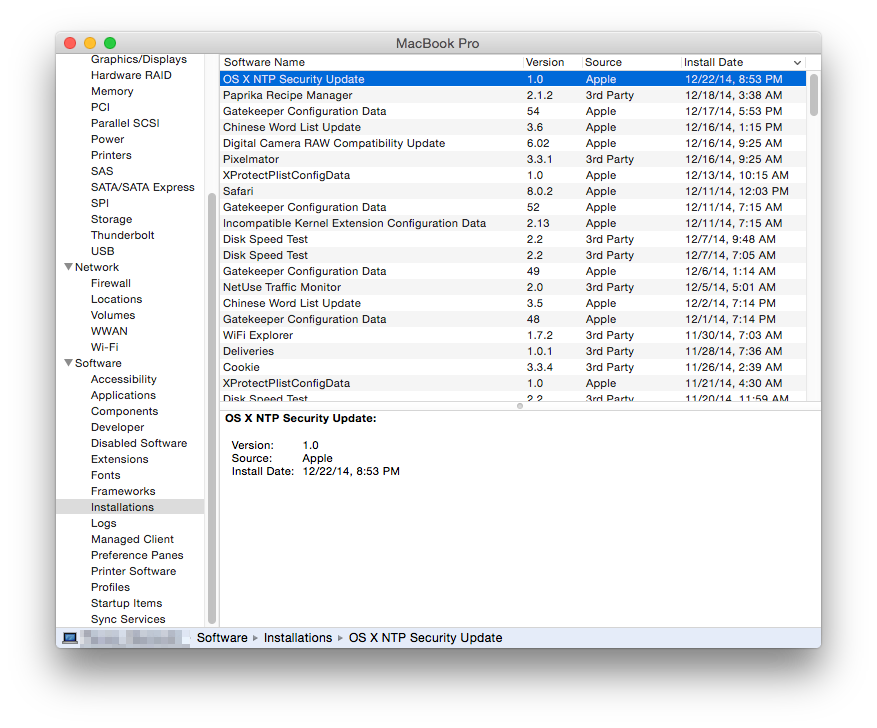
I'm on Yosemite, so yours may be different. I have this box checked to auto install security updates and from the System Report Installations section you can see it auto installed the update for me last night.
I also saw I had a Notification on the screen this morning telling me the update had been applied.
Nothing is showing in the App Store updates in last 30 days section.
Go to the App Store and click on Updates. It will show you updates installed in the last 30 days. It wasn't an automatic update for everyone. I had to authorize it before it would install.
Are you just wanting to make sure you got it? As I recall Mavericks had the same screen in System Report.
Click the little Apple at the top left of your screen then select About this Mac then System Report and scroll down under the Software heading to Installations and sort by date and should see it there like in my screenshot if you got it.
Click the little Apple at the top left of your screen then select About this Mac then System Report and scroll down under the Software heading to Installations and sort by date and should see it there like in my screenshot if you got it.
Unless you have a very specific reason to be on 10.9.3 you really must update to 10.9.5 and then install the security updates that require 10.9.5. You are missing many other security updates and bug fixes. Many of those may even be more significant for your particular use.
Thanks Weaselboy! This may be the only place online where this information, HOW TO CHECK WHAT SECURITY UPDATES ARE INSTALLED, can be found online.
I've been googling for half an hour to find out HOW TO CHECK WHAT SECURITY UPDATES ARE INSTALLED with no luck. Finally decided to see if anyone has maybe asked here, and sure enough, you have provided easy instructions for HOW TO CHECK WHAT SECURITY UPDATES ARE INSTALLED.
(now maybe Google with do some !@#!@#!@# indexing).