Become a MacRumors Supporter for $50/year with no ads, ability to filter front page stories, and private forums.

MacRumors

macrumors bot
Original poster
Apr 12, 2001
70,402
42,035


Apple today released a pair of firmware updates for iMac users and users of Apple's RAID card for the Mac Pro and Xserve.

- iMac Graphics FW Update 1.0.2 improves system stability for iMacs using ATI Radeon HD 2600 Pro or ATI Radeon HD 2400 XT graphics cards.
This update is for iMac computers with an ATI Radeon HD 2600 Pro or ATI Radeon HD 2400 XT graphics card installed, running Mac OS X 10.5.2 or later.

It updates the graphics card firmware on the ATI Radeon HD 2600 Pro or ATI Radeon HD 2400 XT graphics card in the iMac to improve system stability.
- Apple RAID Card Firmware Update fixes several issues for all Mac Pro and Xserve systems using Apple's RAID card.
This update provides several fixes, including:

- Reliability improvements during boot and power fail recovery
- Addresses a potential issue when rebuilding a degraded RAID 5
- Resolves an issue that can fill the on-board flash file system
- Improves battery handling and reporting

The update is recommend for all Mac Pro (Late 2006, Early 2008) and Xserve (Late 2006, Early 2008) systems with the Apple RAID card.

The updater application will be installed in the /Applications/Utilities folder and will launch automatically. Please follow the instructions in the updater application to complete the update process.

For detailed information on this update, please visit http://support.apple.com/kb/HT3784.
The update weighs in at 26.12 MB and requires OS X 10.5.8 or later.

Article Link: Apple Releases iMac and RAID Card Firmware Updates
 
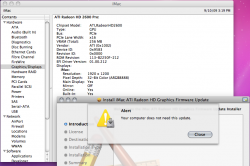
Odd - I get this...
 

Attachments

  • Screen shot 2009-09-10 at 3.19.59 PM.png
    Screen shot 2009-09-10 at 3.19.59 PM.png
    164.9 KB · Views: 392
Were people having problems with these?

after i installed my raid card, i created a striped raid of 2 harddrives thinking boot will be faster. wrong. boot does speed up but u have to add the time for the card to initialize. mine was taking close to 20 seconds for the apple logo to show at start up. then i count boot from there so as not to be disappointed.
hopefully this update fixes or improves initialization.


During OS run, the speed of file transfer and application start up nearly doubled. in my opinion, this card is a little (severely) overpriced but good none the less.
 
Odd - I get this...

I didn't do the update and I have a newer ROM?

ATI Radeon HD 2600 Pro:

Chipset Model: ATI,RadeonHD2600
Type: GPU
Bus: PCIe
PCIe Lane Width: x16
VRAM (Total): 256 MB
Vendor: ATI (0x1002)
Device ID: 0x9583
Revision ID: 0x0000
ROM Revision: 113-B2250F-219
EFI Driver Version: 01.00.219
Displays:
iMac:
Resolution: 1920 x 1200
Pixel Depth: 32-Bit Color (ARGB8888)
Main Display: Yes
Mirror: Off
Online: Yes
Built-In: Yes
Display Connector:
Status: No Display Connected
 
Yes, though my iMac has 2600 ATI card, but it says I didn't need this update.

What's wrong?
 
clearly something is either a miss or the iMacs with ATI HD 2600 pro do not need it, I never updated my iMac ROM since purchasing my iMac back in 11/2007, so it either got fix with SL, or there is something a miss with the installer.
 
same message as all the above posts. Maybe I don't have "PRO"? I have same card as above posted screenshot and it says I don't need this update as well.


I am still on Leopard 10.5.8 so......?

Thought it was kewl :apple: released an update for my imac, but not so much!
 
Mine is also telling me that I don't need the update.

But I have ROM revision: 113-B2250L-259
EFI Driver Version: 01.00.259

iMac model: 8.1
HD 2600 Pro
Running SL 6.1

I haven't done any firmware updates, so what's up with this posted update?
 
My iMac with a 2600 pro running 10.6 gives the same alert, also didn't show up in software update, so I guess it's for a different version of OSX?
 
RE: Same here...

Same here. What model is this update for then? I've never had a ROM update available for my iMac's video chipset since I bought it in 10/2007 :confused:
 
re: my earlier comment

Sweet cheeks, there is a reason why it boots using the 32bit kernel by default.

Indeed. I have the early 2008 iMac 20" model and it runs fine on the 32-bit kernel but on the 64-bit one every so often it makes my monitor do the change resolution dance, so to speak. The flash you get when you make changes to your resolution settings... although the resolution never changes... the screen just goes off and right back on. No problems under Leopard or SL 32bit so I know its not the monitor or cables.

My guess is it MIGHT be changing the screen refresh but in summary yes there is a reason for the 32bit kernel. :mad:

Hope they fix it soon!
 
Is there anyone who actually got the firmware installed?

I get the same message that it's not needed.

PHP:
Model Identifier:    iMac7,1
Chipset Model:       ATI,RadeonHD2600
Vendor:              ATI (0x1002)
Device ID:           0x9583
Revision ID:         0x0000
ROM Revision:        113-B2250F-219 
EFI Driver Version:  01.00.219
 
Register on MacRumors! This sidebar will go away, and you'll see fewer ads.