N0ughtsAndCr0sses
macrumors 6502a
You must have a lot of “sheet” broken or buggy trn
17 pro
From 2621


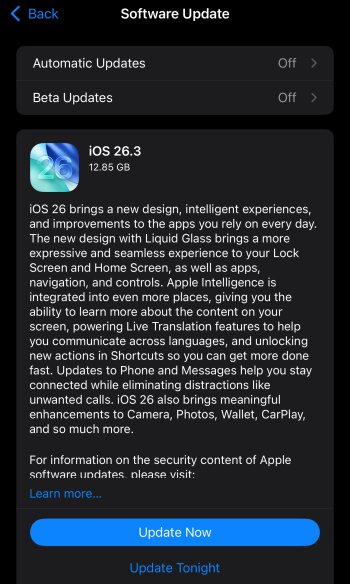
So how big is the download if you're on iOS 26.2.1? Could take a while to download like my update from iOS 26.1 to 26.2.
It can be quite confusing when two people with the same phone model see totally different numbers for the same update. Even if you are both coming from the exact same previous version, the size difference usually comes down to how Apple packages the files for your specific device at that moment.


I have a 17 PM all AI features turned on, went from 26.2.1 and my .3 install size was under 2gb.I noticed that these massive update sizes seem to be when there is some change with Apple Intelligence. You will see 10gb+ if you have an Apple Intelligence capable device.

If you are talking about the autocorrect and suggestions, that is run by a local AI model and would probably not get an upgrade until 26.4.Keyboard is still broken ^___^
It can be quite confusing when two people with the same phone model see totally different numbers for the same update. Even if you are both coming from the exact same previous version, the size difference usually comes down to how Apple packages the files for your specific device at that moment.
Here are the main reasons why this happens:
1. "Delta" Updates vs. Full Updates
This is the most common technical reason:
* Delta (Small): The phone downloads only the specific code that has changed since the last version. It’s like replacing a few parts in a car rather than the whole engine.
* Full/Combo (Large): Sometimes, the system triggers a full download (often 5-6GB+) if it detects a file corruption, a previous update error, or if the "Delta" path is unavailable for your specific build. It replaces the entire operating system to ensure stability.
2. Update Method
* OTA (Over-the-Air): Updates done directly via the iPhone settings over Wi-Fi are usually Delta updates (smaller).
* Via Computer (Mac/PC): If you plug your phone into a computer and use Finder or iTunes, it will always download the full firmware image. This is much larger because it completely overwrites the system to ensure a clean install.
3. App Thinning and Hardware Specifics
Apple uses a process called App Thinning. Even with the same model, the server might send different resource packets based on your regional settings, storage capacity, or even specific hardware revisions within the same model line. Newer models might also download extra assets (like AI models or high-res graphics) that older models don't receive.
4. Preparation Space
Sometimes the size shown includes the space required to unpack the files, not just the download itself. If a device is low on storage, the system might report a different "required space" figure to account for moving temporary files around during the installation process.
> Key Takeaway: No matter which size you see, once the update is finished and the temporary files are deleted, both phones will end up using roughly the same amount of storage.
If you are talking about the autocorrect and suggestions, that is run by a local AI model and would probably not get an upgrade until 26.4.

I’m doing the jump today from iOS 18 as well. We’ll get thru it together hahaFor my iPhone 15 Pro Max. I’m think I’m ready to update. I hope I don’t regret this.
Is there a slider to turn off Liquid Glass? Or a slider to reclaim all the lost screen real estate from the ios26 “upgrade?” Or a slider to allow me to place search boxes, etc back where I prefer them? Or a slider to turn off all the distracting visual candy that slows down my phone?
For my iPhone 15 Pro Max. I’m think I’m ready to update. I hope I don’t regret this.

No, in the 26.3 beta, Apple tested other Europe-only changes for third-party wearables. It does not appear to be in the GM.In the iOS 26.3 beta, Apple added other Europe-only changes for third-party wearables
Not sure what OP was referring to, but there's this and also the issue of missed keys presses. I've consistently noticed when typing certain words that contain other words it sometimes seems to want to stop there and not take the next key press. The same specific words every time.
There's also the issue of tons of missed presses in general in 26. Many times lately I have tapped a screen element, even seen the visual feedback for the touch, and yet nothing happens. I have to press it again with feeling this time before it gets through to it.
Seems to be something going on with accidental touch rejection or something like that.

3.75 on my 17PM, I have Apple Intelligence turned off11.9 GB on 17PM
It was a quick update though, took about 24 minutes from start to finish.Just over 12GB for my iPhone 😳
Keyboard is still broken ^___^