Become a MacRumors Supporter for $50/year with no ads, ability to filter front page stories, and private forums.

MacRumors

macrumors bot
Original poster


Apple today provided public beta testers with the third release of an upcoming macOS Tahoe 26.4 update for testing purposes. The public beta comes a week after Apple seeded the second beta.
macOS-Tahoe-26-Feature.jpg

After signing up for beta testing on Apple's beta site, public beta testers can download the updates using the Software Update section in the settings app for each update.

macOS Tahoe 26.4 includes several new features. The Compact tab layout has been reimplemented in Safari for those who missed having the option in earlier versions of macOS Tahoe, and there is a new Charge Limit feature that lets Mac users select a maximum charge level that ranges from 80 percent to 100 percent.

Apple silicon Mac users will see now see warnings about apps that are still using Rosetta 2, because Apple is phasing out Rosetta after macOS 27. macOS Tahoe is also the final version of macOS that will run on Intel-based Macs, and Apple is working to remove all lingering Intel features.

We could see additional features in upcoming versions of macOS Tahoe 26.4, such as new emoji characters. Apple is expected to test the update for the next several weeks, with a launch planned for the spring.

Article Link: Apple Releases Third macOS Tahoe 26.4 Public Beta
 
  • Wow
Reactions: Z-4195
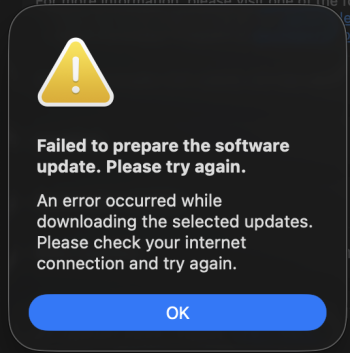
On my MBA M2, i keep getting failed to prepare the software update error. I've retried and rebooted. Any ideas?
 

Attachments

  • Screenshot 2026-03-04 at 2.24.14 PM.png
    Screenshot 2026-03-04 at 2.24.14 PM.png
    106.8 KB · Views: 30
These quick moves away from Intel compatibility worries me. While I no longer use Intel machines, I understand that a lot of people still do, and need a few more years to transition.
 
On my MBA M2, i keep getting failed to prepare the software update error. I've retried and rebooted. Any ideas?
I've had the same issue since beta 2. I still have the issue, but some have resolved it by installing from safe mode, disabling filters, and downloading a full installer.
 
  • Like
Reactions: timmywa
Can you please provide steps to perform the full installer?
I've had the same issue since beta 2. I still have the issue, but some have resolved it by installing from safe mode, disabling filters, and downloading a full installer.
 
Hope this fixes the whole-system crashing and reboot I've been seeing on my 16 inch M1 Macbook Pro Max since Tahoe 26.3 beta 2.
 
Last edited:
Is there any way to change Tahoe’s tabs to look like tabs than pill-shaped button the size of Lake Tahoe?
 
Register on MacRumors! This sidebar will go away, and you'll see fewer ads.