

Become a MacRumors Supporter for $50/year with no ads, ability to filter front page stories, and private forums.

MacRumors

macrumors bot
Original poster


Apple today released tvOS 26.4, the fourth update to the tvOS operating system that came out last fall. tvOS 26.4 is available for the Apple TV 4K and the Apple TV HD, and it comes over a month after Apple released tvOS 26.3.
tvOS-26-Feature.jpg

tvOS 26.4 can be downloaded using the Settings app on the ‌‌Apple TV‌‌. Open up Settings and go to System > Software Update to get the new software. ‌‌Apple TV‌‌ owners who have automatic software updates activated will be upgraded to tvOS 26.4 automatically.

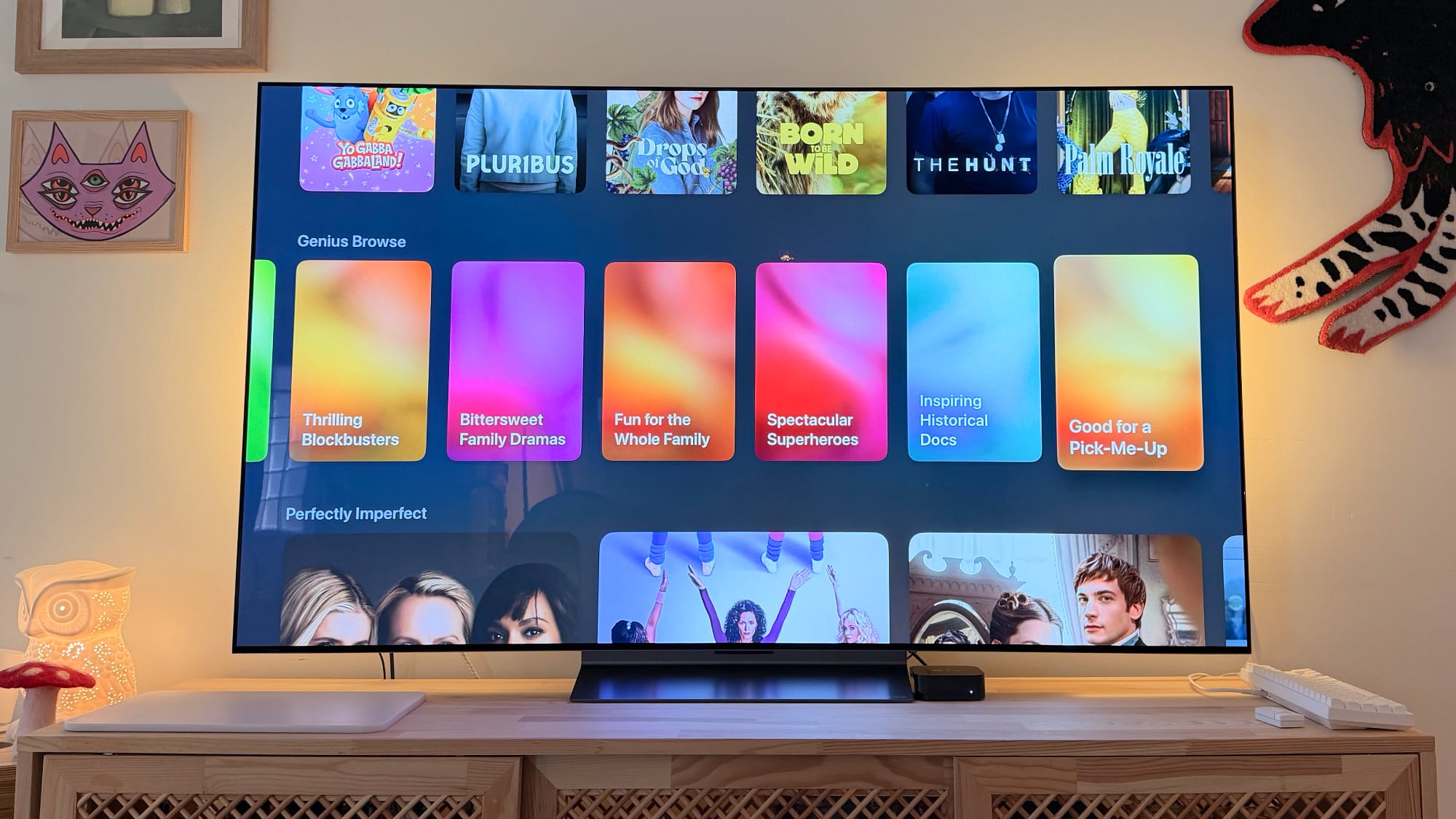
Apple added a new Genius Browse section to the Apple TV app in tvOS 26.4. Genius Browse is a content discovery feature that provides recommendations for TV shows and movies across multiple suggested categories. Suggestions vary based on content preferences, and the options are updated regularly.
tvos-26-genius-browse-overview.jpg


The update removes the dedicated iTunes Movies and iTunes TV Shows apps that Apple started phasing out in 2023, which means wishlists will no longer be available. Apple sent emails to affected customers with instructions on how to transfer wishlist content to the Apple TV app watchlist.

tvOS 26.4 also adds more easily accessible customization options for subtitles, and it improves Apple TV Audio Format settings with an option for Continuous Audio Connection for HDMI output.

Full release notes for tvOS 26.4 are available through Apple's tvOS support document.

Article Link: Apple Releases tvOS 26.4 With Genius Browse
 
  • Wow
Reactions: Z-4195
and it improves Apple TV Audio Format settings with an option for Continuous Audio Connection for HDMI output.

Can a kind soul please dumb that down for me and will it do anything noticeable for my Sonoc Arc?
 
  • Like
Reactions: Abombito
and it improves Apple TV Audio Format settings with an option for Continuous Audio Connection for HDMI output.

Can a kind soul please dumb that down for me and will it do anything noticeable for my Sonoc Arc?
I saw a video the other day about it. What I think it means is, at least on mine, sometimes I start a show or movie and the sound cuts in a couple seconds later. You get almost a click noise. It should fix that.
 
My apple tv has been running soooooo terribly lately with extreme input lag from the remote . I read that unpairing the remote and repairing it should help but I can't help but wonder if there's been some underlying OS issues. I keep up to date with fresh updates on that and the homepods that are paired as stereo speakers. Sometimes, I only get audio from one side too. Real magical experience from apple.
 
I wish they’d fix YouTube streaming to Apple TV over AirPlay. If a YouTube video has multiple soundtracks (which is getting very common now days with AI-generated dubs), the video will play in some random foreign language with no way to change it to the native audio. UNLESS you set the quality to 360p (only!), but that looks awful.
 
I saw a video the other day about it. What I think it means is, at least on mine, sometimes I start a show or movie and the sound cuts in a couple seconds later. You get almost a click noise. It should fix that.
Why is it an option? Is there any disadvantage to enabling it?
 
I saw a video the other day about it. What I think it means is, at least on mine, sometimes I start a show or movie and the sound cuts in a couple seconds later. You get almost a click noise. It should fix that.

I also have a Sonos soundbar connected via HDMI. I certainly don’t get any clicking noises but in recent tvOS versions sometimes there is a slight delay where the audio fades in when you start to play something? It’s not bothersome in itself, but the problem is that if you think “oh, the volumes too low” and press the volume up button on the remote too quickly, the volume goes down to nearly zero and stays there. But so long as you just wait, everything is fine.
 
Honestly the Apple TV is a mess. I wish they'd revisit their interface completely. especially around edge cases like thumbnails not loading and not having ANY context about the thing you are clicking on. no ability to sort movies or see the years easily.. not to mention the cumbersome switching between purchased content. Also easier removal of autoplay settings for when you just want to browse quietly. ..

Is it just me?
 
Genius Browse, Will it work on Plex, because that is my only "streaming" service.


Subtitles for the built-in video player(?) Who is using that one?
 
My apple tv has been running soooooo terribly lately with extreme input lag from the remote . I read that unpairing the remote and repairing it should help but I can't help but wonder if there's been some underlying OS issues. I keep up to date with fresh updates on that and the homepods that are paired as stereo speakers. Sometimes, I only get audio from one side too. Real magical experience from apple.

A relative of mine has this remote issue on theirs. It's really awful.
 
Why is it an option? Is there any disadvantage to enabling it?
Apple TV 4K 2021 connected to a Denon AVR-X2800H.
With this new setting enabled, when watching a video with a stereo track, the Denon now report a “Multi Channel input” (as it was a 5.1 track) but audio come out only from left/right speakers. With this setting disabled, the Denon report correctly as Stereo and then I can choose any “decoder” (like DTS Neu:X) I want.
So I’ll keep this disabled.
 
My apple tv has been running soooooo terribly lately with extreme input lag from the remote . I read that unpairing the remote and repairing it should help but I can't help but wonder if there's been some underlying OS issues. I keep up to date with fresh updates on that and the homepods that are paired as stereo speakers. Sometimes, I only get audio from one side too. Real magical experience from apple.
I have seen this issue before and the solution was actually buying a better HDMI cable.. Sounds weird but it seems that some HDMI cables can cause interference with the wireless signals. Don’t know if it would solve your case as well but it’s worth a try if you currently have an older or inexpensive cable.
 
My 2015 ATV 4 lives to see another day. I've been wanting to find an excuse to kick this thing to the curb but Apple keeps updating it. 🥳
 
Updated yesterday so I could watch F1. Which in itself is so damn annoying. And now my picture is super dark. Wtf Apple. This box has always been a hot mess for me as I regularly have to reboot or reload apps. now it’s even worse. And I won’t start up with their damn ads everywhere. It seems like every day Apple drops the ball on something.
 
  • Like
Reactions: Ct applefan
My apple tv has been running soooooo terribly lately with extreme input lag from the remote . I read that unpairing the remote and repairing it should help but I can't help but wonder if there's been some underlying OS issues. I keep up to date with fresh updates on that and the homepods that are paired as stereo speakers. Sometimes, I only get audio from one side too. Real magical experience from apple.
tvOS 26.3 destroyed my Apple TV 4K. Was unusable after update. Had to replace the Apple TV. Worked perfect until it updated to 26.3. My new one will be on 26.2, what it came with, forever
 
Honestly the Apple TV is a mess. I wish they'd revisit their interface completely. especially around edge cases like thumbnails not loading and not having ANY context about the thing you are clicking on. no ability to sort movies or see the years easily.. not to mention the cumbersome switching between purchased content. Also easier removal of autoplay settings for when you just want to browse quietly. ..

Is it just me?

Nope, not just you. Apple has completely given up on being the easy to use, low noise, user friendly option.

They’re full steam ahead on the enshirtfication train. They don’t care what you want to see anymore, it’s just another first party ad platform for them.
 
We have a Dolby Atmos 7.2.2 setup connected by hdmi and I noticed the transition from no sound to sound seems to be smoother after the update when starting a show or movie. Now, this maybe specific to my setup but after the update I noticed everything to be bit more punchy and dynamic. Dialogue sounded clearer and crisper. I only got in about 30 mins of testing but it does sound like an improvement overall compared to the previous version.

Hopefully, my opinion doesn’t change as week goes on!
 
  • Like
Reactions: DCIFRTHS
I have seen this issue before and the solution was actually buying a better HDMI cable.. Sounds weird but it seems that some HDMI cables can cause interference with the wireless signals. Don’t know if it would solve your case as well but it’s worth a try if you currently have an older or inexpensive cable.
Yeah but it worked fine for year and my apple tv is mounted behind my wall mount tv so its not being moved or shifted around. It's been this way for years with no issue
 
Register on MacRumors! This sidebar will go away, and you'll see fewer ads.