Become a MacRumors Supporter for $50/year with no ads, ability to filter front page stories, and private forums.

oberrz

macrumors newbie
Original poster
I'm having issue connecting 3 monitors with my new setup.

Perviously used: (all worked like a charm)

• Mac Book Pro M3 Max (Closed lid)
• Better Display
• LG C4 42 (4k-120h) USB-C - Cable matter (HDMI adapter) - HDMI
• GP27-FUS (4k-120h) USB-C - USB-C
• GP27-FUS (4k-120h) HDMI - HDMI


Current setup: (Trouble connecting 3rd monitor)

• Mac Book Pro M3 Max (Closed lid)
• Better Display
• Apple Studio Display XDR USB-C - USB-C
• GP27-FUS (4k-120h) USB-C - USB-C
• GP27-FUS (4k-120h) (No options works)

No matter what I'm trying to do (switch ports, cables, setup refresh rate 60hz, etc..) - Only Apple XDR and 1 more monitor working, 3rd one always stay off.

M3 Max

Simultaneously supports full native resolution on the built-in display at 1 billion colors and:


  • Up to four external displays: Up to three external displays with 6K resolution at 60Hz over Thunderbolt and one external display with up to 4K resolution at 144Hz over HDMI
  • Up to three external displays: Up to two external displays with 6K resolution at 60Hz over Thunderbolt and one external display with up to 8K resolution at 60Hz or one external display with 4K resolution at 240Hz over HDMI

As per my understanding this Mac should support 3 monitors, please help if someone has the answer/solution.
 
Are we certain we have the M3 Max? Just had to ask...

For what it's worth, I had 3 Studio Displays (original models) connected to my 14" M3 Max and all three worked fine.
 
1. We certain.
2. Original display is a big difference with new 5k 120hz. in regards of compatibilities
 
2. Original display is a big difference with new 5k 120hz. in regards of compatibilities
The Apple Studio Display XDR is 5K120. It requires more bandwidth than the Apple Pro Display XDR which is 6K60.

I guess Apple is limiting the total number of pixels per second to something less than the total allowed by the DisplayPort spec. Apple does not describe the limit as a calculation that one can use to determine if an arbitrary configuration can work. They only give examples of working configurations. It is basically useless information since it is not an exhaustive list of all possible working configurations. Such a list would be impossible to create.

Have you tried connecting the Studio Display XDR last?

4K60 = 534 MHz
5K60 = 939 MHz
4K120 = 1097 MHz
6K60 = 1290 MHz
4K144 = 1333 MHz
5K120 = 1921 MHz
8K60 = 2091 Mhz

Apple supported configuration 1: 1290 x 3 + 1333 = 5203 (3870 DisplayPort, 1333 HDMI)
Apple supported configuration 2: 1290 x 2 + 2091 = 4671 (2580 DisplayPort, 2091 HDMI)

xraydoc's configuration: 939 x 3 = 2817
oberrz's original configuration: 1097 x 3 = 3291 (2194 DisplayPort, 1097 HDMI)
oberrz's new configuration: 1097 x 2 + 1921 = 4115 (3018 DisplayPort, 1097 HDMI)

Seems like oberrz's new configuration should work if the limit was just total pixels per second.
@oberrz , you did try connecting one of the 4K120 displays to HDMI?

I guess it would be interesting to see oberrz's original configuration changed so that the HDMI port is not used.

Use SwitchResX or BetterDisplay to get the EDID of your displays so we can get the exact pixel clock for each.
 

joevt

Thank you for detailed response.
Before I explain what I got now I'll answer your questions: of course I tried HDMI - HDMI for 3rd one.
After hours of trying different setups I finally made it to the work but it's still very tricky one, so, now I have 3 or 4 monitors working:

• Better Display
• Mac Book Pro M3 Max (Closed or open lid works both scenarios) - Pro-motion
• Apple Studio Display XDR USB-C - USB-C (Original TB5 cable, right Mac's USB-C port ) - 5k scaling 200%- Adaptive 47-120hz
• GP27-FUS (4k-120h) USB-C - USB-C)( left 1st top USB-C port ) - 4k scaling 150% - 120hz
• GP27-FUS (4k-120h) HDMI-HDMI - 4k scaling 150% - 120hz

At least I have it working but the issue still exists:
After disconnecting/turning off/reseting/reboot any of the display, the setup won't work again unless jumping through hoops:

Steps to make it work again:

  1. Disconnect all cables
  2. Open MacBook Pro Lid (Very important without opening the lid it won't work again any scenario)
  3. Connect XDR Display >>> Setup 60hz
  4. Connect UBC-C Display >>> Setup 60hz
  5. Connect HDMI Display >>> Setup 60hz
  6. Change XDR Display back to 120hz
  7. Change UBC-C Display back to 120hz
  8. Change HDMI Display back to 120hz
  9. Close the lid
  10. It gonna work till next any display disconnect
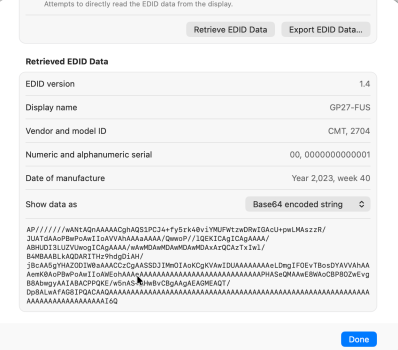
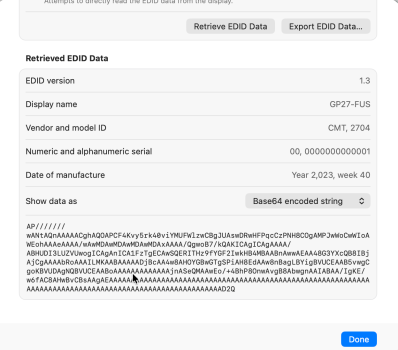
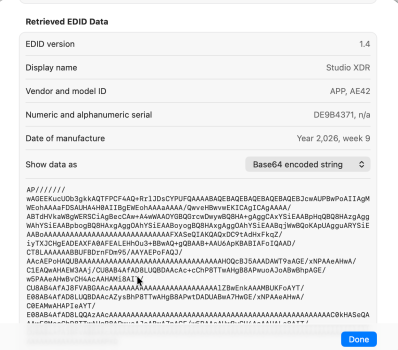
EDIDs attached
 

Attachments

  • 1_ 2026-04-11 at 9.41.47 PM.png
    1_ 2026-04-11 at 9.41.47 PM.png
    159.1 KB · Views: 41
  • 1_ 2026-04-11 at 9.41.59 PM.png
    1_ 2026-04-11 at 9.41.59 PM.png
    152.7 KB · Views: 36
  • 1_ 2026-04-11 at 9.42.11 PM.png
    1_ 2026-04-11 at 9.42.11 PM.png
    227.5 KB · Views: 39
At least I have it working but the issue still exists:
After disconnecting/turning off/reseting/reboot any of the display, the setup won't work again unless jumping through hoops:
Send feedback to Apple about this problem.

EDIDs attached
All of them have the EDID partially obscured by the cursor.
The third one has the EDID truncated.
Use the "Export EDID Data..." button to produce a text or binary file?
 
Send feedback to Apple about this problem.


All of them have the EDID partially obscured by the cursor.
The third one has the EDID truncated.
Use the "Export EDID Data..." button to produce a text or binary file?
Sorry my bad, find below:
AP///////wANtAQnAAAAACghAQS1PCJ4+fy5rk40viYMUFWtzwDRwIGAcU+pwLMAszzR/JUATdAAoPBwPoAwIIoAVVAhAAAaAAAA/QwwoP//lQEKICAgICAgAAAA/ABHUDI3LUZVUwogICAgAAAA/wAwMDAwMDAwMDAwMDAxArQCAzTxIwl/B4MBAABLkAQDARITHz9hdgDiAH/jBcAA5gYHAZODIW0aAAACCzCgAASSDJIMmOIAoKCgKVAwIDUAAAAAAAAeLDmgIFOEvTBosDYAVVAhAAAemK0AoPBwPoAwIIoAWEohAAAeAAAAAAAAAAAAAAAAAAAAAAAAAAAAPHASeQMAAwE8WAoCBP8OZwEvgB8AbwgyAAIABACPPQKE/w5nAS+AHwBvCBgAAgAEAGMEAQT/Dp8ALwAfAG8IPQACAAQAAAAAAAAAAAAAAAAAAAAAAAAAAAAAAAAAAAAAAAAAAAAAAAAAAAAAAAAAAAAAAAAAAAAAAAAAAAAAAI6Q

AP///////wANtAQnAAAAACghAQOAPCF4Kvy5rk40viYMUFWlzwCBgJUAswDRwHFPqcCzPNH8COgAMPJwWoCwWIoAWEohAAAeAAAA/wAwMDAwMDAwMDAwMDAxAAAA/QgwoB7/kQAKICAgICAgAAAA/ABHUDI3LUZVUwogICAgAnICA1FzTgECAwSQERITHz9fYGF2IwkHB4MBAABnAwwAEAA48G3YXcQB8IBjAjCgAAAAbRoAAAILMKAABAAAAADjBcAA4w8AHOYGBwGTgSPiAH8EdAAw8nBagLBYigBVUCEAAB5vwgCgoKBVUDAgNQBVUCEAABoAAAAAAAAAAAAAjnASeQMAAwEo/+4BhP8OnwAvgB8AbwgnAAIABAA/IgKE/w6fAC8AHwBvCBsAAgAEAAAAAAAAAAAAAAAAAAAAAAAAAAAAAAAAAAAAAAAAAAAAAAAAAAAAAAAAAAAAAAAAAAAAAAAAAAAAAAAAAAAAAAAAAAAAAAAAAAAAAAAAAD2Q

AP///////wAGEEKucUOb3gkkAQTFPCF4AQ+RrlJDsCYPUFQAAAABAQEBAQEBAQEBAQEBAQEBJcwAUPBwPoAIIAgMWEohAAAaFDSAUHA4H0AIIBgEWEohAAAaAAAA/QwveHBwvwEKICAgICAgAAAA/ABTdHVkaW8gWERSCiAgBecCAw+A4wWAAOYGBQGrcwDwywBQ8HA+gAggCAxYSiEAABpHqQBQ8HAzgAggWAhYSiEAABpbogBQ8HAxgAggOAhYSiEAABoyogBQ8HAxgAggOAhYSiEAABqjWwBQoKApUAgguARYSiEAABoAAAAAAAAAAAAAAAAAAAAAAAAAAAAAFXASeQIAKQAQxDC9tAdHxFkqZ/iyTXJCHgEADEAXFA0AFEALEHhOu3+BBwAQ+gQBAAB+AAU6ApKBABIAFoIQAAD/CT8LAAAAAABBUFBDrnFDm95/AAYAEPoFAQJ/AAcAEPoHAQUBAAAAAAAAAAAAAAAAAAAAAAAAAAAAAAAAAHOQcBJ5AAADAWT9aAGE/xNPAAeAHwA/C1EAQwAHAEW3AAj/CU8AB4AfAD8LUQBDAAcAc+cChP8TTwAHgB8APwuoAJoABwBhpAGE/w5PAAeAHwBvCH4AcAAHAMi8AIT/CU8AB4AfAJ8FVABGAAcAAAAAAAAAAAAAAAAAAAAAAAAAlZBwEnkAAAMBUKFoAYT/E08AB4AfAD8LUQBDAAcAZysBhP8TTwAHgB8APwtDADUABwA7HwGE/xNPAAeAHwA/C0EAMwAHAPIeAYT/E08AB4AfAD8LQQAzAAcAAAAAAAAAAAAAAAAAAAAAAAAAAAAAAAAAAAAAAAAAAAAAAAAAAAC0kHASeQAAAwE8MecChP8TTwAHgB8APwuoAJoABwA7pAGE/w5PAAeAHwBvCH4AcAAHALe8AIT/CU8AB4AfAJ8FVABGAAcAAAAAAAAAAAAAAAAAAAAAAAAAAAAAAAAAAAAAAAAAAAAAAAAAAAAAAAAAAAAAAAAAAAAAAAAAAAAAAPKQ
 
Sorry my bad, find below:
Attached the EDID dumps.

The first GP27-FUS is connected to DisplayPort.
It has a HDMI 4K60 and 4K120 mode.
It has CVT-RB 4K60 mode.
Other modes: 4K50, 75, 144, 160

The second GP27-FUS is connected to HDMI.
It has HDMI 4K30, 50, 60, 120 modes
It supports 4:2:0 for 4K30 (invalid?), 50, 60.
Other modes: 4K144, 160

The Apple Studio display XDR has two different 5K120 modes with slightly different pixel clocks for some reason.
It has a dual tile 5K60 mode for compatibility with Macs that don't support DSC (similar to previous Apple Studio Display and LG UltraFine 5K). It doesn't have other timings for dual dial mode. The EDID for the other tile was not included.
 

Attachments

how does your app take into account DSC?
It doesn't curently, bu i think i can make it (or possibly estimate it), at the moment it overestimates becasue of DSC woul actually bring the bandwidth down>

I'll see if i can get this working over the weeknd or very soon
 
Register on MacRumors! This sidebar will go away, and you'll see fewer ads.