Become a MacRumors Supporter for $50/year with no ads, ability to filter front page stories, and private forums.

anthony13

macrumors 65816
Original poster
Y’all. Please help. This set up is driving us crazy. I have an Apple TV with stereo HomePods as the audio output.

We also of course have iPhones and often control the Apple TV with our phones remote app as I assume so many others do to.

But that simple act of using the control app seems to then tie the phones media to the tv as well. For example. We’re watching a show on Apple TV. I go to the other room and play a play a podcast on my phone, and it automatically stops what’s playing on my tv in the living room and plays my podcast there. What’s worse is, I’m not unfamiliar with how it ‘should’ work. So I turn off the audio to the tv but it seems to just get stuck in a ‘thinking’ mode and won’t play locally on my phone either.

I’m about ready to buy a sound bar for the tv and get out of the Apple home pod game all together. Is there some thing im missing?
 
Y’all. Please help. This set up is driving us crazy. I have an Apple TV with stereo HomePods as the audio output.

We also of course have iPhones and often control the Apple TV with our phones remote app as I assume so many others do to.

But that simple act of using the control app seems to then tie the phones media to the tv as well. For example. We’re watching a show on Apple TV. I go to the other room and play a play a podcast on my phone, and it automatically stops what’s playing on my tv in the living room and plays my podcast there. What’s worse is, I’m not unfamiliar with how it ‘should’ work. So I turn off the audio to the tv but it seems to just get stuck in a ‘thinking’ mode and won’t play locally on my phone either.

I’m about ready to buy a sound bar for the tv and get out of the Apple home pod game all together. Is there some thing im missing?
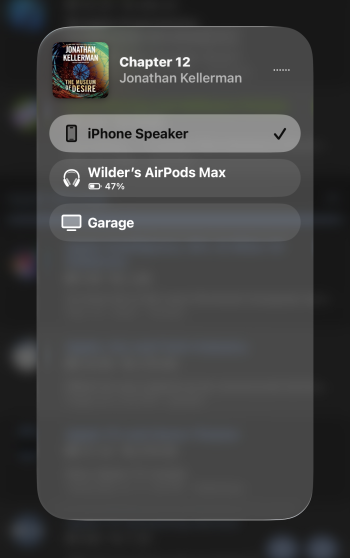
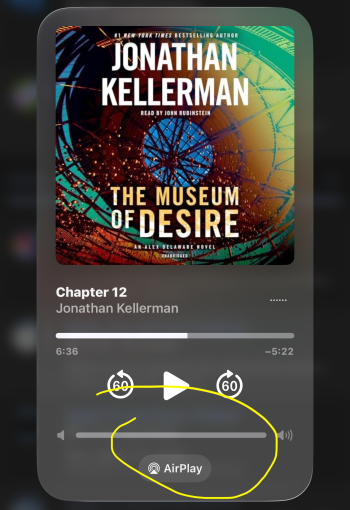
Try changing the airplay on your phone to the room your in.
 

Attachments

  • IMG_1554.png
    IMG_1554.png
    1.8 MB · Views: 9
  • IMG_1553.png
    IMG_1553.png
    3.1 MB · Views: 8
Like wilderkun said, make sure you change the source for where you want the audio to play. It’s actually pretty intuitive once you get the hang of it. I have the AirPlay platter in my Control Center and do it from there. So if I’m watching TV and want to do something on my phone, I tap the AirPlay icon, then “All speakers and TVs” at the bottom and select which source I want the new audio to play on. So you would select iPhone speaker.

Pro tip- the first screen on the AirPlay menu will let you select multiple sources for the current audio. “All speakers and TVs” at the bottom lets you select a new source to control, which you can add multiple sources to after.

This used to annoy me as well until I figured it out.
 
  • Like
Reactions: b17777 and srl7741
I appreciate the help. The thing is I understand all those things. How do I make the phone never ‘assume’ to cast to my HomePods? For some reason using the remote app (which really has nothing to do with airplay) makes my phone think it should also cast any audio to my tv. I don’t want that. In fact I basically never want my phone to cast to my stereo HomePods. I have that auto continuity option already turned off.
 
  • Like
Reactions: Itinj24
I appreciate the help. The thing is I understand all those things. How do I make the phone never ‘assume’ to cast to my HomePods? For some reason using the remote app (which really has nothing to do with airplay) makes my phone think it should also cast any audio to my tv. I don’t want that. In fact I basically never want my phone to cast to my stereo HomePods. I have that auto continuity option already turned off.
Ok, yes, I see what you’re saying. I get the same behavior too which is why I make it a habit of going into the AirPlay menu to select my iPhone as the source whenever the ATV is playing, and I want to source audio from content on the iPhone. The way I think it works, is if you’re playing something on the TV, it automatically selects that in the AirPlay menu out of “convenience” so the controls are immediately available to you. FWIW, I force closed the Remote app and the behavior remained the same. It still transferred audio from my phone the ATV.

One would think that setting in AirPlay and Continuity to automatically AirPlay would fix this issue but unfortunately it doesn’t.
 
  • Like
Reactions: anthony13
I don’t think there’sa way to do exactly what your trying to do with the current os. Depending on your hardware the AirPlay switcher should show the room you’re in because first in the list.
 
Register on MacRumors! This sidebar will go away, and you'll see fewer ads.