
Become a MacRumors Supporter for $50/year with no ads, ability to filter front page stories, and private forums.

VideoBeagle

macrumors 6502a
Original poster
Ok, I have blu-ray rips that I've converted for use with the Apple TV in Handbrake.

I'm using the modified Apple TV 3 preset mentioned in the other thread here.

nOrERro.png


Both 5.1 channels.

When I add the mp4 to iTunes and play it, this is what's in the controls menu:
5gbiBI5.png


My Apple TV is connected to my Sony Receiver with 5.1.

Is this just itunes, and has no bearing on the digital signal being received by my Receiver? Or am I just getting stereo?
 
When you're playing it in iTunes, you're limited to what your computer can handle. If the computer only has stereo output, that's all you can select in iTunes.
 
Have you enabled DD5.1 pass-through in aTV Audio & Video settings?
turn-on-dolby-digital.jpg

Set to On or Auto.
This works immediately, if you connect your aTV to receiver with optical TOSLINK cable. If you route signal via TV set (aTV->TV->Receiver), you need to conf your TV to pass DD5.1 through as well. Some are even incapable to do that, as we've learned in this forum.
If you intend to get DD5.1 from your computer, you also have to use it's digital audio output to pass DD5.1 out to receiver.
 
Is this just itunes, and has no bearing on the digital signal being received by my Receiver? Or am I just getting stereo?

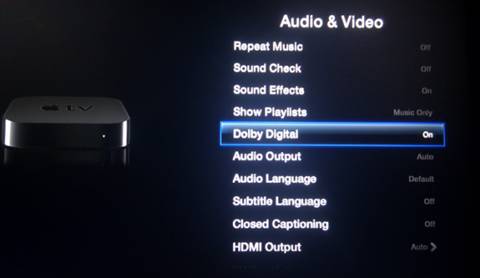
It's just iTunes. Go to your Apple TV, hold down Select on your remote control until the menu pops up, and you should be able to see what audio track is playing. My Apple TV gets a 5.1 signal even though iTunes says stereo. By default, the Apple TV will automatically try to determine whether your receiver can Dolby Digital or not. In my case, my TV (connected via HDMI) cannot, but my receiver (connected with optical) can, so I have forced Dolby Digital on in the Apple TV settings.

Sony receivers are usually pretty clear on what signal they are receiving. Mine lights up like a Christmas tree when it gets a DD signal.

A.
 
By default, the Apple TV will automatically try to determine whether your receiver can Dolby Digital or not.
That would only be possible over HDMI but I have no knowledge if aTV really does such discovery.
But if the movie contains DD5.1 track, it will automatically pass it on to digital outputs (HDMI and optical), unless you supress it in A&V settings (Dolby Digital = Off).
 
But if the movie contains DD5.1 track, it will automatically pass it on to digital outputs (HDMI and optical), unless you supress it in A&V settings (Dolby Digital = Off).

That is not my experience. My TV (HDMI) cannot accept a DD signal, and so if set to 'automatic' my Apple TV will never send one (over any port). If I manually set DD to on, my TV will complain and my receiver (optical) will get a DD signal.

A.
 
Thanks! looks like I need to set Dolby Digital to On instead of auto to get it to work right.
 
If I manually set DD to on, my TV will complain and my receiver (optical) will get a DD signal.
That's really strange. So you connect picture to TV via HDMI and audio to receiver via optical (directly from aTV)?
What happens if you disconnect HDMI? Will it play DD5.1 audio to the receiver via optical?
 
So you connect picture to TV via HDMI and audio to receiver via optical (directly from aTV)?
What happens if you disconnect HDMI? Will it play DD5.1 audio to the receiver via optical?

With no HDMI connected and ATV DD set to 'Automatic', there is a stereo signal at the optical output. I do not have a DD-capable HDMI device with which to make the final conclusive test.

A.
 
With no HDMI connected and ATV DD set to 'Automatic', there is a stereo signal at the optical output.
With HDMI disconnected, the only thing I see, is the message that playback requires HDCP authentication, so I can not play back any HD movies.
Shall retry with a SD movie someday.
 
I have the same sort of issue. I have a ripped movie, that according to Handbrake, has a 5.1 audio track, but when I play it via ATV3, my receiver says PCM, and only decodes stereo. This happens with about 50% of the videos I have, even though they are all 5.1. Some play, some don't. But when I open the video in Handbrake, the only audio track is 5.1.

So why wouldn't a video with 5.1 not play 5.1 on my receiver? Why do some work and some don't? Strange...

And I have my ATV3 connected to my receiver via HDMI, then one HDMI goes to my TV.
 
I had this exact same issue when I started using ATV. What I did was set Handbrake to AC-3 5.1 @ 640Kb/s for stream #2. So yes, it has to transcode the AC-3 on disc to a new AC-3 stream. However, the movies have all played back perfectly ever since.

I think it's something about the AC-3 stream on the disc doesn't jive well with ATV. It could also be a bug with Handbrake.

But all my movies that Handbrake has encoded, work perfectly on any player.
 
I had this exact same issue when I started using ATV. What I did was set Handbrake to AC-3 5.1 @ 640Kb/s for stream #2. So yes, it has to transcode the AC-3 on disc to a new AC-3 stream.
My experience is directly opposite: I never let HB to transcode an AC3 track, always pass it through.
Never had a problem with that.
And in general HB produces extremely compliant MPEG-4 files. By the book, the iTunes-compliant file must have the AAC track and may have the AC3 track. Using HB's appleTV preset takes care of that!
One thing, that may need manual fixing post-HB in Subler is however the language tag of the audio track. If it's left Undefined in MKV, you can't set it in HB either and it ends up as Undefined language track in MP4. Have a look at that.
 
Register on MacRumors! This sidebar will go away, and you'll see fewer ads.