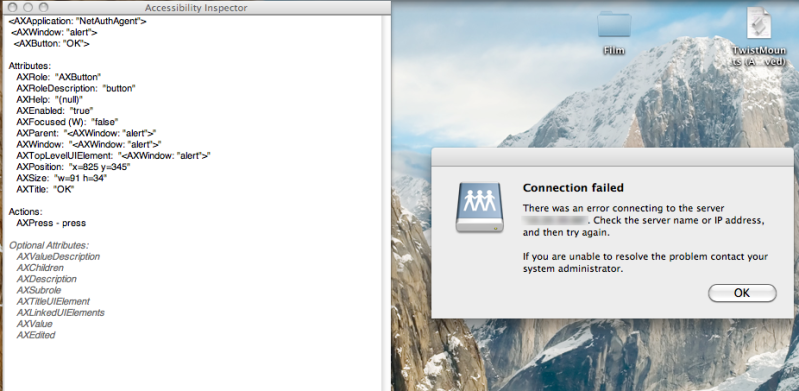
Normally use System Events, but I'm not sure how you reference a popup that isn't a sheet (like a drop down dialog from the window title-bar.
ie.
Code:
tell application "System Events"
tell process "Finder"
click (button "OK" of sheet 1 of window 1)
end tell
end tell
But in your case there is no sheet and no window, although you could start by trying "frontmost window". Or if you're in OSX 10.4 or later, try recording it with Automator and see what script is produced.
Cheers for the help, but I think I might need pointing in the right direction still.
This is what I have so far
Code:
tell application "Finder"
try
mount volume "afp:/XXXX:XXXX@server/server_share"
tell application "System Events"
tell process "Finder"
keystroke return
end tell
end tell
end try
end tell
Looks good, although you maybe want a delay after the connection attempt
or put the tell application "System Events" after an on error
just before the end try, ie.
Code:
tell application "Finder"
try
mount volume "afp:/XXXX:XXXX@server/server_share"
on error
tell application "System Events"
tell process "Finder"
keystroke return
end tell
end tell
end try
end tell
Can't be sure if any connection failure is regarded as an error, so you may need to test.
Otherwise replace the "on error" with a "delay 5" or "delay 60", or however long (in seconds) you are comfortable with, just to give the mount long enough to fail and produce the dialog box.
Can't work out from the Finder Dictionary what the dialog might be referenced as, I suppose we could try 'dialog' - back to my first script clicking button "OK".