Become a MacRumors Supporter for $50/year with no ads, ability to filter front page stories, and private forums.

Sepultura

macrumors regular
Original poster
I wasn't sure where to put this topic, but since battery life is related I thought I would put it in one of the laptop forums.

What apps are available to test for a failing battery and hard drive?

If I were to buy a used Macbook Pro or Air - old or new model, I want to check these and make sure I am not getting a dud.

For example on the hard drive... On Windows I use a fantastic program that is FREE, called CrystaldiskInfo. It checks the SMART attributes and will warn you if a hard drive is failing.

What free programs are available on Mac?
 
Coconut Battery: Health should be above 90% and the cycle count below 500 I would say. A very low cycle count can also be bad... less than 10-20/year is a reason to be concerned.

I don't know what is good to test the hard drive.
 
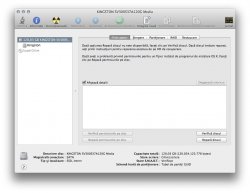
No need for special apps.
You can check the HDD with Disk Utility and the battery with System Profiler.

*My OS is in Romanian but you get the idea.
 

Attachments

  • Captur? de ecran 2013-07-14 la 02.03.20.jpg
    Captur? de ecran 2013-07-14 la 02.03.20.jpg
    123.7 KB · Views: 193
  • Captur? de ecran 2013-07-14 la 02.02.17.jpg
    Captur? de ecran 2013-07-14 la 02.02.17.jpg
    123.1 KB · Views: 190
Last time I used disk utility it didn't give as much information as I wanted.

I will have to check it out next time.

Thanks for the tip on Coconut battery.

* also free recommendations only please.
 
I don't know about software to "test" a battery, other than monitoring it with Coconut Battery, however months ago I put together a list of drive testing products right here on Macrumors.

Here's a link:

https://forums.macrumors.com/threads/1544280/

I use Scannerz nowadays myself. If you find other products let me know and I can update/edit the list as needed.

Disk Utility can do index corrections in it's "Repair" mode and can modify/reset permissions, and newer versions give better SMART status (for what that's really worth) but that's it. It doesn't do surface scans. If you drive actually has some types of media defects, Disk Utility will never let you know.
 
Register on MacRumors! This sidebar will go away, and you'll see fewer ads.