
Got a tip for us?
Let us know
Become a MacRumors Supporter for $50/year with no ads, ability to filter front page stories, and private forums.
Are faster boot disks or scratch disks better when video editing?
- Thread starter DoNoHarm
- Start date
- Sort by reaction score
You are using an out of date browser. It may not display this or other websites correctly.
You should upgrade or use an alternative browser.
You should upgrade or use an alternative browser.

spinnerlys
Guest
Scratch disk, as the editing software is already loaded into the RAM.
The boot disk will also write some data to swap files, if the RAM is to full.
The boot disk will also write some data to swap files, if the RAM is to full.

Scratch disk, as the editing software is already loaded into the RAM.
The boot disk will also write some data to swap files, if the RAM is to full.
Hmm... so then instead of getting a 500gb 2.5" form factor drive, it's better to get a 3.5" form factor 1TB 7200 rpm disk (at the same price), correct?
also if I have the old MBP, which firewire version will provide the optimum data transfer speeds?
spinnerlys
Guest
3.5" drives should be better, but I don't have exact transfer (write and read at random or in sequence) speeds in my head, so I might be wrong.
We at work use 3.5" 1TB Western Digital Studio drives for storing Digi Beta and DV material onto them.
They are connected via Firewire 800 on the newer machine and FW400 on the older.
I don't see a downside even on the Firewire 400 port when the video has a data rate of 26.7MB/s (byte, not bit), but it's only one stream.
Two or more would cripple even the FW800 port, when editing in 1:1 resolution, therefore we edit with a lower resolution and then capture only the material for the end product. But that's only because we have hundreds of tapes for one project (6-12 shows).
We at work use 3.5" 1TB Western Digital Studio drives for storing Digi Beta and DV material onto them.
They are connected via Firewire 800 on the newer machine and FW400 on the older.
I don't see a downside even on the Firewire 400 port when the video has a data rate of 26.7MB/s (byte, not bit), but it's only one stream.
Two or more would cripple even the FW800 port, when editing in 1:1 resolution, therefore we edit with a lower resolution and then capture only the material for the end product. But that's only because we have hundreds of tapes for one project (6-12 shows).
Hmm... so then instead of getting a 500gb 2.5" form factor drive, it's better to get a 3.5" form factor 1TB 7200 rpm disk (at the same price), correct?
also if I have the old MBP, which firewire version will provide the optimum data transfer speeds?
If buying an external disk buy the FW800 even if your computer only does FW400. It will work if you have the correct cable and if you ever upgrade the computer you will then be able to use the faster interface. FW800 is noticeably faster but is compatible with FW400

bigbossbmb
macrumors 68000
man, it seems crazy to get this brand new fast hard drive and NOT have it utilized inside my MBP.... Is it really that critical to have the fast drive as the scratch disk and not my main hard disk? What kind of speed difference are we talking about here? This is a mixed use machine, so I will be doing word processing, web development, etc. as well as video editing...
talking to my friends, it seems that the rpm of the scratch disk is not where the bottleneck is. It's what connection you use. firewire 800 seems to be the best connection, but also where the bottleneck is.... Does anyone have any benchmark tests that looked at hard drive speed using the same connection when encoding video? Any real world numbers?

Macmaniac
macrumors 68040
Just a piece of advice, never ever use your internal Hard Drive as a scratch disk. Its a great way to shred your drive.
Just invest in a good Firewire 800 7200RPM external drive (3.5in)
I edited a huge 150gb HDV project off a Firewire 800 drive and it did fine scrubbing through hours of source material. Just make sure you have plenty of RAM allocated.
Just invest in a good Firewire 800 7200RPM external drive (3.5in)
I edited a huge 150gb HDV project off a Firewire 800 drive and it did fine scrubbing through hours of source material. Just make sure you have plenty of RAM allocated.
spinnerlys
Guest
talking to my friends, it seems that the rpm of the scratch disk is not where the bottleneck is. It's what connection you use. firewire 800 seems to be the best connection, but also where the bottleneck is.... Does anyone have any benchmark tests that looked at hard drive speed using the same connection when encoding video? Any real world numbers?
If you mean encoding to a more compressed format like an .mp4 with the .h264 codec, the FW800 will more than suffice.
FW800 will give you 50-65MB/s transfer speeds, so there is plenty of room for proper encoding.
You also could SATA with an eSATA express card, as that will offer more speed, but then you really have to use fast 7200rpm drives or even raid to fully exhaust that port.
What kind of video are planning to edit and encode? DV, HDV, Digi Beta, 1080i/p,....?
The more resolution the material and the less compression you use, the more speed you're going to need.
DV - 3.25MB/s
HDV - approx. 17 to 20MB/s
Digi Beta 1:1 - 26MB/s
1080i/p - depending on the lossless codec you use.
bigbossbmb
macrumors 68000
spinnerlys
Guest
spinnerlys, HDV and DV have the same data rate.... they are both 3.5MB/s
On tape they have, as HDV is an MPEG-2 stream, but once captured with FCP and converted to AIC, HDV takes up 5 times more space.
Or do you save HDV as MPEG-2 stream on your HDD and edit it in MPEG-2?

knello
macrumors member
On tape they have, as HDV is an MPEG-2 stream, but once captured with FCP and converted to AIC, HDV takes up 5 times more space.
Why do you use AIC and not ProRes? (curious)
spinnerlys
Guest
^I don't know, I only used HDV once in my life, and I choose AIC then.
What would be the advantage of ProRes over AIC?
What would be the advantage of ProRes over AIC?
\
What kind of video are planning to edit and encode? DV, HDV, Digi Beta, 1080i/p,....?
I'm working with 720p avchd encoded files.
spinnerlys
Guest
I'm working with 720p avchd encoded files.
The faster scratch disks should be your way to go, as AVCHD imported into FCP (and converted to AIC or ProRes) will take up space and needs good read speeds.
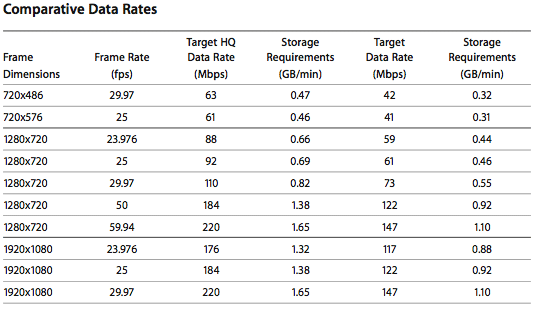
ProRes chart from AppleInsider
Hi, sorry to hijack the thread, but I have similar questions. I was thinking of going the esata route and getting an external enclosure to put a couple of 320 GB WD 7200 RPM drives from my desktop in a raid 0 then import the footage from a sony dv camcorder using the firewire port. I'm getting a 17 MBP. Also, be working w/ 720P clips from nikon D90. I'm just trying to figure out the correct expresscard 34 esata to get that will work w/ the new mbp. There's a question in here somewhere. Is this going to work as smoothly as I am thinking it will? This is just for home use, i'm not making a living off of it or anything, but I'm a first time switcher so I've got a lot to learn. . .
*again sorry for the hijack*
*again sorry for the hijack*
spinnerlys
Guest
eSATA might be overkill.
DV has a data rate of 3.125MB/s and 720p footage converted to ProRes has around 11MB/s, so even a FW800 would do and you could still have five to 15 concurrent video streams in the timeline.
But to answer your question, here are some threads about eSATA ExpressCards/34: http://www.google.com/cse?cx=011016...e:forums.macrumors.com&hl=en&as_qdr=all&meta=
DV has a data rate of 3.125MB/s and 720p footage converted to ProRes has around 11MB/s, so even a FW800 would do and you could still have five to 15 concurrent video streams in the timeline.
But to answer your question, here are some threads about eSATA ExpressCards/34: http://www.google.com/cse?cx=011016...e:forums.macrumors.com&hl=en&as_qdr=all&meta=
eSATA might be overkill.
DV has a data rate of 3.125MB/s and 720p footage converted to ProRes has around 11MB/s, so even a FW800 would do and you could still have five to 15 concurrent video streams in the timeline.
But to answer your question, here are some threads about eSATA ExpressCards/34: http://www.google.com/cse?cx=011016...e:forums.macrumors.com&hl=en&as_qdr=all&meta=
Yeah, i've picked up on Mroogle and have been using it. There's a few expresscard esata threads and a main one, it's a mess the only card that seems to work flawlessly is a sonnet pro version for $280. What a headache. I thought if I went esata then I could leave the fw 800 port open to connect my dv camcorder to and just import directly to the esata drives? Would that not save a step of importing to the boot drive and then copying over to the esata drive? or do I just not understand what I'm trying to do 🙂
Thanks for the advice/input. I haven't even got the 17 MBP yet, it should be here by june 25th I hope.
spinnerlys
Guest
Yeah, i've picked up on Mroogle and have been using it. There's a few expresscard esata threads and a main one, it's a mess the only card that seems to work flawlessly is a sonnet pro version for $280. What a headache. I thought if I went esata then I could leave the fw 800 port open to connect my dv camcorder to and just import directly to the esata drives? Would that not save a step of importing to the boot drive and then copying over to the esata drive? or do I just not understand what I'm trying to do 🙂
Thanks for the advice/input. I haven't even got the 17 MBP yet, it should be here by june 25th I hope.
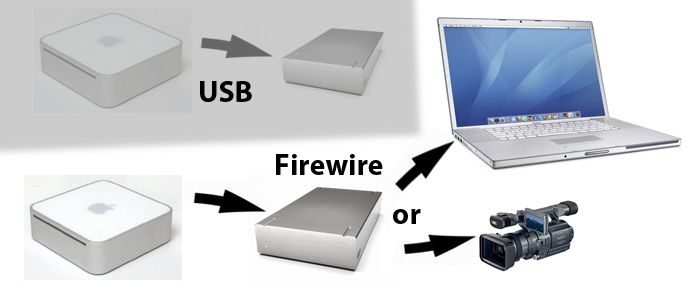
As you can daisy chain FW devices (up to 63 in a row), you could connect the HDD via a FW800 cable to the MBP, and the camera via a FW (4pin to 9pin) cable to the HDD.
An example for daisy chaining below:
ChemiosMurphy
macrumors 6502
Spinner, Big Boss was right, you don't need to transcode HDV to AIC or anything else in FCP. You can capture, edit, and export native if you choose. You still retain the 3.5 MB bitrate but it puts more pressure on the CPU.
spinnerlys
Guest
Spinner, Big Boss was right, you don't need to transcode HDV to AIC or anything else in FCP. You can capture, edit, and export native if you choose. You still retain the 3.5 MB bitrate but it puts more pressure on the CPU.
How can I capture HDV in FCP without transcoding?
And even the transcoded HDV video I once did (AIC), put some pressure on my 2.0GHz Alu iMac with 4GB RAM, the CPU was always above 50%.

LethalWolfe
macrumors G3
Select the appropriate HDV easy setup. We edit HDV daily mainly on G5's so it shouldn't be too much of a struggle for an intel machine.How can I capture HDV in FCP without transcoding?
And even the transcoded HDV video I once did (AIC), put some pressure on my 2.0GHz Alu iMac with 4GB RAM, the CPU was always above 50%.
Lethal