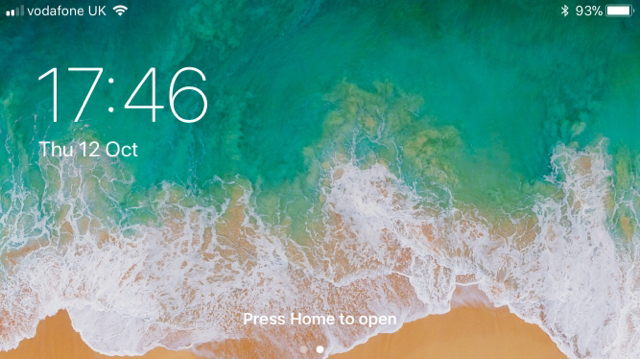
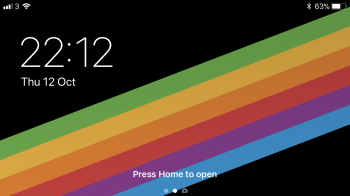
martin2345uk macrumors 68000 Original poster Oct 12, 2017 #1 If I lock the screen after using an app in landscape, the lock screen is then also landscape..: is this by design? I like it! Reactions: Nekomichi
If I lock the screen after using an app in landscape, the lock screen is then also landscape..: is this by design? I like it!
J johnmed macrumors 6502 Oct 12, 2017 #4 My 7 has had it since GM, can’t remember if on any of the betas. Attachments 30137637-0B9A-49F9-B940-6038B525C184.png 812.6 KB · Views: 282
iSayBoourns Suspended Oct 12, 2017 #5 johnmed said: My 7 has had it since GM, can’t remember if on any of the betas. Click to expand... It happened in all the 10 betas
johnmed said: My 7 has had it since GM, can’t remember if on any of the betas. Click to expand... It happened in all the 10 betas
koifish22 macrumors regular Oct 12, 2017 #6 I don't think it's a bug, but it only appears if your phone isn't passcode locked or you have a passcode timer.
I don't think it's a bug, but it only appears if your phone isn't passcode locked or you have a passcode timer.
KGB7 Suspended Oct 12, 2017 #7 Had that happen to me one time few days ago on 6s+. I do like it as well, wish it wasn’t a bug.
akash.nu macrumors G4 Oct 13, 2017 #8 koifish22 said: I don't think it's a bug, but it only appears if your phone isn't passcode locked or you have a passcode timer. Click to expand... It is a bug & a low priority one. It has been there since ages. Sometimes it messes up app that are meant to lock only on portrait mode.
koifish22 said: I don't think it's a bug, but it only appears if your phone isn't passcode locked or you have a passcode timer. Click to expand... It is a bug & a low priority one. It has been there since ages. Sometimes it messes up app that are meant to lock only on portrait mode.
TransPNG macrumors member Oct 13, 2017 #9 akash.nu said: It is a bug & a low priority one. It has been there since ages. Sometimes it messes up app that are meant to lock only on portrait mode. Click to expand... This is new Notification Center design in iOS 11, not a bug. It just "looks like" a lock screen. If you press the power button to lock screen, it will return to normal design.
akash.nu said: It is a bug & a low priority one. It has been there since ages. Sometimes it messes up app that are meant to lock only on portrait mode. Click to expand... This is new Notification Center design in iOS 11, not a bug. It just "looks like" a lock screen. If you press the power button to lock screen, it will return to normal design.
Rok73 macrumors 65816 Oct 13, 2017 #10 Mlrollin91 said: Even Plus models don't have that. Click to expand... Of course they do. EDIT: Apologies, I was wrong. The notification screen looks like this in landscape.
Mlrollin91 said: Even Plus models don't have that. Click to expand... Of course they do. EDIT: Apologies, I was wrong. The notification screen looks like this in landscape.
C C DM macrumors Sandy Bridge Oct 13, 2017 #11 TransPNG said: This is new Notification Center design in iOS 11, not a bug. It just "looks like" a lock screen. If you press the power button to lock screen, it will return to normal design. Click to expand... Seems like the issue here isn't the lock screen use of Notification Center, but the landscape orientation that shouldn't apply to non-plus phones. Reactions: akash.nu
TransPNG said: This is new Notification Center design in iOS 11, not a bug. It just "looks like" a lock screen. If you press the power button to lock screen, it will return to normal design. Click to expand... Seems like the issue here isn't the lock screen use of Notification Center, but the landscape orientation that shouldn't apply to non-plus phones.