C coolnwo macrumors member Original poster Sep 20, 2014 #3 found this http://www.macobserver.com/tmo/article/iphone-6-att-microcell
J jfulcher macrumors regular Sep 20, 2014 #5 You don't have to do all that. Go into the microcell app on your phone. Find the entry for your phone number. Edit it and add an extra letter or space to the end of your name and hit save. This will cause it to resync. Done.
You don't have to do all that. Go into the microcell app on your phone. Find the entry for your phone number. Edit it and add an extra letter or space to the end of your name and hit save. This will cause it to resync. Done.
C coolnwo macrumors member Original poster Sep 20, 2014 #6 I will try that Thanks! jfulcher said: You don't have to do all that. Go into the microcell app on your phone. Find the entry for your phone number. Edit it and add an extra letter or space to the end of your name and hit save. This will cause it to resync. Done. Click to expand...
I will try that Thanks! jfulcher said: You don't have to do all that. Go into the microcell app on your phone. Find the entry for your phone number. Edit it and add an extra letter or space to the end of your name and hit save. This will cause it to resync. Done. Click to expand...
S sdsvtdriver macrumors 65816 Sep 20, 2014 #7 jfulcher said: You don't have to do all that. Go into the microcell app on your phone. Find the entry for your phone number. Edit it and add an extra letter or space to the end of your name and hit save. This will cause it to resync. Done. Click to expand... Didn't work for me. 🙁
jfulcher said: You don't have to do all that. Go into the microcell app on your phone. Find the entry for your phone number. Edit it and add an extra letter or space to the end of your name and hit save. This will cause it to resync. Done. Click to expand... Didn't work for me. 🙁
jlake02 macrumors 68020 Sep 20, 2014 #8 None of these solutions are working for my wife's 6 yet. Getting irritated, grrrr 😡
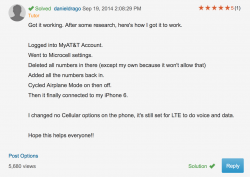
tsmiller macrumors member Sep 20, 2014 #9 I found this over on the AT&T forums... worked for me. Attachments Screen Shot 2014-09-20 at 2.16.01 PM.png 171.5 KB · Views: 154
D DotCom2 macrumors 604 Sep 20, 2014 #10 tsmiller said: I found this over on the AT&T forums... worked for me. Click to expand... This worked for me.
tsmiller said: I found this over on the AT&T forums... worked for me. Click to expand... This worked for me.