Become a MacRumors Supporter for $50/year with no ads, ability to filter front page stories, and private forums.

Aniej

macrumors 68000
Original poster
I was wondering if someone could list from lowest to highest the progression in terms of quality the different recording formats (AIFF, AAC, etc) cary. In addition to that, it would be great if any general information about the typical size of a file based on the different formats would be great. Just to clarify, I know each time I record something it will be a different size due to length, I'm just looking for a little insight on how much of a difference there tends to be between the different formats. Thanks
 
depends upon the sample rate and the codec really, as a rule of thumb, uncompressed formats (aiff, wav SD2) are very large and compressed audio (AAC, MP3 etc) are smaller.

The lower the data rate the smaller the compressed file will be, thus a 128Kbps AAC will be half the size of a 256Kbps file.

A 4 minute aiff stereo file is roughly 60Mb, a 256Kbps AAC version will be about 5Mb, Lossless codecs are roughly half the size of the original.
 
That was really helpful. It was actually more than I asked for, which I love when it happens. Thanks.

A quick follow-up: what is the resulting audio quality difference between setting something at 128kbps compared to 256kbps, and in what audio recording context, i.e., at a concert, live speech, etc, is this important?
 
what is the resulting audio quality difference between setting something at 128kbps compared to 256kbps, and in what audio recording context, i.e., at a concert, live speech, etc, is this important?

if you're talking mp3, i find 128 quite unlistenable. 192, imo, is the lowest i'll go. lately i've been using 256.

@128, cymbal tails sound terrible, for example, if you're looking for something to actively listen for.
 
Run a few conversions on different types of sound (concert, studio music, live speech, etc.) and see what works best for your ears.

I listen to FLAC at home (lossless compression). 160 AAC is fine for me in the car, though. It's casual listening in the car, with that high of a noise floor.
 
hmm. I thought WinterMute's comments were real helpful, but not quite what I wa looking for in terms of answering my question about from best to worst, what audio format tends to be the highest quality? I am guesing lossless is the top?
 
...what audio format tends to be the highest quality? I am guesing lossless is the top?
wav/aiff>FLAC/Apple Lossless>ACC>mp3/wma/etc

wav and aiff are the only uncompressed audio formats listed above. FLAC and Apple Lossless are compressed but conserve all of the original data. I believe ACC is a bit better in it's compression* compared to mp3/wma, but all of these formats start to lose original audio data in addition to the compression.

* not totally sure about this as I don't deal with the ACC format often
 
AAC, MP3 and WMA are all compressed formats, meaning some of the audio quality is stripped away in order to minimise file size. WAV and AIFF are uncompressed formats and are bigger files but preserve the quality of the recording. CD quality audio is either WAV or AIFF (or any other uncompressed format) at 44.1 KHz/16 bit audio.

If you are looking at compressed formats AAC wins hands down against MP3. The compression algorithm is far more advanced, meaning you can get better results from lower bitrates. I personally compress all my music to 224kbit/s AAC for use on my iPod. Apple store uses 128kbit/s AAC. That sounds listenable to me if im not being picky, and it sounds a lot better than the equivilent MP3.

Hope this helps.

Danny
 
AAC is mereley a wrapper for any Apple Audio Codec, so as such they can "wrap" an ALAC (Apple Lossless Audio Codec) and sound the same as an uncompressed file. As for the compressed AAC they do sound better than your standard mp3, but there have been alot of developments in mp3 encoding since the introduction of AAC. Especially the use of LAME and V0. At present it is only possible to encode using LAME with a PC 😱

Check this out for some more info...

In this day and age of cheap storage, there is no reason not to use VBR (essentially the same as 320kbs) or V0 for all your music....
 
At present it is only possible to encode using LAME with a PC

That is just not true at all- I don't know who told you that. I use Lame 3.97 on my Mac as well as my Linux machines. There are binaries for mac here: http://rarewares.org if you do not want to compile it yourself. Also check out this:

http://www.macupdate.com/info.php/id/8837

And Audacity for OS X use Lame for encoding mp3s.

Also, .mp4 is the wrapper/container. AAC IS an audio codec, hence the name (Advanced Audio Codec).

And RE: the -V0 thing. I think you are trying to refer to the new variable bitrate encoding that the latest lame has. Yes it is quite nice! But -V0 is sort of an insane quality rate which will give you a file almost twice the size.

Try this setting:
$ lame -V2 --vbr-new -q0 file.wav file.mp3
 
Thanks, I will go and check it out. 🙂

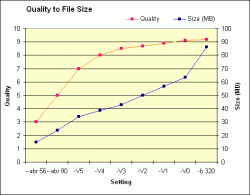
VO , with or without the new vbr encoding is a really good balance between Size and sound quality, if you go up to 320 it is quite a jump.
 

Attachments

  • lame-chart-2.gif
    lame-chart-2.gif
    6.3 KB · Views: 657
Yes, -V0 with or without other settings will make a really large, high quality file. This has been around awhile. But the more important option new to the latest lame (and where it excels) is the new vbr algorithm. So use --vbr-new to take advantage of this.
 
Perhaps an irrelevance, but Sony's ATRAC3+ is easily the best compressed audio codec out there.

It gives near-128K MP3 performance at 64K, near-192K AAC performance at 128K and it has a really well thought out Lossless mode.

The Lossless mode is usually referred to as ATRAC Lossless xxxk where xxxk can be 128, 256, etc. That confuses people, but what ATRAC Lossless does is to save the Lossy version of the track in the same file. In fact, what it saves into the file is the Lossy file and the information needed to make it Lossless. So what you have is your chosen bitrate Lossy rip and the Lossless music in the same file, without taking up much more space than a regular Lossless file.

This means you can enjoy Lossless at home and put Lossy on your portable without transcoding, without multiple libraries, etc. Really good idea.

It's just a crying shame you have to use the crappy Sonicstage to take advantage of it 🙁
 
Quality aside, another concern is longevity of the format. I mean, how long will any of these compressed or lossless formats be around? It might not be an issue for mp3, but what about AAC, Apple Lossless, FLAC, etc?
 
ATARC? That is a proprietary format with ridiculous license restrictions. In other words, only sony hardware/software can really play that back. Bleh.

And as far as something archival/long term, the clear choice in my opinion is FLAC. Flac is open source and made with open compression standards that are freely available to view. It is a long term project that will be there for some time. It's almost like the .zip of music for the audiophiles out there. So I would put my money with Flac. And also- the entire audio content is retained- no lossy. So at any point in the future you can take the .flac and make it into an .mp3, .mp4, or whatever you want, and it is just like ripping from the original cd.

Apple lossless is also nice, but they do not post the compression specs. It is not an open format. So it will probably be around for awhile, but it is proprietary. So who knows.
 
The OP asked for the best to lowest. The others having been covered, I simply mentioned the relatively spectacular performance of ATRAC3+.

It's actually a lot freer in terms of licensing these days - you can use unDRM'd ATRAC files - but it's true to say it only works on Sony hardware, which is a bummer.
 
Register on MacRumors! This sidebar will go away, and you'll see fewer ads.