ghsDUDE macrumors 68030 Original poster Aug 20, 2011 #1 So whenever I'm in a bright room my 2011 MBA won't allow me to adjust the brightness of the keyboard.."Ø" comes up when I go to adjust it. Any tips on how to fix this?
So whenever I'm in a bright room my 2011 MBA won't allow me to adjust the brightness of the keyboard.."Ø" comes up when I go to adjust it. Any tips on how to fix this?
A askrib macrumors member Aug 20, 2011 #2 go into your settings and check off "auto brightness" in energy saver settings this should work.....
JHG722 macrumors newbie Aug 20, 2011 #3 I think that's how they were designed. It automatically senses light, so it disables the backlighting. Happened to me today and I didn't realize that. Went into my bathroom and the backlight went back on.
I think that's how they were designed. It automatically senses light, so it disables the backlighting. Happened to me today and I didn't realize that. Went into my bathroom and the backlight went back on.
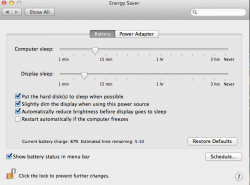
ghsDUDE macrumors 68030 Original poster Aug 20, 2011 #5 askrib said: go into your settings and check off "auto brightness" in energy saver settings this should work..... Click to expand... I don't see that option? Attachments Screen Shot 2011-08-20 at 11.08.12 PM.png 78.2 KB · Views: 196
askrib said: go into your settings and check off "auto brightness" in energy saver settings this should work..... Click to expand... I don't see that option?
Jordan921 macrumors 603 Aug 20, 2011 #6 johndoejohndoes said: So whenever I'm in a bright room my 2011 MBA won't allow me to adjust the brightness of the keyboard.."Ø" comes up when I go to adjust it. Any tips on how to fix this? Click to expand... If you are in a bright room why do you need to adjust the backlit keyboard?
johndoejohndoes said: So whenever I'm in a bright room my 2011 MBA won't allow me to adjust the brightness of the keyboard.."Ø" comes up when I go to adjust it. Any tips on how to fix this? Click to expand... If you are in a bright room why do you need to adjust the backlit keyboard?
onthecouchagain macrumors 604 Aug 21, 2011 #7 The toggle for Automatic Brightness is actually in System Preferences --> Display.
L law0915 macrumors member Aug 21, 2011 #8 johndoejohndoes said: So whenever I'm in a bright room my 2011 MBA won't allow me to adjust the brightness of the keyboard.."Ø" comes up when I go to adjust it. Any tips on how to fix this? Click to expand... If it is bright in the room, that is what it does. Cover up the light sensor by the FaceTime camera and you'll see that you are able to adjust.
johndoejohndoes said: So whenever I'm in a bright room my 2011 MBA won't allow me to adjust the brightness of the keyboard.."Ø" comes up when I go to adjust it. Any tips on how to fix this? Click to expand... If it is bright in the room, that is what it does. Cover up the light sensor by the FaceTime camera and you'll see that you are able to adjust.