
Become a MacRumors Supporter for $50/year with no ads, ability to filter front page stories, and private forums.

jjk454ss

macrumors 601
Original poster
I have a bunch of directories organized by date. Some are 07/15/12 others are July 15, 2012. I'm looking for a quick/easy way to rename the ones in the word format to all numbers. Even if I have to rename everything to a different date format is fine, just so they are all the same. Any way to easily do this?
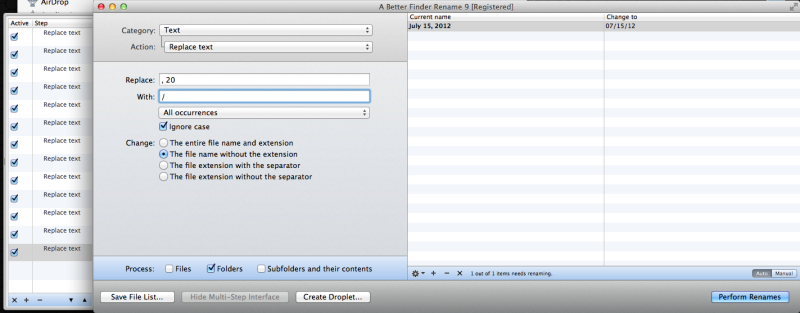
 
I attached a droplet that will produce this output.
Just Drop the folders on the icon (with a better finder rename 9 installed) and it will rename the files. Clicking on the icon will allow you to modify the settings.

date_converter.png
 

Attachments

I attached a droplet that will produce this output.
Just Drop the folders on the icon (with a better finder rename 9 installed) and it will rename the files. Clicking on the icon will allow you to modify the settings.

Image

Thank you, I really appreciate the help.

I just downloaded and tried it. What I did was unzipped the droplet you created into the folder that contains the folders I want converted. I took one folder and drag it onto the droplet, but I don't even know where it went🙂. When I double click the droplet it tells me "the link between the host application and the droplet is broken, running the host application will fix this problem." But, running Better Rename 9 doesn't seem to fix it.

Thanks again.
 
You can recreate it on your copy the settings are

catagory - text
action - replace text

replace "January "
with "01/"

repeat for each month

then
replace ",20"
with "/"
 
You can recreate it on your copy the settings are

catagory - text
action - replace text

replace "January "
with "01/"

repeat for each month

then
replace ",20"
with "/"

Thank you, I didn't realize how simple it is to do. It took a few steps, but it worked great and all the folder names match. Thanks again for the help.
 
Register on MacRumors! This sidebar will go away, and you'll see fewer ads.