
Got a tip for us?
Let us know
Become a MacRumors Supporter for $50/year with no ads, ability to filter front page stories, and private forums.
Battery Cycles
- Thread starter qwerf123
- Start date
- Sort by reaction score
You are using an out of date browser. It may not display this or other websites correctly.
You should upgrade or use an alternative browser.
You should upgrade or use an alternative browser.

GGJstudios
macrumors Westmere
It's strictly a matter of how you use your Mac. Some work mostly at the desk, plugged into AC power. Some are always on the go, needing to run on battery. Using a cycle per day is not unusual at all. The best recommendation is run on battery when you need to and plug in whenever you can. Just don't run on AC power all the time, as your battery needs to be exercised to stay healthy. This should answer most, if not all, of your battery questions:I've managed to do 9 cycles in 10 days on my MBA and after reading what some people claim they've done, I think I may have done loads in no time 😱.
Is the number of cycles I've completed a lot or are some people just not using their MB's 😕
I think Lion might measure cycles more quickly now, too, if you partially discharge the battery. Previously, if you discharged 20% every day, it would take about 5 days to add a new cycle (20% * 5 = 100%). Now, I think it might add a new cycle to meter with less than an equivalent 100% drop. I let mine drain down about 5% each night the first few nights (during deep sleep) and then when it hit 80% remaining in one use (20% discharge), it triggered a new "cycle" in the count meter. It remained fully charged until the next day when I ran it off battery to about 10%, and it triggered the new cycle about when the battery hit 50%.
GGJstudios
macrumors Westmere
It's still measuring cycles the same way. It's just that your battery indicator is not 100% accurate.I think Lion might measure cycles more quickly now, too, if you partially discharge the battery.
I think Lion might measure cycles more quickly now, too, if you partially discharge the battery. Previously, if you discharged 20% every day, it would take about 5 days to add a new cycle (20% * 5 = 100%). Now, I think it might add a new cycle to meter with less than an equivalent 100% drop. I let mine drain down about 5% each night the first few nights (during deep sleep) and then when it hit 80% remaining in one use (20% discharge), it triggered a new "cycle" in the count meter. It remained fully charged until the next day when I ran it off battery to about 10%, and it triggered the new cycle about when the battery hit 50%.
I know its not good, but for the time I've had it, its been mainly plugged into the mains.
And I've rarely let it go below 70% on the 3-4 time i've taken it off the mains.
Does the battery still go through cycles when plugged in?
I just wish I could remove the battery like on many PC's and then keep it plugged in!
GGJstudios
macrumors Westmere
No. Read the "WHAT IS A CYCLE?" section of the Battery FAQ I posted.Does the battery still go through cycles when plugged in?
Even if you could, MacBook and MacBook Pro: Mac reduces processor speed when battery is removed while operating from an A/C adaptor (also from the Battery FAQ)I just wish I could remove the battery like on many PC's and then keep it plugged in!
No. Read the "WHAT IS A CYCLE?" section of the Battery FAQ I posted.
Even if you could, MacBook and MacBook Pro: Mac reduces processor speed when battery is removed while operating from an A/C adaptor (also from the Battery FAQ)
Well I gave Apple Care a quick call and they told me a battery would go through a cycle when plugged in.

Cynicalone
macrumors 68040
I have 9 cycles on mine so far, but I have been using it away from my desk.
According to Apple the battery is good for 1000 cycles. I really wouldn't worry about it.
According to Apple the battery is good for 1000 cycles. I really wouldn't worry about it.
GGJstudios
macrumors Westmere
It won't go through a cycle while plugged in, unless you've already drained it and it's recharging. If you leave it plugged in all the time and never drain it, it will never go through a cycle. Read the definition of a cycle in the FAQ.Well I gave Apple Care a quick call and they told me a battery would go through a cycle when plugged in.

DustinT
macrumors 68000
Confirmed, thats correct information.It won't go through a cycle while plugged in, unless you've already drained it and it's recharging. If you leave it plugged in all the time and never drain it, it will never go through a cycle. Read the definition of a cycle in the FAQ.
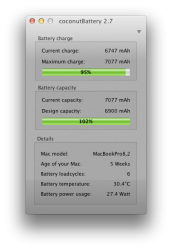
The screenshot below proves it since this unit is a month old but its in constant, daily use plugged in. I only use it for a few hours a day unplugged, at most.
Attachments
Confirmed, thats correct information.
The screenshot below proves it since this unit is a month old but its in constant, daily use plugged in. I only use it for a few hours a day unplugged, at most.
Ok, Seems these Apple folks don't know much about their own products.
Got a new MBA now anyway so I'll see how it goes.
Thanks for the advice guys
GGJstudios
macrumors Westmere
Remember, "Genius" is only their job title, not an indication of their intelligence, knowledge or experience.Ok, Seems these Apple folks don't know much about their own products.

I removed coconut battery from my macbook air after using it for 2 days.
I found myself stressing over how and where I was using my new macbook air, all for the sake of 'taking care of the battery'. In the end, I felt it was just not worth the extra stress.
Use your computer how you want it, when you want it, for what you want. Don't worry too much about the battery. That battery faq has good tips. Follow them, and enjoy your purchase.
I found myself stressing over how and where I was using my new macbook air, all for the sake of 'taking care of the battery'. In the end, I felt it was just not worth the extra stress.
Use your computer how you want it, when you want it, for what you want. Don't worry too much about the battery. That battery faq has good tips. Follow them, and enjoy your purchase.
GGJstudios
macrumors Westmere
You don't. coconutBattery will show you the age of your Mac, but not your battery.how do you find out how old your battery is?

Confirmed, thats correct information.
The screenshot below proves it since this unit is a month old but its in constant, daily use plugged in. I only use it for a few hours a day unplugged, at most.
so is it better to use it plugged in when youre at home?

Duke15
macrumors 6502
You don't. coconutBattery will show you the age of your Mac, but not your battery.
Awesome thanks man
Mine is 21 weeks old, 98% battery, 1 cycle ran, got almost 8 hours battery life on it yesterday no complaints
Cynicalone
macrumors 68040
You don't. coconutBattery will show you the age of your Mac, but not your battery.
Unfortunately I think it needs an update. It says the new MacBook Airs are nearly 6 months old.
I've always thought it got the age from the battery, but they say serial number. Something is definitely off, I know these 2011 MacBook Airs where not built in January and February.

echo.park
macrumors regular
I have 9 cycles on mine so far, but I have been using it away from my desk.
According to Apple the battery is good for 1000 cycles. I really wouldn't worry about it.
This.