My 2020 i7 Intel MBP battery drains at least 30% overnight in sleep mode on Tahoe 26.0.1. I couldn't find many threads on this topic, so I'm starting this one. Your experience, tips, tricks, and fixes are welcome.
My 2020 i7 Intel MBP battery drains at least 30% overnight in sleep mode on Tahoe 26.0.1. I couldn't find many threads on this topic, so I'm starting this one. Your experience, tips, tricks, and fixes are welcome.
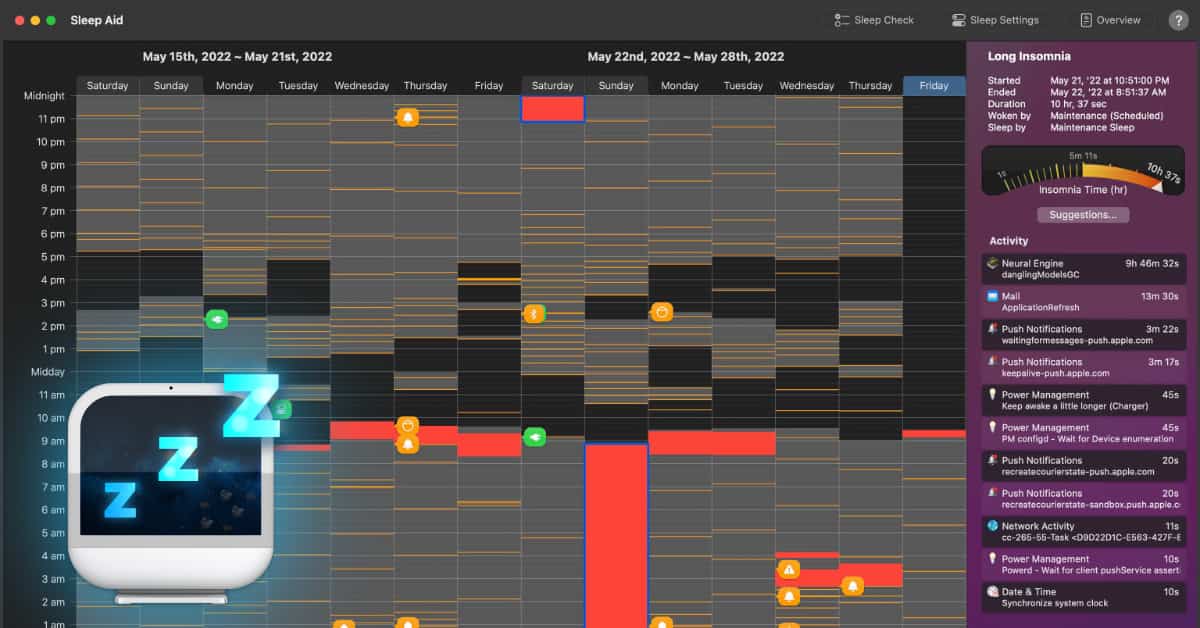
Sleep Aid is designed to reveal details on how a Mac sleeps. This is useful to see what's going on, and to help troubleshoot why a Mac won't go to sleep (even with lid closed), or why it keeps waking in the middle of the night. Sleep Aid includes many Apple sleep settings, as well as some...
Use activity monitor to check how much data the corespotlightd process is writing to your disk. This was happening with my M3 Max MBP, and that was the cause.
Thanks, all. This morning my MBP battery was completely drained. It was at 65% when I closed the lid. I don't know how to find the culprit with activity monitor. I've downloaded Sleep Aid, and will give that a try.
I did that, but I'm not sure what to make of it all. I initiated the suggested settings below, and there was no drain last night. However, I'm not comfortable with having things disabled that I didn't have to disable in the past with Sequoia.
Well, my M4 Mac Studio is stuttering and stopping every few seconds. Activity Monitor tells me that corespotlightd is consuming the most cpu cycles. You'd think that after all these years Apple would have fixed Spotlight by now. Sheesh.