Become a MacRumors Supporter for $50/year with no ads, ability to filter front page stories, and private forums.

dissdnt

macrumors 65816
Original poster
Quick question.

Anyone know the best setup for using a macbook pro as a desktop too and not hook up a billion wires.

I'm guessing, wireless keyboard and mouse.. so it will pair when it's near.

The new little cable for hooking up to my monitor.

Is there any wireless audio that will pair?

Thanks
 
I would get the 17" MBP with a stand and wireless keyboard and mouse. The only wires you need is the power cord and iPod syncing station if you have an iPod.

ChrisN

You can check out the griffen evolve for your iPod, thats all I can think of
 
Airport express will give you wireless audio but you'll have to do some hacks to make it work with other apps. I'm not aware of any desktop bluetooth speakers but i'm sure they are out there.
 
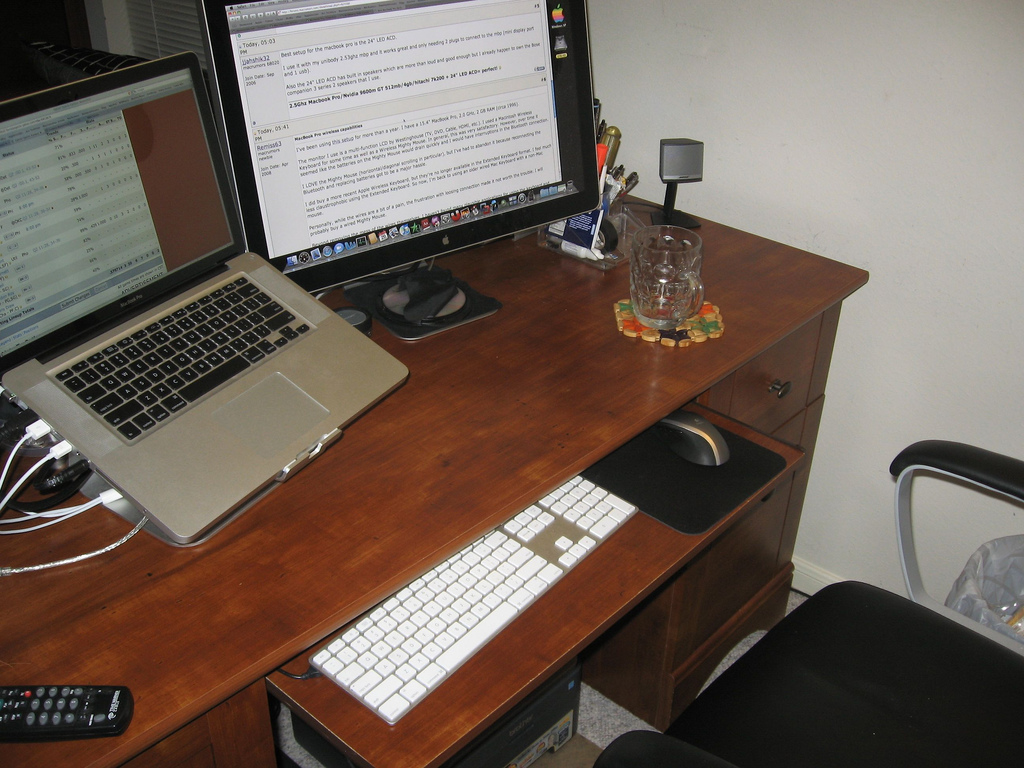
Best setup for the macbook pro is the 24" LED ACD.

I use it with my unibody 2.53ghz mbp and it works great and only needing 2 plugs to connect to the mbp (mini display port and 1 usb).

Also the 24" LED ACD has built in speakers which are more than loud and good enough but I already happen to own the Bose companion 3 series 2 speakers that I use.
 
MacBook Pro wireless capabilities

I've been using this setup for more than a year. I have a 15.4" MacBook Pro, 2.0 GHz, 2 GB RAM (circa 1996).

The monitor I use is a multi-function LCD by Westinghouse (TV, DVD, Cable, HDMI, etc.). I used a Macintosh Wireless Keyboard for some time as well as a Wireless Mighty Mouse. In general, this was very satisfactory. However, over time it seemed like the batteries on the Mighty Mouse would drain quickly and I would have interruptions in the Bluetooth connection.

I LOVE the Mighty Mouse (horizontal/diagonal scrolling in particular), but I've had to abandon it because reconnecting the Bluetooth and replacing batteries got to be a major hassle.

I did buy a more recent Apple Wireless Keyboard, but they're no longer available in the Extended Keyboard format. I feel much less claustrophobic using the Extended Keyboard. So now, I'm back to using an older wired Mac Keyboard with a non-Mac mouse.

Personally, while the wires are a bit of a pain, the frustration with loosing connection made it not worth the trouble. I will probably buy a wired Mighty Mouse.

Beyond removing the mess of the wires themselves, I haven't found many plausible applications for using the keyboard and mouse from a distance. Usually from a distance I will simply use the Apple Remote to control a slide show or video. If I need to type, I usually will want to be close enough to see what it is I'm typing and where.

 
3148555531_af2bd53d6f_b.jpg


This is my current setup, works really really well! =D
 
What is that awesome light tripod thing?! I WANT!

Target has them in the flashlite section for like 25 bucks or so. You should be able to find a double pack in Costco as well.

I have my Macbook Pro connected to a 23" apple cinema display. I don't have a wireless keyboard or mouse but that's not too much of a problem to get a hold of. My only gripe about a wireless set-up of anything is having to replace the batteries which is a drag when you really need to get something done and fast.
 
whenever possible just use a usb hub so you can cut down the number of things you plug into your laptop. if you are mobile, it gets annoying quickly to deal with all those wires.
 
well.. really up to you but..

here is my setup, nothing fancy really.
Macbook Pro 15" on Griffin Elevator
Bluetooth MightyMouse and Keyboard
24" "old" DELL Ultrasharp with svideo in and picture in picture <-- which is used for my dreambox satellite input as you can see.
1TB external disk, Spyder3Elite calibrator and all hooked up to a Airport Extreme with a 24mbit dsl line.
Speakers are hooked up to the dreambox as is the wireless headphones, they can be hotswitched when the family sleeps at night.

oh and plenty of desk space still.. VEry needed...

As i said, nothing fancy but it works.. I think you need to just think what you want to to and then go for comfort all the way.

desk.jpg
 
3049140918_2760794d55_o.jpg


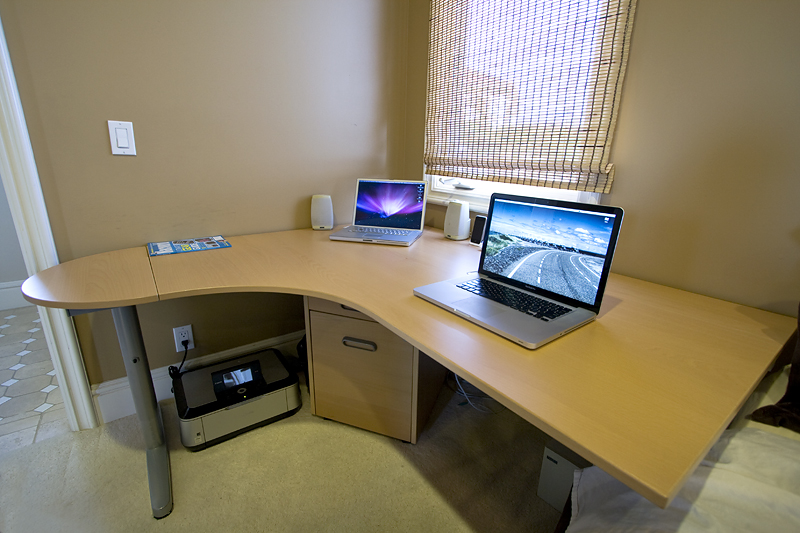
I'd like to pick up an mStand along with a 24 or so inch monitor for a main displays. Ultimately I'd love 2x 24" but can't afford that at the moment.
 
This is my setup. I just need to find some somewhat decent small speakers as my MBP doesn't sound very good when it's in clamshell. Also, here's to hoping Apple release a home media server - I want the Mini gone!
 

Attachments

  • IMG_0029.JPG
    IMG_0029.JPG
    447.2 KB · Views: 366
That workspace isn't big enough for me. I would get claustrophobic. 😛

Yea, I started to feel the same way so I recently rearranged the desk in the room.

3160590931_a0400cee15_b.jpg


3160598745_7e222d3152_b.jpg
And this is the other side of the room (52" Sony Bravia XBR4, Yamaha v861 hd receiver with B&W 685s speakers, xbox 360), as you can see this is a huge room.
 
What's the deal with those laptop stands? What function do they provide over having the computer on a table?
 
I have a friend down the hall of my dorm. He has a gigantic LCD screen that he has hooked up to his macbook pro as well as a Griffin surround sound system that he uses.

He has a wireless keyboard and mouse and the MBP sits in the top drawer of the desk in clamshell mode allowing the top of the desk to be completely clutter free.

It's quite elegant, but the only thing I've noticed is he has to pull the desk open and open his macbook pro to power it on.

I thought about how I could put it into sleep and wake with my wireless keyboard, but I wonder if I could get another device to power my computer on without have to do that.

Edit: I have a pair of bluetooth headphones I use with my xv6800. I've also paired them with my MBP and I must say that the A2DP implementation in OSX really is subpar. I get better audio quality on XP then I do in OS X. I wouldn't expect speakers to be any better.

I would check out Bose's desktop speakers with two mini subwoofer's built in. I've had them for almost 4 years now and they are spectacular! I sadly don't have the name of the model with me since I'm at work.
 
Register on MacRumors! This sidebar will go away, and you'll see fewer ads.