I've found that HDR pics turn out MUCH better when you tap to expose on the dark part of the scene. Otherwise, it just looks the same as a non HDR image.
Just keep in mind it'll still seriously over-expose the bright areas, should be there more than 5-6 EV difference between the dark and bright areas.
Let me show some examples I've initially made for my
iOS HDR Bible.
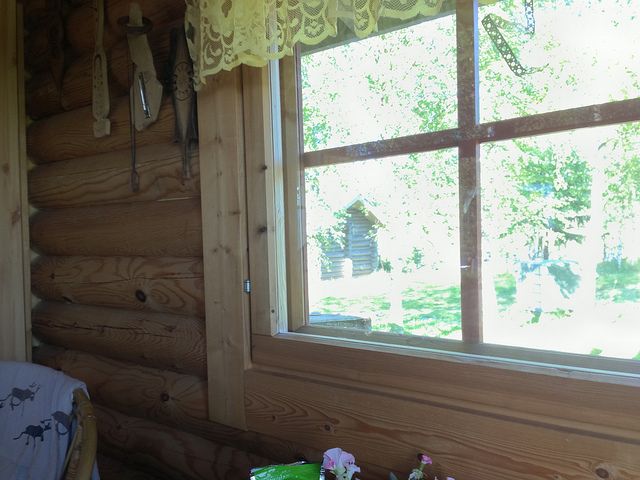
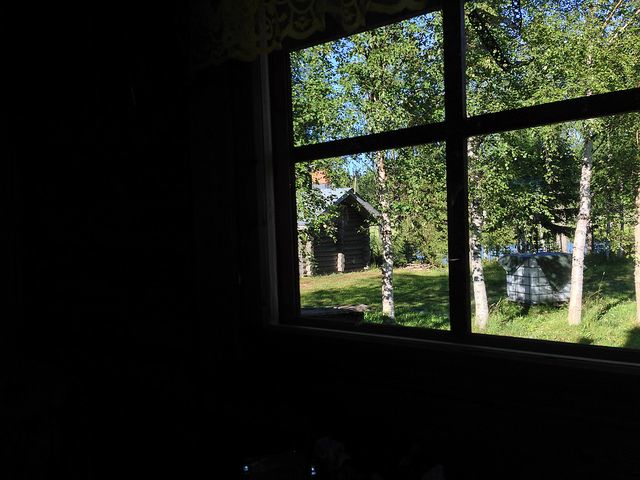
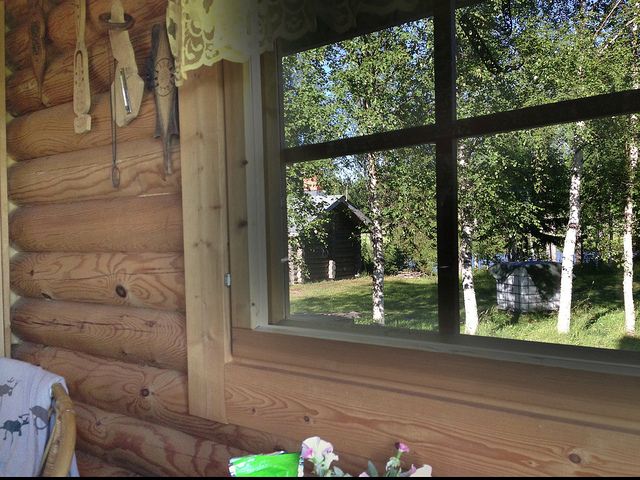
The following shot is the HDR result of exposing for the outer area (that is, the opposite of what you're recommended):
Full-res and -quality original:
http://www.flickr.com/photos/33448355@N07/9365925353/in/set-72157634791582799
Non-HDR original:
http://www.flickr.com/photos/33448355@N07/9365924031/in/set-72157634791582799
This (HDR result) shows exposing the inner area:
Original:
http://www.flickr.com/photos/33448355@N07/9365924279/in/set-72157634791582799
Non-HDR original:
http://www.flickr.com/photos/33448355@N07/9365924993/in/set-72157634791582799
All in all, if there are truly drastic differences in light levels (like in the above scene), try finding a middle point. It, of course, won't work with drastic light differences as the sensor of even the iPhone 5s' is pretty small and has pretty bad dynamic range. (Unfortunately, not even Apple can beat the laws of physics, no matter how they advertise their stuff.) In those situations, try using real HDR apps like below.
This is an in-iPhone 5 stitching done with Top Camera, one of the best HDR apps:
Original:
http://www.flickr.com/photos/33448355@N07/9365924661/in/set-72157634791582799
Note that you don't need to use an app that not only shoots 3+, in addition to normal, under/overexposed images, but also stitches them on the iPhone. You can just shoot the photo series and stitch on a desktop to hve sometimes significantly better results. In my
Exposure Compensation and Bracketing Bible, I've explained this all, particularly in the chapter "3. Bracketing with pre-setting the brightest and the darkest areas".